
Inspiring
December 12, 2023
Answered

Filename Character Length Limit in Acrobat

  • December 12, 2023
  • 3 replies
  • 10543 views

I regularly run into the following error message in Acrobat when trying to Save to PDF in Word.  To work around the issue, I have to Print the documentment to the Acrobat printer.  It doesn't appear to have this limitation.
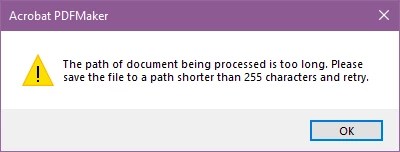
 

This seems like a limitation based on very old versions of Windows and should be gone on Windows 10 and 11 as well as the current versions of Acrobat.


I've left feedback regarding the issue, but that seems to have been pointless.


Any thoughts on how to get this fixed?

This topic has been closed for replies.
Correct answer Rodrigo22160188mpti

I just ran into a similar problem when trying to print to a PDF file.  I have a series of files where the path is too long for the Save as PDF option to work.  If I try to use that function I get the path too long error.  To get around that, I just Print to PDF using the Acrobat PDF Printer.  However, on a couple of the files with the path too long error, when I went to print them using the printer option, it started the printing process but then hung or got stuck with only a bit of the progress bar being completed.  I waited for 3-4 minutes to see if it would complete and then canceled the print job when it didn't.


I suspected that the filename/path was too long, so I printed the files to another directory just off of the root directory and they printed without issue.  So, it would appear that even the Acrobat PDF Printer suffers from this same issue, but doesn't even generate an error, it simply hangs.


Microsoft Office doesn't have any issues with these long paths and filenames, so it still appears to be a problem with Acrobat.  <Sigh>

3 replies

Rodrigo22160188mptiAuthorCorrect answer
Inspiring
January 19, 2024

I just ran into a similar problem when trying to print to a PDF file.  I have a series of files where the path is too long for the Save as PDF option to work.  If I try to use that function I get the path too long error.  To get around that, I just Print to PDF using the Acrobat PDF Printer.  However, on a couple of the files with the path too long error, when I went to print them using the printer option, it started the printing process but then hung or got stuck with only a bit of the progress bar being completed.  I waited for 3-4 minutes to see if it would complete and then canceled the print job when it didn't.


I suspected that the filename/path was too long, so I printed the files to another directory just off of the root directory and they printed without issue.  So, it would appear that even the Acrobat PDF Printer suffers from this same issue, but doesn't even generate an error, it simply hangs.


Microsoft Office doesn't have any issues with these long paths and filenames, so it still appears to be a problem with Acrobat.  <Sigh>

Inspiring
January 10, 2024

For those that are following this topic, here is the link to the bug report if you'd like to vote for it's resolution.


https://acrobat.uservoice.com/forums/590923-acrobat-for-windows-and-mac/suggestions/47523920-word-save-as-pdf-results-in-an-error-the-path-of 

Amal.
Community Manager
Community Manager
December 13, 2023

Hi @Rodrigo22160188mpti 


Hope you are doing well and thanks for reaching out.


Please go through the similar discussion that I have found on Microsoft support page https://answers.microsoft.com/en-us/windows/forum/all/file-name-too-long-for-destination-folder/250ad90a-ad93-46ef-bfae-41036a1f0ede and see if that helps.


~Amal

Inspiring
December 20, 2023

This doesn't appear to be the problem as the only application that runs into this limitation is Adobe Acrobat.  I have never received this error in any other application when utilizing long filenames and deep paths.

Amal.
Community Manager
Community Manager
December 21, 2023

Hi there


Please try to copy the file to your desktop an see if that works.


Let us know how it goes.


~Amal