
Fill 2 text fields from combo box choice
I coordinate a girls club (with 6 club levels from pre-K to 12th grade) at a small church and have created a 4 page
order form with fillable fields. Since I am on a limited budget for the supplies and awards for the girls, I'm using
PDFill to create the fields on the form. I am new to setting up combo boxes, but have some experience with the
math aspect. The form is set to calculate the number of pages in use for the page __ of __ field as well as
display the subtotal of the pages on page 1 and to calculate the postage and handling based on the amount
ordered. The form also has an inventory column and a need column which are used to determine how many of
each item to order, then compute the total cost for each item being ordered. Now I want to make filling in the item
descriptions easier.
A template form with each item already filled in will be copied to use for ordering. The issue is the activity pages
and awards for each of the levels. The number of units and years for the levels vary, but for simplicity I will use a
club with 9 units and a rotation of 3 years. In the script the "R" stands for the club level, the "bg" stands for
the award earned (on a different line it will be "ap" for activity page). Column is based on a Unit Rotation form for
tracking what units will be taught in the current year. The only thing needed from that form is the knowledge of
how many columns the current club level has in it's rotation.
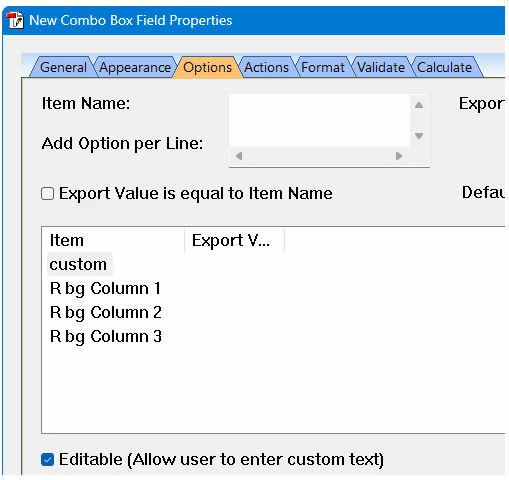
Results needed: If column 2 of the combo box (cBx152) is selected, the related description needs to show in
desc152 text field and the item number needs to show in the cat152 field. Also, if for some reason a different unit
needs to be done, the user needs to be able to manually enter it. cBx152 will need to be duplicated for the other
8 units which will range from 153 to 162.
I have tried both of the following scripts, but neither of them puts the desired info in desc152 or cat152.
Var ComboVal = this.getField("cBx152").valueAsString;
if(Val(ComboVal) = 1) {
this.getField("desc152").value = "R bg 1 Bears"
this.getField("cat152").value = "150864"
}
else if(Val(ComboVal) = 2) {
this.getField("desc152").value = "R bg 2 Ladybugs"
this.getField("cat1502").value = "150876"
}
else if(Val(ComboVal) = 3) {
this.getField("desc152").value = "R bg 3 Dolphins"
this.getField("cat152").value = "157154"
}
else {
this.getField("desc152").value = ""
this.getField("cat152").value = ""
}
alternate script:
Var ComboVal = this.getField("cBx152").valueAsString;
switch(ComboVal) { //use val or right to test number part only
Case "1 R bg Column 1":
this.getField("desc152").value = "R bg 1 Bears"
this.getField("cat152").value = "150864 b"
break;
Case "2 R bg Column 2":
this.getField("desc152").value = "R bg 2 Ladybugs"
this.getField("cat1502").value = "150876 l"
break;
Case "3 R bg Column 3":
this.getField("desc152").value = "R bg 1 Dolphins"
this.getField("cat152").value = "157154 d"
break;
Default:
this.getField("desc152").value = ""
this.getField("cat152").value = ""
break;
}
 AdChoices