Participating Frequently
November 13, 2017
Answered

Fill & Sign problem

  • November 13, 2017
  • 6 replies
  • 14843 views

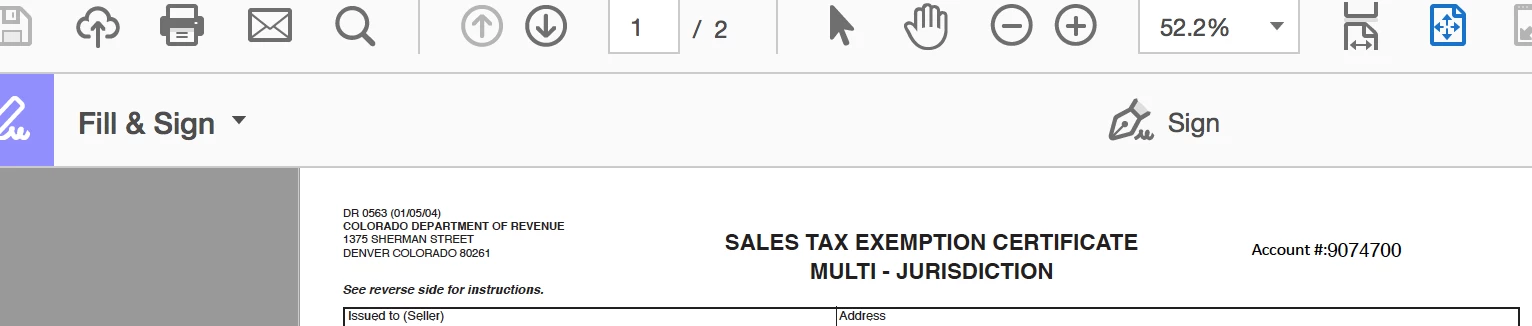
Have been using this tool for weeks. All of a sudden the crosscheck, text tool etc are missing and only the sign function is there.

See attached screen shot.

Please help, got a load of tax docs to fill and sign

This topic has been closed for replies.
Correct answer Josh_Corey

When you open a PDF in Acrobat or Reader and then click the "Fill & Sign" tool - it will show you the text tool, x, check mark etc ONLY if the PDF is NOT an actual form - it does not have fields that can be clicked into and typed without clicking the Fill & Sign tool...  So for "Acroform" and "XFA" (Livecycle Designer forms) those tools will not show up, you can still use the Fill & Sign tool to sign the PDF but the fields in the form *should* be fillable just by clicking in them.  Sometimes a form is only partially created, if there is even one "real form field" on the PDF Fill & Sign assumes it is a fillable form and does not enable the tools except for signing.

Hopefully this clarifies the issue.

Thanks,

Josh

6 replies

Participant
January 26, 2023

Print the document to PDF. When I do this and select the Fill & Sign tool I can access the checkmark, crosscheck etc again. No idea why it does this or why it works again when you print to pdf but it worked for me.

Participant
April 6, 2023

This worked!  Thanks!

Josh_CoreyCommunity ManagerCorrect answer
Community Manager
November 29, 2017

When you open a PDF in Acrobat or Reader and then click the "Fill & Sign" tool - it will show you the text tool, x, check mark etc ONLY if the PDF is NOT an actual form - it does not have fields that can be clicked into and typed without clicking the Fill & Sign tool...  So for "Acroform" and "XFA" (Livecycle Designer forms) those tools will not show up, you can still use the Fill & Sign tool to sign the PDF but the fields in the form *should* be fillable just by clicking in them.  Sometimes a form is only partially created, if there is even one "real form field" on the PDF Fill & Sign assumes it is a fillable form and does not enable the tools except for signing.

Hopefully this clarifies the issue.

Thanks,

Josh

talkjoAuthor
Participating Frequently
November 13, 2017

I noticed same issue on different forms. It seems on the RHS there is an option for sending (which I'm not interested in). This never used to be there

talkjoAuthor
Participating Frequently
November 13, 2017

Bernd, how can I send the pdf to you? It's not a public doc

Bernd Alheit
Community Expert
Community Expert
November 13, 2017

Use Tools > Send & Track and send the link in a PM.

Bernd Alheit
Community Expert
Community Expert
November 13, 2017

Does the file contains fill-able form fields?

talkjoAuthor
Participating Frequently
November 13, 2017

Re: Form fields, this has not been an issue in the past. I've been filling out forms like mad for months with this tool. All of sudden I'm missing half the features

Bernd Alheit
Community Expert
Community Expert
November 13, 2017

Is this a public form? Can you share the link of the form?

try67
Community Expert
Community Expert
November 13, 2017

It's possible the file was created in such a way that comments are not allowed.

talkjoAuthor
Participating Frequently
November 13, 2017

Makes no sense, they are tax docs