Participating Frequently
December 6, 2024
Answered

Fillable form locked and cant unlock or read all the info in it.

  • December 6, 2024
  • 1 reply
  • 1339 views

My PDF ( i did not create it) had fillable boxes. After filling all the boxes i tried digitally signing the form but was having inssues with my password. Worried that i would lose all the info i input into the fillable boxes, i saved it to my desktop. My desktop version has the information i input, but the text box has a "plus" sign in the right corner (presumably one would use to enlarge the box and read all the info in it) , however the text box is greyed out and clicking the plus icon does not open the text box to read everything. And i can not edit it or retreive any of the info i input in it. 

i attached the before and after screen shot of one of the pdf sections.  i need the information in the now greyed out text boxes. Clicking the plus sign does nothing. 



This topic has been closed for replies.
Correct answer try67

Yes using Acrobat Pro DC

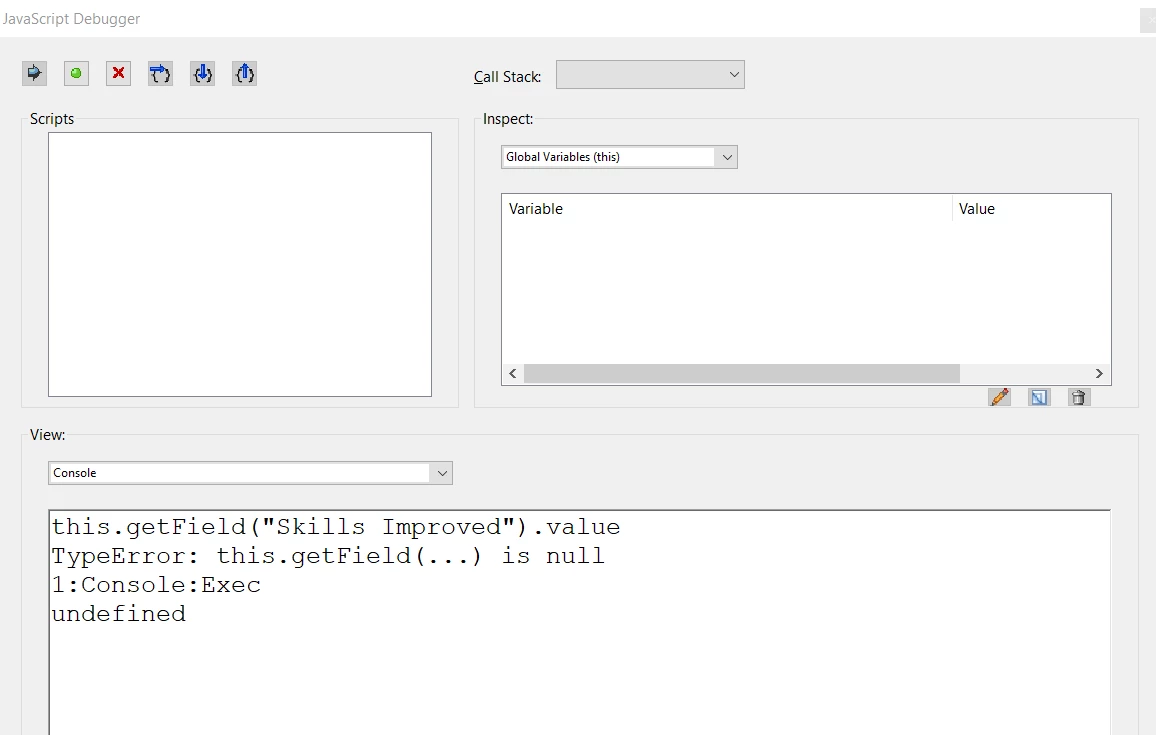
this is the result i got in the console... 

note that the screenshot shows the script without the ; at the end of line in case i was supposed to use it. I tried it with a semicolon and i got the same results. 


It seems the fields have been flattened, then. Any hidden information is lost, I'm afraid.

Did you maybe print the file as a new PDF, or something like that?

If you could share the actual file it will be easier to give you a more definite answer.

1 reply

PDF Automation Station
Community Expert
Community Expert
December 6, 2024

That looks like a multi-line text box in which the doNotScroll property is set to true and there is too much text to display without scrolling.  Do you have a copy of the original form?  If the file is not encrypted use it to "Prepare form" to find the field name, then run the following script in the console:

this.getField("TheField").value;

Change TheField to actual field name of course.

Participating Frequently
December 6, 2024

I do have the original, (which i didnt create) but i was able to find out the name of that field in the screen shot.

using the your directions, the script would read " this.getField("Skills Improved").value;"

here is a screen show of what showed when i did "prepare form" on the original document

however, i am lost as to where to put the script? Do i put the script on the document with the typed info that is greyed out and can not scroll? Im guessing yes, but dont know where do put the script when you say "console"


try67
Community Expert
try67Community ExpertCorrect answer
Community Expert
December 6, 2024

Yes using Acrobat Pro DC

this is the result i got in the console... 

note that the screenshot shows the script without the ; at the end of line in case i was supposed to use it. I tried it with a semicolon and i got the same results. 


It seems the fields have been flattened, then. Any hidden information is lost, I'm afraid.

Did you maybe print the file as a new PDF, or something like that?

If you could share the actual file it will be easier to give you a more definite answer.