Inspiring
April 24, 2019
Answered

Find/Change Bookmark Names

  • April 24, 2019
  • 1 reply
  • 2788 views

Hi,

I've exported a PDF of an InDesign document that uses numbering 1.0, 2.0, 3.0 etc. This numbering carries across into the bookmarks.

I now want to split that PDF into indivuial files as per the top level bookmarks.

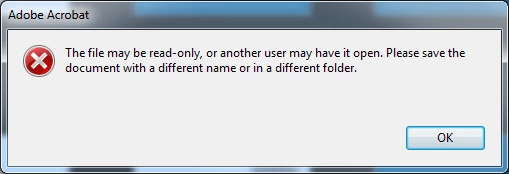
When I try and do that I get an error that says the file may be read only or open by another user.

I believe the cause of this is the periods in the bookmark names because changing the periods to hyphens works. However I have hundreds of bookmarks so I was wondering if there was any way of chaning all the periods to hyphens in the bookmark names? Maybe a script?

Thanks!
This topic has been closed for replies.
Correct answer try67

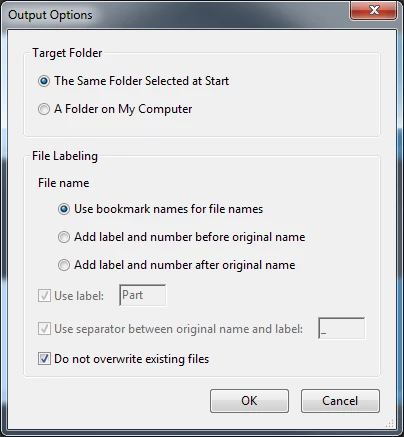
Strange. These are the options I use and the error message I get...


Sorry, my bad. I didn't have the option to name the generated files based on the bookmarks. I do get the same error as you now.

I did some further testing and found the issue, though. Somehow, a tab character was inserted into the bookmarks' names after the numbers, instead of a space, which is not allowed in a file name, so the tool fails. To fix it run this code (you don't need to run the code that removes the periods, as that's not an issue):

for (var i=0; i<this.bookmarkRoot.children.length; i++) {

    var bkm = this.bookmarkRoot.children;

    bkm.name = bkm.name.replace(/\t/g, " ");

}

1 reply

try67
Community Expert
Community Expert
April 24, 2019

Yes, this can be done using a script. If it's only the top-most level then it's not too complicated, but if you want to rename all levels then it will require using a recursive function, which is quite complex.

im_fbAuthor
Inspiring
April 24, 2019

Yes its only the top-level ones I need to change.

try67
Community Expert
try67Community ExpertCorrect answer
Community Expert
April 25, 2019

Strange. These are the options I use and the error message I get...


Sorry, my bad. I didn't have the option to name the generated files based on the bookmarks. I do get the same error as you now.

I did some further testing and found the issue, though. Somehow, a tab character was inserted into the bookmarks' names after the numbers, instead of a space, which is not allowed in a file name, so the tool fails. To fix it run this code (you don't need to run the code that removes the periods, as that's not an issue):

for (var i=0; i<this.bookmarkRoot.children.length; i++) {

    var bkm = this.bookmarkRoot.children;

    bkm.name = bkm.name.replace(/\t/g, " ");

}