
Participant
January 26, 2023
Question

fix for adobe collab sync

  • January 26, 2023
  • 1 reply
  • 21300 views

Has this issue been resolved? 

I receive this error multiple times when opening a pdf.
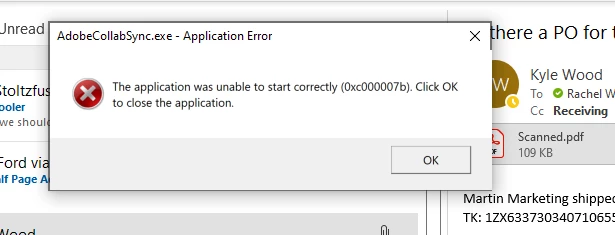
I've uninstalled Acrobat, reinstalled it, and kept my software up to date to rule out any issues that could arise from typical errors.

I have tried going to C:\Program Files (x86)\Adobe\Acrobat DC\Acrobat\ and locate AdobeCollabSync.exe

Right-click > Properties > Compatibility > checked the box run this program in compatibility mode for and selected Win7 from the list. Then clicked Apply OK, and rebooted the machine. I also made it so that the compatibility mode would affect all users. That didnt fix the issue. The only way that I have been able to workaround the issue is to:

a) Close Acrobat.

b) Open the Windows Task Manager's Details pane by pressing CTL+ALT+ Delete and selecting task manager. Confirm that the Processes tab is selected. Find AdobeCollabSync in the process list. Click to highlight and right click to end or stop the process. 
c) Then in C:\Program Files (x86)\Adobe\Acrobat DC\Acrobat\, rename AdobeCollabSync.exe to something like AdobeCollabSyncOLD.exe. 
d) Next click the Windows Start button, type Startup, select Startup Apps, and click the toggle to turn off AdobeCollabSync. 

This stops it temporarily until Acrobat receives a new update. The update process repairs/recreates AdobeCollabSync.exe, so I have to go back and repeat the process above each time Adobe gets a new update. A new solution to resolve this issue has to have been found by now!


    1 reply

    kglad
    Community Expert
    Community Expert
    January 26, 2023

    uninstall acrobat including preferences

    use the acrobat cleaner, http://labs.adobe.com/downloads/acrobatcleaner.html

    restart your computer

    reinstall acrobat.


    in the future, to find the best place to post your message, use the list here, https://community.adobe.com/


    p.s. i don't think the adobe website, and forums in particular, are easy to navigate, so don't spend a lot of time searching that forum list. do your best and we'll move the post if it helps you get responses.


    <moved from using the community>

    Inspiring
    January 6, 2025

    the link for acrobat cleaner doesn't work.

    Is this the correct link?

    kglad
    Community Expert
    Community Expert
    January 7, 2025

    Your link does not work.


    @Lynnea1941 


    for a clean cc install carefully following each applicable step:

    uninstall every cc app including preferences per https://helpx.adobe.com/creative-cloud/help/uninstall-remove-app.html

    then uninstall the cc desktop app, again using the correct uninstaller per https://helpx.adobe.com/creative-cloud/help/uninstall-creative-cloud-desktop-app.html#sa_src=web-messaging

    clean your computer of cc files per http://www.adobe.com/support/contact/cscleanertool.html

    check for, and if available, update your os

    if windows is your os, repair all ms visual c++ versions that can be repaired (use google if you don't know how to do this)

    if windows is your os update your ms visual c++, if it can be updated (use google if you don't know how to do this)

    restart your computer (don't skip this)

    reinstall the cc desktop app using the "alternative download links" at the bottom of the page at https://helpx.adobe.com/download-install/kb/creative-cloud-desktop-app-download.html

    use the desktop app to install your cc programs/trials>

    if that fails, you probably have a corrupt user account. google your os and how to create a new one.