
Participant
August 17, 2020
Answered

Flexible field length and input table

  • August 17, 2020
  • 3 replies
  • 763 views

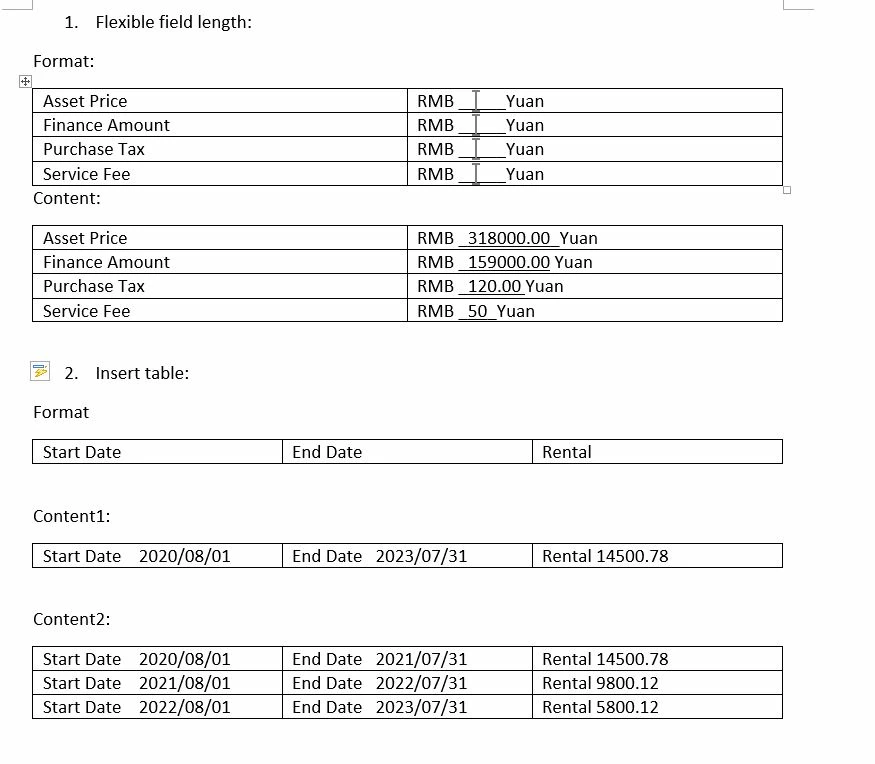
I am generating the adobe form by converting from a word file, and willing to achieve following two goals, and I tried some features and not able to do it. I am wondering if Adobe form can achieve such functions? if positive, how to do it, Thanks!

 Goal 1: The format from user is in word, and tontent various in lentgh, how can the field adapt to the content automaticlly? becuse the content is not predictable, so can not set the template as various length.

Goal 2: Some time the content is a table rather then one line. Like the 2 examples in Goal2. some customer have same rental for all month until contract end, but some customer have rentals differs from month to month, How the form can be designed? or is it possble to do it with Adobe form.
This topic has been closed for replies.
Correct answer Bernd Alheit

1. Use the word Yuan also in the field content.

3 replies

Bernd Alheit
Community Expert
Bernd AlheitCommunity ExpertCorrect answer
Community Expert
August 20, 2020

1. Use the word Yuan also in the field content.

try67
Community Expert
Community Expert
August 20, 2020

That's the best way to achieve goal #1, yes.

try67
Community Expert
Community Expert
August 20, 2020

The first goal is not possible at all. The second goal is only possible by creating the fields in advance and then show/hide them as needed, but that would not cause the rest of the contents on the page to "re-flow" so you would need to leave empty space for the fields when they are hidden.

Participant
August 24, 2020

Thanks for your reply, seems I would need to find some other solution

Participant
August 20, 2020

Can anyone help me on this? thanks so much!