Participating Frequently
May 18, 2023
Answered

Font Ligatures Lost when converting from Word to PDF

  • May 18, 2023
  • 2 replies
  • 3653 views

Hello everyone,

I've installed an open source font called Adelphe on my laptop. It is from a reputable designer.

Now, the ligatures for this font (for letter combinations such as 'fl' or 'fi') work perfectly on Word but when I convert the Word file to a PDF, all the ligatures are lost.

I've attached screenshots with sample text (Word vs. PDF) to emphasise the changes.

Any ideas on how I might fix this?

Thanks for reading!

Yannis

This topic has been closed for replies.
Correct answer Bevi Chagnon - PubCom.com

Hi @Ioannis260733166cu6 ,

The font might not be fully embedded in the exported PDF file.

Using the Acrobat ribbon in Word, check you Preference settings to ensure that all fonts are being embedded into the PDF. You'll have to drill down through the Advanced Settings until you come to the section for Fonts:

 
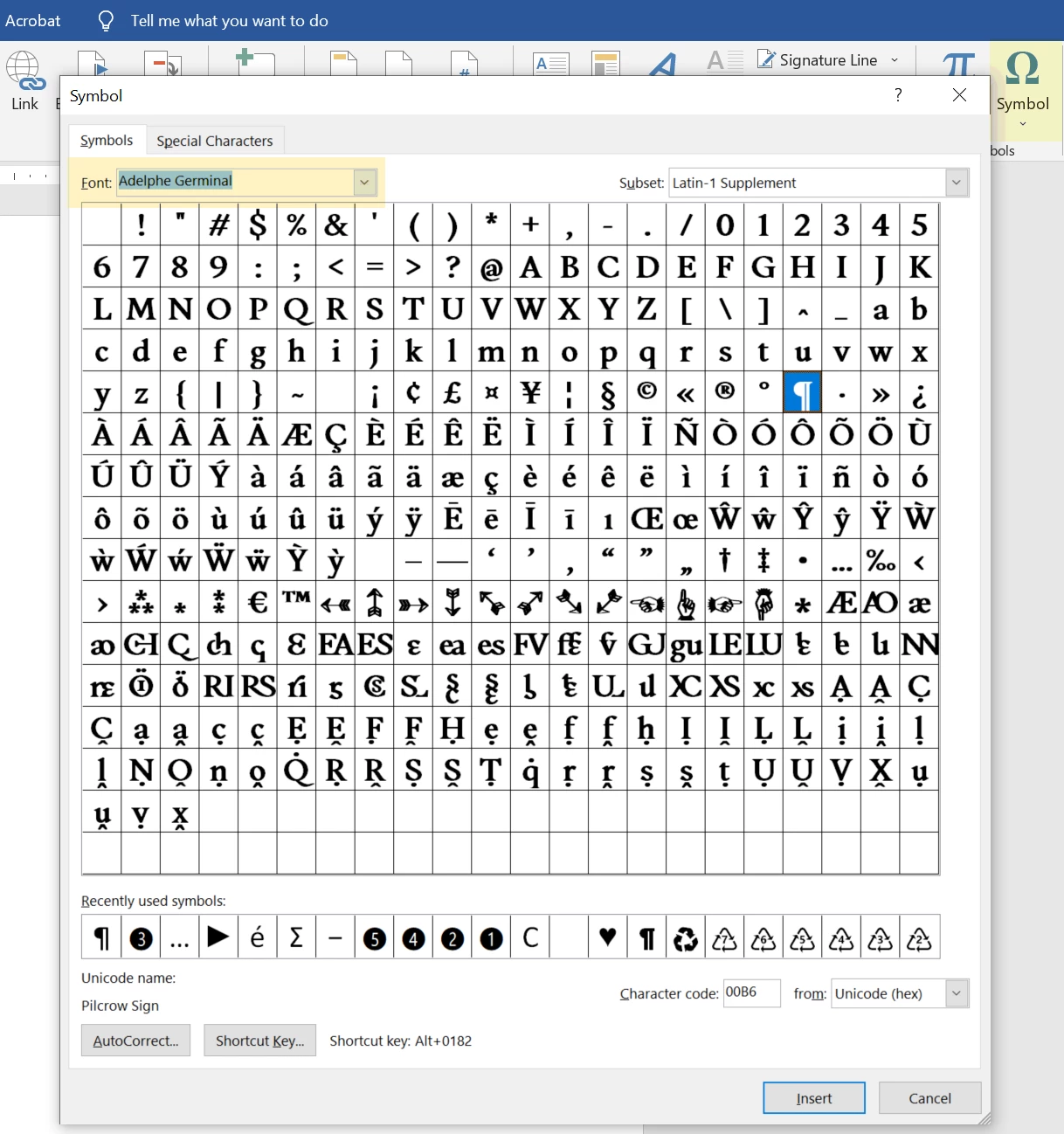
  •  I downloaded the Adelphe family and examined it. In my versions (all weights), there standard ligatures are missing for fl and fl (and others). It has a very small character set. Because there are so many versions of this font on the web, I'm wondering if your version is missing the ligatures like mine.  Check by opening the full glyphs pallete in Word: Insert / Symbol / other Symbols and choose your Adelphe font. This is what is in my version's glyph set:

  •  


Hope this helps. Let us know what you discover.


2 replies

Amal.
Community Manager
Community Manager
May 19, 2023

Hi @Ioannis260733166cu6 


Hope you are doing well and sorry to hear that.


Is this an issue with a particular file or with all the Word file? Please try with a different Word file and check.


What is the workflow/steps you are doing to create the PDF from MS Word? Please try to create the PDF from the Acrobat ribbon present in MS Word and see if that works.


For more information about creating PDF please go through the help page https://helpx.adobe.com/acrobat/using/creating-simple-pdfs-acrobat.html and see if that works. 


Let us know how it goes


Regards

Amal

Participating Frequently
May 20, 2023

Hello Amal,

Thanks a lot for your reply and suggestion.

I tried it with a different Word file, but the ligatures still get lost when I convert it to a PDF. It seems that the issue is with all files.

To create the PDF, I went to 'File>Save as Adobe PDF'. I also did this through the Acrobat ribbon in Word (Acrobat tab>Create PDF), but it did not fix the issue.

I'd be grateful for other ideas. This seems like a tough nut to crack!

Kind regards,

Yannis

Bevi Chagnon - PubCom.com
Legend
May 20, 2023

Hi @Ioannis260733166cu6 ,

The font might not be fully embedded in the exported PDF file.

Using the Acrobat ribbon in Word, check you Preference settings to ensure that all fonts are being embedded into the PDF. You'll have to drill down through the Advanced Settings until you come to the section for Fonts:

 
  •  I downloaded the Adelphe family and examined it. In my versions (all weights), there standard ligatures are missing for fl and fl (and others). It has a very small character set. Because there are so many versions of this font on the web, I'm wondering if your version is missing the ligatures like mine.  Check by opening the full glyphs pallete in Word: Insert / Symbol / other Symbols and choose your Adelphe font. This is what is in my version's glyph set:

  •  


Hope this helps. Let us know what you discover.


|    Bevi Chagnon   |  Designer, Trainer, & Technologist for Accessible Documents ||    PubCom |    Classes & Books for Accessible InDesign, PDFs & MS Office |
Participating Frequently
May 19, 2023

I should add that I'm using Microsoft Word 2016 and Adobe Acrobat Pro