
Quitter
  • Communauté internationale
    • Langue:
      • Deutsch
      • English
      • Español
      • Français
      • Português
  • 日本語コミュニティ
  • 한국 커뮤니티

Font Overlapping

Nouveau ici ,
Feb 26, 2021 Feb 26, 2021

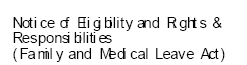
When opening my PDF versions of my documents after converting them into that format from Word, the fonts become close to illegible by overlapping and squishing together. Font in original document is Calibri and after trying to tweak various settings and contacting IT I still have not been able to find a solution. Please help!! 
ryan5C11_0-1614385003050.png


SUJETS
Création de PDF , Modification et conversion de PDF , Résolution des problèmes , Formulaires PDF
2.0K
Traduire
Signaler
Directives de la communauté
Restez bienveillant et courtois, ne vous attribuez pas la paternité des créations d’autrui et assurez-vous de l’absence de doublons avant de poster du contenu. En savoir plus
community guidelines
Community Expert ,
Feb 26, 2021 Feb 26, 2021
LA PLUS RÉCENTE

In MS Word, go to the Acrobat tab, click on it and select "Preferences"  from the Acrobat menu toolbar.


See the slides I am posting for you below.


I created a preset just for MS Word to PDF conversion settings to help another user who had similar issue.


In my slides my preset is called toMSWORD. To create and save a custom preset click on the "Advanced Settings ..." button and enter the same values as shown in the illustrations for each section.


the Fonts section in particular is the most important one. You'll need to manually embed all MS Windows Fonts.


When you're done save the preset under a name, and the next time you'll convert that MS Word document to PDF select the customized preset that you created from the dropdown menu "Conversion Settings:" as shown in the dialogue window to the left of the "Adobe PDF Settings" dialogue window on each of the slides below.


I hope this helps.


toWord1.png


toWord2.png


toWord3.png


toWord4.png


toWord5.png


Traduire
Signaler
Directives de la communauté
Restez bienveillant et courtois, ne vous attribuez pas la paternité des créations d’autrui et assurez-vous de l’absence de doublons avant de poster du contenu. En savoir plus
community guidelines