
Participant
February 4, 2023
Question

Fonts render inconsistently on PDFs generated from LaTeX in Overleaf

  • February 4, 2023
  • 1 reply
  • 2879 views

Adobe Acrobat is rendering certain fonts inconsistently on PDFs generated from LaTeX on Overleaf.com. Acrobat omits pixels from displays of glyphs or characters in larger fonts when the document is displayed at 100%-125% Zoom, but at higher Zooms, the characters display correctly. Here is an example:

Displayed at 100%:

Note omission of pixels at junctures of some lines in some glyphs in both title and subtitle.

Displayed at 125%:
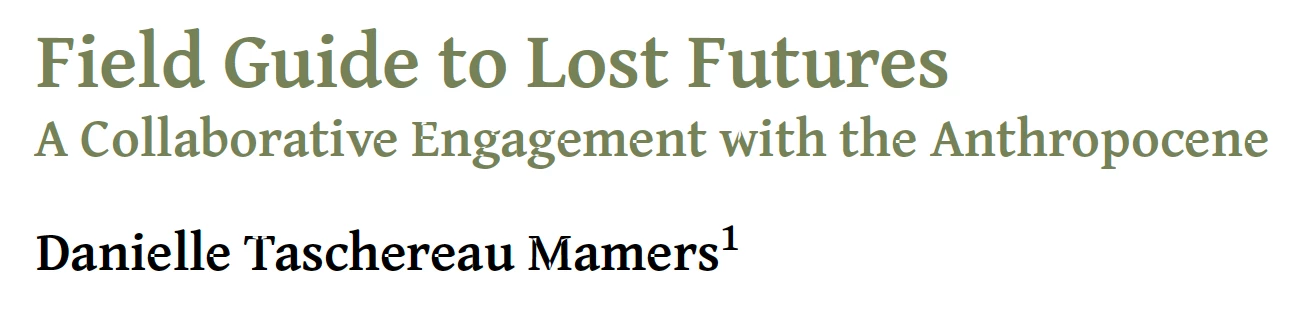
Here, note that the larger heading now displays without omitted pixels, but the subtitle and author names still have them. But if we Zoom in to 150% or higher, all the characters display correctly. We've reproduced this problem on multiple platforms using Acrobat readers.


The problem DOES NOT appear when we view the PDF using third-party viewers, such as Apple's Preview or Skim, or the built-in viewers in browsers such as Safari or Firefox.


I've attached the actual PDF with the example above here.


Any advice would be most welcomed! Thanks in advance!

-Brian

This topic has been closed for replies.

1 reply

Bevi Chagnon - PubCom.com
Legend
February 5, 2023

It's the font used in the PDF, Gentium Plus PS.


When I examined your PDF and enlarged it to view individual letters in Gentium, I noticed a pattern of where the white "dots" appeared — always where 2 postscript vectors intersect, such as where the lowercase e's horizontal cross arm intersects the curved vector, the lowercase d's curved bowl intersects the straight vertical vector, etc.  Here are 400% enlarged screen captures:


Where the different vectors intersect, they actually overlap and the overlapped portions reverse color. Therefore you see white, not black, for the overlapped portions. Very common for us who design vector graphics in Adobe Illustrator.


This version of the Gentium Plus font isn't correctly programmed or designed. I suspect that it doesn't completely conform to whatever standard/specification is required for scalable vector fonts. Gentium was designed and developed by SIL International. https://software.sil.org/gentium/  originally in 2002 but updated several times since then.


To confirm this theory, I edited your PDF in order to test different fonts in the same document. I chose Minion Pro (an Adobe-developed font) because Adobe invented scalable vector fonts in the mid-1980s and if anyone could program a font correctly, it would be Adobe.


The tests below show one word, "audience," in two fonts: Gentium and Minion Pro. There's no problem with the Minion Pro version.


Suggestions:

  • Choose another font. If you want opensource fonts, maybe try something from Google Fonts https://fonts.google.com/. I've had good success with Source Serif/Sans and Noto Serif/Sans.
  • Download and install a newer version of Gentium from SIL. Possibly you're using an older version of the font and the error was corrected in recent versions. https://software.sil.org/gentium/download/   Version 6.2 was released a couple of days ago on February 1, 2023. That's the one I'd download and try.


Hope this helps.


|    Bevi Chagnon   |  Designer, Trainer, & Technologist for Accessible Documents ||    PubCom |    Classes & Books for Accessible InDesign, PDFs & MS Office |
Bevi Chagnon - PubCom.com
Legend
February 5, 2023

Could also be the PDF Producer used by LaTeX to convert your source file to PDF.

I don't do LaTeX anymore so I have no idea where it stands in development, but there might be a newer PDF Producer available.


|    Bevi Chagnon   |  Designer, Trainer, & Technologist for Accessible Documents ||    PubCom |    Classes & Books for Accessible InDesign, PDFs & MS Office |
Participant
February 6, 2023

@Bevi Chagnon - PubCom.com As for the version of pdfTex, that's interesting, because the version on the PDF file, 1.40.24 is one beyond what I understand to be the current stable release, which some poking around suggests is 1.40.23. Perhaps Overleaf is using a newer, unstable version. I'm checking into that as well.