
Exit
  • Global community
    • Language:
      • Deutsch
      • English
      • Español
      • Français
      • Português
  • 日本語コミュニティ
  • 한국 커뮤니티
0

form field missing numeric tab

Community Beginner ,
Nov 14, 2018 Nov 14, 2018

When I set up my word doc as a fillable pdf I must have checked off 'need signatures'.  Now none of the field property boxes show the 'numeric' tab.
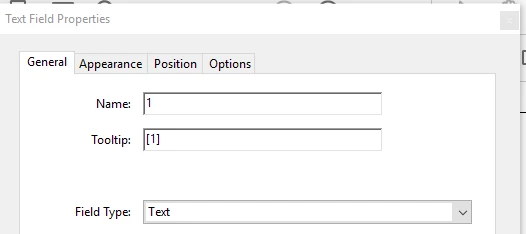
I have read that I should be able to go to 'prepare forms' and click on 'more' on the right side of the screen but that just takes me to more tools.  I do not see an option to 'convert to normal adobe pdf'

I have already formatted the form so I hope I don't have to start from scratch.

TOPICS
PDF forms
1.5K
Translate
Report
Community guidelines
Be kind and respectful, give credit to the original source of content, and search for duplicates before posting. Learn more
community guidelines
1 ACCEPTED SOLUTION
Community Expert ,
Nov 14, 2018 Nov 14, 2018

Look at More above the field names.

View solution in original post

Translate
Report
Community guidelines
Be kind and respectful, give credit to the original source of content, and search for duplicates before posting. Learn more
community guidelines
Community Expert ,
Nov 14, 2018 Nov 14, 2018

What can you see under More?

Translate
Report
Community guidelines
Be kind and respectful, give credit to the original source of content, and search for duplicates before posting. Learn more
community guidelines
Community Beginner ,
Nov 14, 2018 Nov 14, 2018

The only 'more' I know about is the 'wrench' icon in the bottom right which just takes me to 'more tools'

which takes me here

Translate
Report
Community guidelines
Be kind and respectful, give credit to the original source of content, and search for duplicates before posting. Learn more
community guidelines
Community Expert ,
Nov 14, 2018 Nov 14, 2018

Look at More above the field names.

Translate
Report
Community guidelines
Be kind and respectful, give credit to the original source of content, and search for duplicates before posting. Learn more
community guidelines
Community Beginner ,
Nov 14, 2018 Nov 14, 2018

Thank you sooooo much!  This is what I was looking for.

Translate
Report
Community guidelines
Be kind and respectful, give credit to the original source of content, and search for duplicates before posting. Learn more
community guidelines
New Here ,
May 20, 2020 May 20, 2020

I don't see in that box of 4 options where one can enable a field to be numeric. I want to be able to format a field so that folks are forced to enter digits. I'd also like to be able to  calculate a sum in one.  Help?


Translate
Report
Community guidelines
Be kind and respectful, give credit to the original source of content, and search for duplicates before posting. Learn more
community guidelines
Community Expert ,
May 20, 2020 May 20, 2020
LATEST

Those particular options are for Fill & Sign forms. For a regular form use the "Format" tab. And for calculations, use the "Calculate" tab.

Thom Parker - Software Developer at PDFScripting
Use the Acrobat JavaScript Reference early and often

Translate
Report
Community guidelines
Be kind and respectful, give credit to the original source of content, and search for duplicates before posting. Learn more
community guidelines
Community Beginner ,
Nov 14, 2018 Nov 14, 2018

From 'edit form' the 'more' button shows me -

Translate
Report
Community guidelines
Be kind and respectful, give credit to the original source of content, and search for duplicates before posting. Learn more
community guidelines