
Participant
November 14, 2018
Answered

form field missing numeric tab

  • November 14, 2018
  • 1 reply
  • 1428 views

When I set up my word doc as a fillable pdf I must have checked off 'need signatures'.  Now none of the field property boxes show the 'numeric' tab.
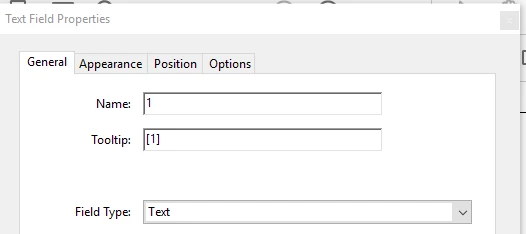
I have read that I should be able to go to 'prepare forms' and click on 'more' on the right side of the screen but that just takes me to more tools.  I do not see an option to 'convert to normal adobe pdf'

I have already formatted the form so I hope I don't have to start from scratch.

This topic has been closed for replies.
Correct answer Bernd Alheit

Look at More above the field names.

1 reply

Bernd Alheit
Community Expert
Community Expert
November 14, 2018

What can you see under More?

Participant
November 14, 2018

The only 'more' I know about is the 'wrench' icon in the bottom right which just takes me to 'more tools'

which takes me here

Thom Parker
Community Expert
Community Expert
May 20, 2020

I don't see in that box of 4 options where one can enable a field to be numeric. I want to be able to format a field so that folks are forced to enter digits. I'd also like to be able to  calculate a sum in one.  Help?


Those particular options are for Fill & Sign forms. For a regular form use the "Format" tab. And for calculations, use the "Calculate" tab.

Thom Parker - Software Developer at PDFScriptingUse the Acrobat JavaScript Reference early and often