
Known Participant
June 4, 2018
Question

Form fields doubling...?

  • June 4, 2018
  • 7 replies
  • 34381 views

I have been having a hell of a time getting our forms put back together in Acrobat Pro DC. Besides the well known iOS issues, I now have some of our forms going out with double fields. For instance, I will have a plain text field named "Description_01" I will finish up the document, send it out to our techs, then when the document comes back printing is a nightmare because the text will be blurred around. I started looking into the problem and set a hard font size for that box, also set so that long lines will not scroll. That fixed many of the issues, but when you printed it, the text would appear bold. I went back into editing and found out that for some reason, some of my text fields had doubled. In edit, it looks normal, but if you click on the field and drag the box, there is another copy of the exact same field right below it. How does that even happen?

I
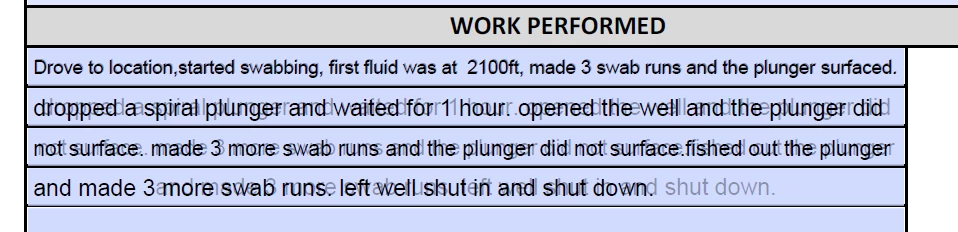
This was from a simple area of the form. This kind of stuff is coming in on a semi regular basis. There is a software hiccup somewhere.

7 replies

Participating Frequently
January 13, 2025

I have this trouble occasionally when someone emails me a form they've completed.  It's a form that I created, and I *KNOW* for a fact that the original form does not have duplicated fields or fields with identical names as I'm very careful when creating fillable forms not to do either of those things.  I've found that, if I go through and delete the text in every field that has doubling/shadow duplication, save the file, then save it again as an optimized PDF with form fields flattened (which I need to do before uploading it for signatures anyway), the form displays and prints as one would expect it to, without the doubled ghost text.  However, if you save it as an optimized document with flattened fields *before* deleting the text, it will display both sets of text (making it unreadable).  In fact, this is how I usually find out that this issue exists.  I suspect that in these cases, the form is being filled out in some third party application that is somehow breaking the form by duplicating every field that is typed into.  The latest one I received shows the PDF Producer as "iOS Version 17.6.1 (Build 21G93) Quartz PDFContext" so I'm assuming this person filled it out on their iPhone or iPad or similar Apple product.  I've attached a screenshot of the most recent instance of this (the red blockouts are where the student's name, phone number, and email address are).  Interestingly, the signature field is the only field which doesn't show this weird duplication.

NeighborhoodOverlord
Participating Frequently
November 13, 2020

Having the same problem. Making adjustments to a form another designer created. Every time I move a form field up or down using the arrow keys it duplicates itself. Some fieds suddenly have 3 copies. Real pain. 

Participating Frequently
January 25, 2019

This has happened to us, also.  I think the form is designed or saved incorrectly.  If a user saves the form to their desktop, and then re-uses it again at another time, the text is duplicated, as if it save their original fields are part of the form? I have to keep asking people to use a fresh form from our website each time they complete it.  I think some of our users have the adobe acrobat vs the adobe reader.  Acrobat will let you edit the form. For some reason, when a user does this it changed the "default value" of the form fields.  So when you click in the box it will appear empty as it is expecting you to input new non-default data.  Then when the user sees its empty, they type it again.  I'm going to try the flattening option to see if I can make it non-editable once submitted.

Participant
December 16, 2019

Any luck with a solution, Im new to Eco Sign, and created a PDF Form in Acrobat DC many times and imported it to Adobe Sign and all goes great and when sending I get the duplicated text all jumbled. Eco Sign isn't as user friendly with the form features so Im kind of stuck I guess at this point.

Known Participant
June 5, 2018

Is there a chance that some of my various problems (besides the double form fields) are being caused by people in the field using Reader to fill the forms, then those forms are being emailed back to various managers who also have Reader. Those managers sometimes modify the form data before emailing or printing it.

Can this messy chain of events cause issues?

try67
Community Expert
Community Expert
June 5, 2018

Using the file in Reader should not cause any such issues.

Bevi Chagnon - PubCom.com
Legend
June 4, 2018

Note: in John's screen capture, the data text in the fields is identical. I'm sure he didn't type it twice, once in each field.

Could be that you have duplicate form field names? Check the names of your fields in the form fields panel (right hand panel when in forms edit mode).

johnb68146259, it's strongly recommended to have just one large, multi-line form field for this type of question/data field. Breaking it into 4 different fields doesn't help your users, either!

Draw one large text form field to fill the area.

Properties / Options and check Multiline and Scrollable. This will allow your text to wrap inside the one form field so your user can write as much text as needed.

|    Bevi Chagnon   |  Designer, Trainer, & Technologist for Accessible Documents ||    PubCom |    Classes & Books for Accessible InDesign, PDFs & MS Office |
Known Participant
June 4, 2018

I appreciate the suggestion, and I have made it to them myself, however, we have been having issues with iOS breaking the large text boxes and when the tickets come in, the large boxes appear empty, until you click on the field, then the text shows up. But, as soon as you click anywhere else, the field is empty again.

With the single line boxes, set font size, no scrolling long lines, it *seems* to have helped with some of the corruption issues.

try67
Community Expert
Community Expert
June 4, 2018

iOS by itself won't do that. What application are you using to open the files, exactly? If it's Apple Preview, then yes, it will corrupt your PDF forms and cause all kinds of issues. It's known to be a buggy application.

Inspiring
June 4, 2018

It's most likely that you accidentally duplucated the fields, so that one is on top of the other and set up with different font settings. It is easy to accidentally duplicate when you have the Ctrl key held down while even slightly moving the mouse.

Participant
August 18, 2018

We are having this same problem. It is not a problem with accidentally duplicating fields. The new client form that we send out is sent to new clients to fill out and send back. I am finding that 80-90% of the time the client fills it out, sends it back and we are able to print it. Several times a month, we run into the entire form doing what the original poster describes. Visually it is fine but when printing, it usually says there is an error (but still prints) and double prints all of the fields of text.

We also have two other problems whereas people fill it out, save it and when it gets to us it is blank (theirs is blank too when they go back and check it). I ask them to save it to their computer or tablet first before filling it out. That works most of the time. Also, only about 20% of the people are able to figure out how to do the digital signature. Most of the time they say they click on it and nothing happens.

However, it is the duplicating text that is the biggest problem (7-page form) because I have to create a new one for our printed records. Note: there are two of every field for the text, which is why it is double printing, however, the original document does not have two fields for every field nor would I suspect that several people each month are accidentally duplicating all 50+ text boxes in a 7-page fillable pdf. And, of course, this is only happening to 10% or so of the people who fill these out.

Known Participant
August 18, 2018

I did find a little bit of a solution. I grabbed another, non Adobe, PDF reader and when I would get a messed up form, I open it in that other reader and it then prints fine. I haven't had the double field issue on print since I started running the corrupted ones through the other reader. So far, works every time.

Hope that helps.

FYI I just picked a random reader out of the windows store. If you need me too I can check and see which one it is. It wasn't an editor just simple reader.

Bevi Chagnon - PubCom.com
Legend
June 4, 2018

I've never come across this before in an Acrobat PDF form.

But have a question:

In your screen cap, it shows black borders around each of the 4 lines of the form field.

Are these 4 one-line form fields?

Or one multi-line, scrollable form field?

|    Bevi Chagnon   |  Designer, Trainer, & Technologist for Accessible Documents ||    PubCom |    Classes & Books for Accessible InDesign, PDFs & MS Office |
Known Participant
June 4, 2018

They are one-line form fields. Not how I would like to set it up, but that is how they wanted it.

As far as multiple copies of the boxes, that is true, they were there.

try67
Community Expert
Community Expert
June 4, 2018

Remove the duplicates and the issue will be solved.