
brianb16553101
Participant
April 16, 2024
Answered

Form Filed now always e-sign field

  • April 16, 2024
  • 13 replies
  • 10788 views

Hello,


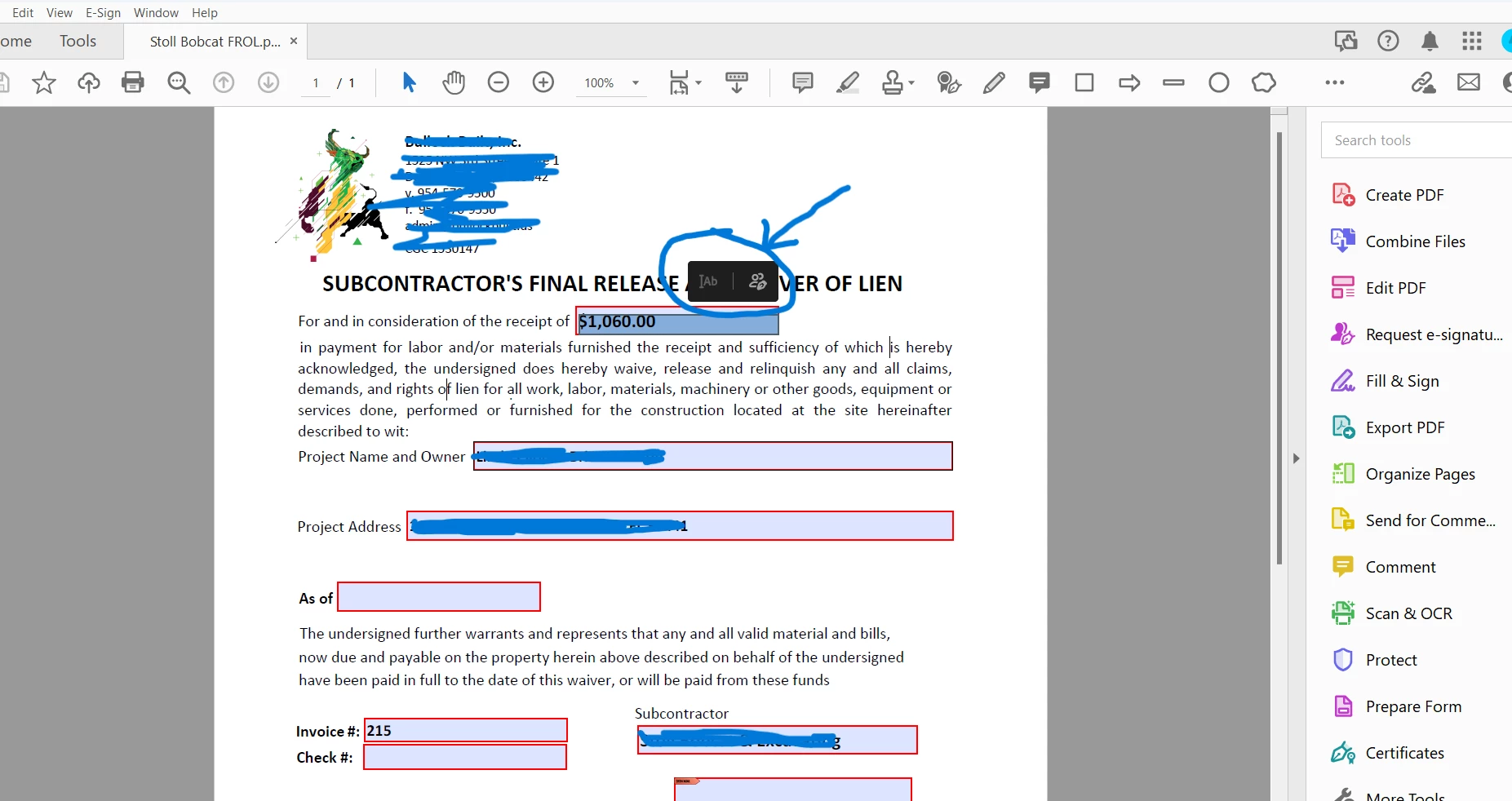
Today for some reason all forms I have and all fields have become request for e-sign and will not let me type or earse anything previously typed into a field or type in blank field. It worked fine until today, and now every form I have is acting like this. Any ideas what is causing this?
Correct answer brianb16553101

It is Acrobat Pro (64). I ran a repair, switched to classic and that seemed to have fixed the issue. 


13 replies

Meenakshi_Negi
Legend
May 2, 2024

Hi All,


Thank you for your patience so far.


The issue has been resolved. Please reboot the machine and then relaunch Acrobat.

Then wait for some time and try again to fill the forms. 


Let us know how it goes.


Thanks,

Meenakshi


Marking a reply or response “Correct” will help future users with the same issue quickly identify the correct answer.

KTdid.
Inspiring
June 4, 2024

This has not been resolved.

abkitsme
Participant
April 24, 2024

This is still happening! Haven't been able to use Acrobat for days! Would LOVE to know when this get's fixed so that I can continue working. I'm kinda stuck in the mud without these forms.

Participating Frequently
April 25, 2024

Bad !!!  We waiting again 🙂

You can click like if you want convert, the field will be unlocked... you can enter want you want and after you need to register again, it temporary, my brother find this !!! but you need more manipulation to do !


Courage, i waiting a solution from ADOBE too ....with you 😉

Participating Frequently
April 24, 2024

Hello,


Ho come on Adobe ! It's not working..... Give us our Acrobat BACK or Fix the BUG , but don't put a "Green"Answer like the problem resolved , cause many user still have this problem.


Work on it, please cause we paid for it 🙂 and give us an update or fix your new 24.02.20687 , cause i have it, i fixes, i update, i switch and NOTHING happen! I unastall, i install again , it work for few minutes and BOUMMMM again !!!


Don't hide behind a Green answer resolved cause the problem is NOT RESOLVED 🙂 Thank You Adobe !!!

abkitsme
Participant
April 24, 2024

PREACH!

Participant
April 23, 2024

The same issue as described here. Have been searching for a solution to this issue, and this is the only thread I can find. Reverted to using Adobe Reader to fill out the forms and/or going into design mode.  Please fix ASAP. 

rubenm2021
Participant
April 20, 2024

I am having the same issue. What is going on?  Adobe please fix the issue.

rubenm2021
Participant
April 20, 2024

Oh boy. Easy fix. Switch from the pointing/selecting arrow to the pan or hand icon.  See attachment.

Participant
April 21, 2024

Perfect, that works.

Participant
April 19, 2024

I am having the same issue. This has made all of my typical work using Adobe custom forms impossible all of this work week. This issue started happening after the latest update.


Please fix this problem as soon as possible.


I rely on Adobe and at this point, will have to search for a different product if this cannot be resolved.

Participant
April 19, 2024

I am having this issue as well and it is causing a lot of disruption, hopefully it is fixed asap.

Bp82
Known Participant
April 19, 2024

Thank goodness it isn't just me! Appreciate the work around others found of using the Pan/Hand tool to select the text. I was about to go nuclear on Adobe.


Adobe... fix yo self!

Participant
April 19, 2024

Thank you for the fix this was killing me at work. I use spacebar for the pan tool so just to add, you may need to click on the arrow tool and hold it and the pan icon will appear. Thanks again!!!

Participant
April 19, 2024

This is happening to us as well. Adobe please fix!

Participant
April 22, 2024

THIS IS NOT SOLVED!! This work around does not work for Mac. We have uninstalled and reinstalled and it worked okay for 1 day and now it is back. We cannot keep uninstalling and reinstalling the software each day. That is absurd!! 

@adobe you need to fix this!! 

Participant
April 18, 2024

Hello All, 


A few of our users have been experiencing this issue as well. I imagine it is part of the most recent Adobe Update. The quick fix we found was changing the Select Text > Pan instead of Select. Hopefully Adobe will roll out a fix soon. 

Participant
April 19, 2024

Thanks!  I am also having this highly annoying issue and the only thing that worked for me is this solution of selecting the  "Pan (hand)" icon instead of the "Select Text (pointer)" icon.  Adobe please fix this!!