
Participating Frequently
September 19, 2018
Answered

Formatting Placeholder text

  • September 19, 2018
  • 1 reply
  • 1570 views

Hello,

i make pdf form with placeholder text with the script:

// Custom Format script for text field

if (event.value === event.target.defaultValue) {

    event.value = "Downsell Offer #2 or OTO Discount";

    event.target.display = display.noPrint;

    event.target.textColor = color.black;

    event.target.textSize = 10;

    event.target.textFont = "Helvetica-Oblique";

} else {

    event.target.textFont = "Helvetica";

    event.target.display = display.visible;


}
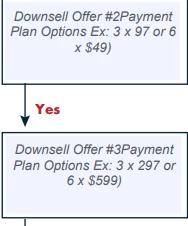
its worked perfectly, but the problem is i want the text in 3 line and "Payment Plan" in bold text (like on last picture). im searching all tutorial but i cant find it, could you help me?
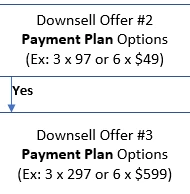
Thanks

This topic has been closed for replies.
Correct answer George_Johnson

You will have to allow rich text formatting for the field and in your code construct the appropriate spans and assign your spans array to event.richValue.

I'm not aware of any tutorials that present this topic, but the documentation is always a good place to start: Acrobat DC SDK Documentation

1 reply

George_JohnsonCorrect answer
Inspiring
September 19, 2018

You will have to allow rich text formatting for the field and in your code construct the appropriate spans and assign your spans array to event.richValue.

I'm not aware of any tutorials that present this topic, but the documentation is always a good place to start: Acrobat DC SDK Documentation

Participating Frequently
September 20, 2018

Thank you Sir,

im sorry, im really confused with this, do you have example? im really new for this..thanks