 Adobe Community

- Home
- Acrobat
- Discussions
- Re: Formula help: adding up mileage fields then mu...
- Re: Formula help: adding up mileage fields then mu...

Copy link to clipboard
Copied
It woked - then when I saved .pdf it was lost when I reopened it. Then it would only work in some fields an not others. Now it won't work at all.
// Get first field value, as a number
var v1 = +getField("MileagemilesRow1").value;
// Get second field value, as a number
var v2 = +getField("MileagemilesRow2").value;
// Get third field value, as a number
var v3 = +getField("MileagemilesRow3").value;
// Get fourth field value, as a number
var v4 = +getField("MileagemilesRow4").value;
// Get first field value, as a number
var v5 = +getField("MileagemilesRow5").value;
// Calculate and set this field's value to the result
event.value = .58 * (v1 + v5);


 1 Correct answer
Thank you for all your help. There was a duplicate formula in another cell (which I had inadvertently copied) that was causing the problem. But you had easier formulas to use. Thank you, again!!!

 22
Replies
22
22
Replies
22


Copy link to clipboard
Copied
You can use the simplified field notation:
(MileagemilesRow1 + MileagemilesRow5) * 0.58
Copy link to clipboard
Copied

Copy link to clipboard
Copied
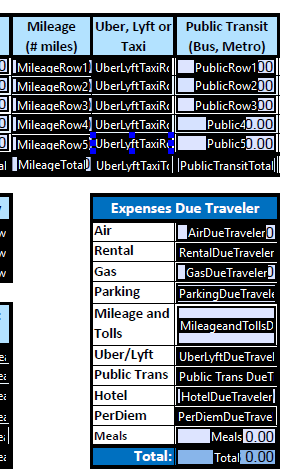
Still can't get it to total?
Copy link to clipboard
Copied
Where is your problem?
(0.0 + 0.0) * 0.58 is 0.0
Correct answer by
cynbee3162
AUTHOR
Copy link to clipboard
Copied
Thank you for all your help. There was a duplicate formula in another cell (which I had inadvertently copied) that was causing the problem. But you had easier formulas to use. Thank you, again!!!

Copy link to clipboard
Copied

Copy link to clipboard
Copied
The problem is most likely the special characters in your field's name. Rename it or use a calculation script, like this:
event.value = Number(this.getField("AUTO: Mileage 1.0").valueAsString) * 0.28;
Copy link to clipboard
Copied
Well, that definitely fixed it (changing the name) but now the Total is calculating the number entered, not the number that field calculates to.

Copy link to clipboard
Copied
Sorry, I don't follow what you mean... Where did you place the code?
Copy link to clipboard
Copied
sorry i wasn't more clear. i put the code in both simplified field notation & custom calculation script. In simplified, i enter 100 & it calculates to $28 but the total (calculates the sum of all fields in this section) calculates $100 (it is calculating the value entered (100), not the value calculated ($28).
Thanks for jumping in & helping so quick. I spent hours online & watching videos trying to get it to work. You have been the most helpful!
Copy link to clipboard
Copied
It can't be in both places. Use it only under the third option: Custom Calculation Script.
Copy link to clipboard
Copied
sorry, i didn't finish typing that out! *doh
i tried it in both. in the custom field, it did not calculate at all (i entered 100 & it displayed $100).
the code i used is: Mileage * 0.28
Copy link to clipboard
Copied
Did you rename the field to "Mileage"? Check the JS Console (Ctrl+J) for error messages.
If it still doesn't work share the actual file with us.
Copy link to clipboard
Copied
yes, i renamed it to Mileage & updated the code you shared above event.value = Number(this.getField("Mileage").valueAsString) * 0.28. i attempted to attached the file but it was flagged as spam. here is the error message in the JS Console:
TypeError: this.getField(...) is null
1:Field:Calculate
TypeError: this.getField(...) is null
1:Field:Calculate
TypeError: this.getField(...) is null
1:Field:Calculate
TypeError: f is null
1282:byteCodeTool
ReferenceError: Mileage is not defined
1:Field:Calculate
ReferenceError: Mileage is not defined
1:Field:Calculate
ReferenceError: Mileage is not defined
1:Field:Calculate
ReferenceError: Mileage is not defined
1:Field:Calculate
ReferenceError: Mileage is not defined
1:Field:Calculate
ReferenceError: Mileage is not defined
1:Field:Calculate
Copy link to clipboard
Copied
If you're using this:
Mileage * 0.28
It needs to go in the Simplified Field Notation option, not the Custom Script one...
Copy link to clipboard
Copied
that is what i did & got the result i pasted above (enter 100 & it calculates to $28 but the Total calculates to $100, not $28)
Copy link to clipboard
Copied
Are you calculating the value of the total field, or the Mileage field?
Copy link to clipboard
Copied
both. calculating the mileage in the mileage field & total of all fields in the Auto category. (the mileage field is the 1st field in the Auto category).
Copy link to clipboard
Copied
So what's the formula for each one?
Copy link to clipboard
Copied
the formula for the mileage field is: Mileage * 0.28 in the Simplified field notation
the calculation in the TOTAL field is set to: Value is the sum (+) & all fields under Auto are selected.
Is there a way I can upload my document to you? This is my first created form using Adobe so I really appreciate your patience.
Copy link to clipboard
Copied
That doesn't make sense. You can't use a field's own value in its calculation.
That's like using this formula:
x = x + 5
Copy link to clipboard
Copied
ah!!!!! well that explains it...we were trying to avoid showing the mileage rate but I think i can add it to the form & use it in the calculation.


 AdChoices
