

Fragments / Missing artwork when compressing PDFs with Acrobat Pro
Greetings to all,
I am creating this topic because I am now desperate: I create labels as a designer and to send them to our suppliers, I convert them to PDFs and as sometimes, PDF files can be quite heavy, I optimise them before sending, which usually has a positive impact on the size of the file and cleans up all unnecessary bits and pieces.
This used to work perfectly fine and I was very happy with the overall quality.
My Acrobat auto updated recently (end of September) and another time again after this (beginning of October I believe), I now have version 2019.008.20080 and ever since these updates, when trying to optimise files like I always have before, I get very random results, especially with files that have transparency of some kind (shading, spot colours, gradients etc) on top of getting over-fragmented images and artwork when I precisely check "Bring fragments together" in the saving options.
I have searched long and hard without success for a solution, tried contacting Adobe too to no avail: no one gets back to me and my cases get closed. Is it only me ? or is there some real problem with how Acrobat now compresses data ?
Here is an example: file is perfect before compression (made in Illustrator in high quality)
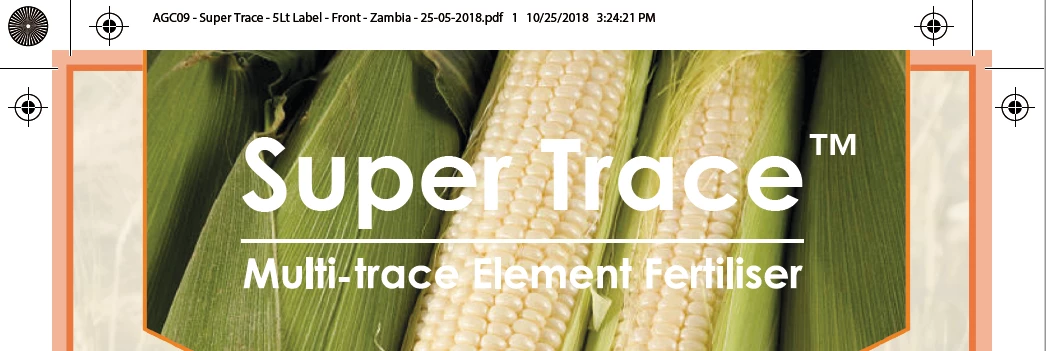
Then I compress, and some of the artwork disappears or gets fragmented into several images, in spite of checking "bring image fragments together" (even vectors - this NEVER happened before the update, with the same label, I have compressed it several times without issues or loss)
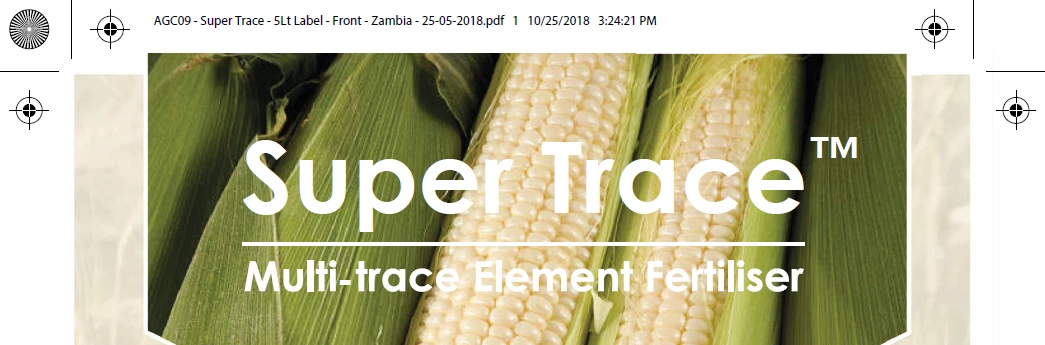
I would really appreciate if Adobe or anybody else could come up with a solution, this is a serious set back in my work.
Thank you upfront Community !
Angie.
 AdChoices