
Participant
January 17, 2023
Question

Full Search did not find the word in the right place in the chart

  • January 17, 2023
  • 1 reply
  • 2380 views

Hi all,


I am IT Support for the company, the affected user reported this issue to me and I am stumped on this now, hoping for any help on this would be hugely appreciated.

How to reset/enable search to find all the words in the document/chart but also, at the right area. For example:


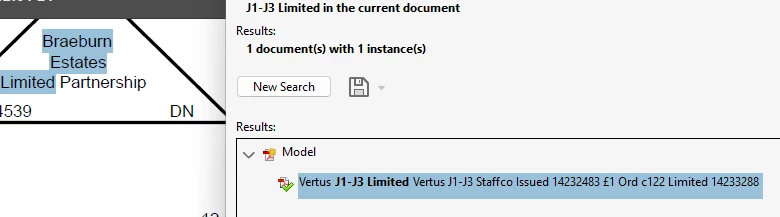
I searched for J1-J3 Limited and expect the search to bring up that in the document but what happened then it show up in highlight of completely different words and state that it all it found. See screenshot below.


I have already tried purge, reset index, ensure application is updated and still did not fixed this issue.
 

This topic has been closed for replies.

1 reply

try67
Community Expert
Community Expert
January 17, 2023

This is usually the result of a badly constructed PDF file. Do you know how the file was created, ie. from which application and using what exact command? Also, can you share a sample file with us?


AaronC99Author
Participant
January 18, 2023

Based on my understanding thus far from the user, is that they have been doing this for years (which I believe they export from Microsoft application - will confirm on this once I get the response back from the user).


Please see attached of the file.

try67
Community Expert
Community Expert
January 18, 2023

Actually, this file was created in AutoCad. I'm guessing the problem is with how that was done there.