
Known Participant
April 25, 2025
Answered

Getting "unable to create the temporary folder error 183" when I'm not even on computer!

  • April 25, 2025
  • 1 reply
  • 13393 views

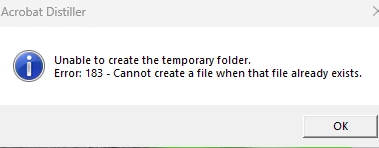
I don't know that Acrobat is the right place to post this, but it seems to be coming from something called Adobe Distiller and I don't know if I'm even using the product in the background of something or not.  In the last week or so, I've been getting the error image pasted below (at least it's below as I enter this).   It happens about half the time upon boot up and it pops up occasionally at other time, even when I'm not working or having any Adobe Creative Cloud products open.  Like I might leave my computer just fine, go have dinner, come back and find that error pop-up on my screen.  Or just now, when the only thing I've got open at the moment is the Creative Cloud Desktop, not any of its products.

...

One thing I found online says that if you get that message you should uninstall and reinstall the product, but when I go to my install/uninstall option in Windows 11, I don't even see a product called Windows Distiller there. 

...
What could be causing this and how can I stop the errors?  And what existing product of mine might be kicking it off at boot-up or when I'm not even using the computer?  CPU and memory usage after a bootup are in the 30% range, so I don't think it's a memory issue.

...

Also, if someone can tell me if there's a more appropriate place to post this, I'd be happy to.  I just didn't see a group that referenced Distiller or even one that was like "Generic Adobe Concerns".  Thank you!


Correct answer AnandSri

Hello!


Thank you for providing the additional information. The latest version of Acrobat for Windows is 25.001.20474, released on April 28, 2025. You can check the version by going to the Menu > Help > About Adobe Acrobat. Please make sure to reboot your machine to ensure that all updates are installed correctly and that the new features are activated.


Let us know if you experience any issues.

Thanks,

Anand Sri.

1 reply

AnandSri
Community Manager
Community Manager
April 29, 2025

Hello!


I hope you are doing well, and thanks for reaching out.


Could you please confirm which Adobe apps are installed and the version of your operating system? 

The error message "Unable to create the temporary folder. Error: 183 – Cannot create a file when that file already exists" typically occurs in Adobe Acrobat or Distiller when the application attempts to create a temporary folder or file that already exists or has conflicting permissions.


Try the following suggestions, and let us know how it goes.

Please ensure you have the latest version of Acrobat installed on the machine: 25.001.20474 (Win) | 25.001.20476 (Mac), Apr 28, 2025. Check for any pending updates from the Menu > help > check for updates, install the updates, restart the app and the machine, and try again. For more information, see this: https://adobe.ly/4cWqhcz

  • Verify and Adjust Permissions for Temporary Folders:
    • Navigate to C:\Windows\Temp.
    • Right-click on the Temp folder and select Properties.
    • Go to the Security tab.
    • Ensure that the Users group has Full Control permission.
    • If not, click Edit, select Users, and check Full Control.
    • Click Apply and then OK to confirm the changes.


  • Check for Existing Temporary Folders:
    • Navigate to C:\Windows\Temp\Acrobat Distiller DC.
    • If the folder exists, right-click on it and select Properties.
    • Ensure that the folder is not marked as Read-only.
    • If it is, uncheck the Read-only attribute, click Apply, and then OK.​


  • Clean Temporary Files:
    • Press Windows + R, type %temp%, and press Enter.
    • In the Temp folder, delete unnecessary files and folders.
    • This can free up space and remove potential conflicting temporary files.


If the issue still persists, download and install all the mandatory and optional updates of the operating system. Restart the machine, use the Acrobat Cleaner tool to remove the installed app, restart the computer, and then install Acrobat. You can also try the suggestions from this article: https://adobe.ly/4iIryW6


Thanks,

Anand Sri.

Known Participant
April 29, 2025

My system info is in the graphic above. 

Next is a list of every adobe product loaded...it's a lot.

In good news, I was able to change two settings you mention.

Full Control was not on, so now it is.

And the DistillerDC was indeed marked as read-only so I changed that.

Fingers crossed that one of those two things makes a difference.


In this step:

  • In the Temp folder, delete unnecessary files and folders.

I did not take any action because I don't know, of the many files in there, what might be unnecessary and I wasn't feeling brave enough to delete everything without knowing.


When I went to acrobat, it said there were updates available so I did that.  I can't tell you the new version because it's making me do a reboot to get that and I'd lose this note if I did, but I assume that it'll be to the best new version.


So let's see if all of this helps and I'll let you know if the problem persists, thanks!

AnandSri
Community Manager
AnandSriCommunity ManagerCorrect answer
Community Manager
April 30, 2025

Hello!


Thank you for providing the additional information. The latest version of Acrobat for Windows is 25.001.20474, released on April 28, 2025. You can check the version by going to the Menu > Help > About Adobe Acrobat. Please make sure to reboot your machine to ensure that all updates are installed correctly and that the new features are activated.


Let us know if you experience any issues.

Thanks,

Anand Sri.