Participating Frequently
April 11, 2025
Question

Getting "Windows - Application Error" errors in the latest Acrobat version

  • April 11, 2025
  • 2 replies
  • 2843 views

I have multiple users who are reporting this issue that comes up when using Acrobat:
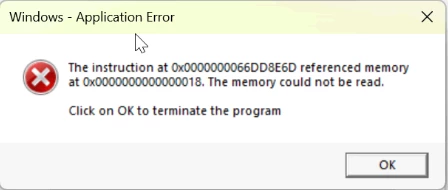
 

There isn't a specific action that causes it; for one user, it comes up when they save a PDF document. One user has it come up for almost every action--combining PDFs, editing, signing, etc.--and it constantly interrupts their work.


They are both on the latest version, Adobe Acrobat 64-bit 25.001.20435.

I have tried fixing generic Windows errors through chkdsk, sfc /scannow, and DISM. I made sure drivers were up to date. However, the error seems to only come up when using Acrobat, so I think I have mostly ruled out a generic Windows error or memory error.


Looking at the event viewer logs, I do see error 1328 coming up for both. Here is the full error:


Product: Adobe Acrobat (64-bit) -- Error 1328.Error appliying patch to file C:\Program Files\Adobe\Acrobat DC\Acrobat Elements\ContextMenu64.dll.  It has probably been updated by other means, and con no longer be modified by this patch.  For more informationcontact your patch vendor.  System Error: -1072807676


This error also comes up for both machines I've looked at:


Product: Adobe Acrobat (64-bit) - Update 'Adobe Acrobat (25.001.20435)' could not be installed. Error code 1603.


For both machines I have been testing on, I have completely deleted all Adobe folders / files and registry entries, and ran the Adobe cleanup tool, restarted, and reinstalled Creative Cloud and Acrobat. Same issue.


Since I've tried most of the fixes I know off of the top of my head, I'm wondering if this is possibly an Adobe issue introduced in a recent patch? And is there possibly a setting I can change to fix this?

2 replies

Participant
June 10, 2025

This error still seems to be a problem. I keep having the error pop up every time I stamp something with a signature specifically. I tried unchecking the "Enable assistive technology support" in the 'Accessibility' tab and that did not work. Is there anything else I can do? It's driving me insane.

Participating Frequently
June 10, 2025

The fix recommended by Adobe worked for 2 people that were having the issue, but for several others it did NOT work. When I've been looking through other community and forum posts, I've seen this issue happening as far back as 2015. Adobe claims they are working on it, but if they haven't fixed it in 10 years, I kinda doubt it will ever be fixed.

A couple more things you can try: If you see the error when opening PDFs through Outlook, try downloading the Adobe app in Outlook. If it's unrelated to Outlook, try running Acrobat in compatability mode or running the compatability troubleshooter.

It's clear that while Adobe markets their live service as continually improving, the only thing improving is their profits as we pay them every month to ignore us.

Participating Frequently
June 12, 2025

Hello @Isaak37906817yajz & Emily_Dean5029!


I hope you are doing well, and thanks for reaching out.


Thank you for sharing the steps that worked for you. And I am sorry for the trouble.


Please install the latest build of Acrobat 25.001.20531 (Win) | 25.001.20529 (Mac), planned update June 10, 2025, and see if you still get the error message.


If the issue still continues, please provide the following information: the current version of the operating system on your device and the logs from the affected machine. To collect the logs, download and run the Log Collector tool. Make sure to select all log options and attempt to reproduce the issue. After that, close the Log Collector tool; it will generate the logs along with a log ID. Please share this log ID with us for further investigation.


Thanks for your time and cooperation on this.

Regards,

Anand Sri.


Thank you for the response. I will have our users manually update. It is worth noting that running the compatibility troubleshooter for the Acrobat exe file in program files and using the Windows recommended compatibility settings worked for resolving the issue.

Amal.
Legend
April 11, 2025

Hi there


This is a known issue and our engineering team is actively working on it.


In the meantime, please try disabling assistive technologies. To do this,  Go to Preferences (Ctrl,Cmd+K) > Accessibility and uncheck “Enable assistive technology support,” then restart Adobe Acrobat application and check.


Let us know how it goes.


Participating Frequently
April 11, 2025

I appreciate the response, I will try enabling this and see if it helps resolve the issue. Thank you.

AnandSri
Legend
April 16, 2025

Hello Isaak!


I hope you are doing well.


Thank you for your time and cooperation. We will provide an update when a fix is available.


Regards,

Anand Sri.