
Participating Frequently
July 22, 2024
Question

Help! I can no longer print PDF's in Color on a MAC!

  • July 22, 2024
  • 4 replies
  • 4987 views

All of a sudden whenever I want to print a PDF it only brints in black and white!  I have no idea how this happened.  I've uninstalled the app several times, and I've even updated it.


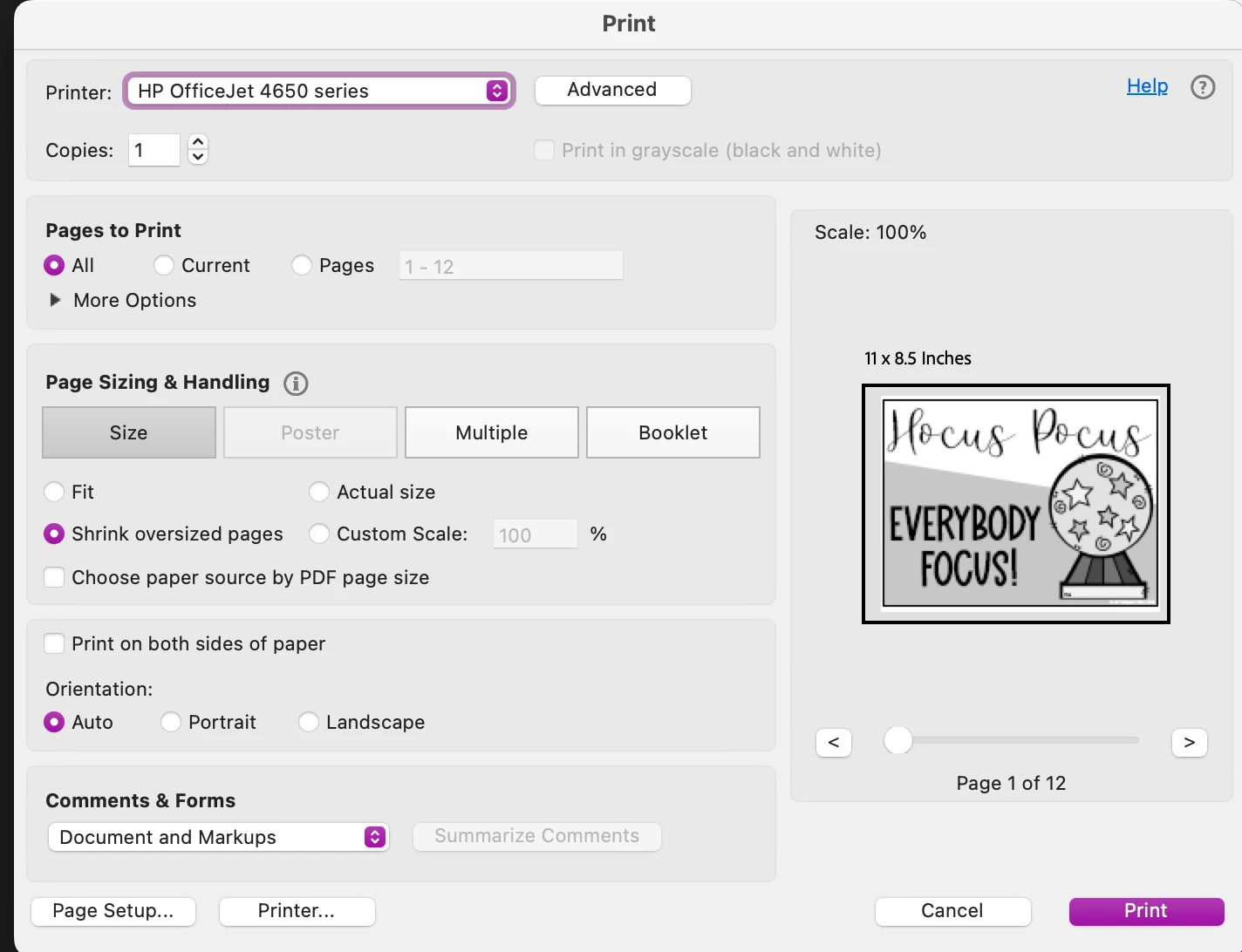
As you can see in the picture.. the print in greyscale option is blacked out, and there is no other place for me to select print in color option.  Trust me I've looked everywhere.  Really hoping somewhere on here can help! 


I'm using a MacBook Pro by the way.  TIA for any help!!  I'm a teacher as you can see from the picture below, so I'm getting ready to print tons of things, and they are all in color!
  

4 replies

Participant
January 16, 2025

Hello, I am also having this issue, Mac is not printing PDFs in colour. They used to print fine. JPGs print fine. Printer print quality test print fine. Only PDFs do not print in colour. Was there any solution to this? Mac OS 13.6.9 

dreamcatcherwolf
Participant
June 19, 2025

I started to have this problem recently, all software fully up to date.

I have now found a cure: in the Print dialogue box, go to Advanced and make sure that the 'Let printer determine colours' box is checked.

Participant
October 14, 2025

Hi,

I'm also having this problem. Can't save files from the internet as a PDF in colour. Would anyone have any tips , please?

Participant
August 21, 2024

I am also having this same issue with the same results as tracy_2849

S_S
Community Manager
Community Manager
July 25, 2024

Hi @Jackie387480776c1n,


Hope you are doing well. Sorry for your experience! 


Would you mind updating the application to the latest version and letting us know if that helps?


If not, I have a question. Have you tried using the option "Print as Image" from the Advanced settings? Do you see the same result there? 


If yes, please share a few details for further investigation:

1. The app version number you are using;

2. The OS and its version;

3. please collect the Adobe CC logs https://helpx.adobe.com/creative-cloud/kb/cc-log-collector.html  and share them via the document cloud link https://helpx.adobe.com/document-cloud/help/sharing-pdfs.html.


Look forward to hearing from you.


-Souvik

Participant
August 21, 2024

@S. S I am having the same problem as described by @Jackie387480776c1n. I was able to print my PDF in color by opening the file in my Preview window on my Mac, and was able to print in color from Google Chrome - so don't think it's a printer issue but an Adobe issue. It looks like this wasn't resolved previously - so wondering if there's an update or anything I can provide to help resolve this. Would be so much easier to print right in Adobe than opening in a different program/app. Thanks in advance!

S_S
Community Manager
Community Manager
September 19, 2024
Hi there, it’s been awhile and still have not heard back from anyone
regarding this issue. Can you, or your other teammates please advise? Thank
you!

@Jackie387480776c1n We are already investigating this, and a ticket has been logged. 


Would you mind getting on a call with me? This will help me get further information from you and share it with the dev team to expedite the issue.

If so, please let me know, and I will send you an email so you can schedule a call according to your preferred time.


-Souvik

Inspiring
July 22, 2024

click the "printer..." button. I would be there are options there.