Participating Frequently
March 21, 2025
Répondu

Help with multiple lines of text in a text field

Trying to figure out how to get a user's multiple line response to fit on two lines that are uneven.

The form looks like this:

          If yes, please explain:______________________________________

          _______________________________________________________


Do I use more than one text field or one that allows for multiple lines? I have tried so many variations and can't get it. Is this something Acrobat can't do?

Thank you!
Meilleure réponse par PDF Automation Station


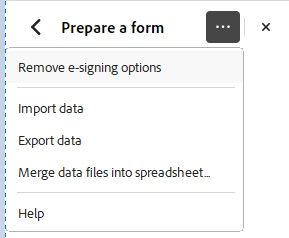
If you're using the New interface, click the 3 dots to the right of Prepare Form and select Remove e-signing options.


2 commentaires

Nesa Nurani
Community Expert
Community Expert
March 21, 2025

Use two text fields, let's name them "Text1" and "Text2".

Put "Text1" on upper line and "Text2" on lower line, adjust their width.

Now go to "Text1" field properties under 'Options' tab uncheck'Scroll long text', now go to 'Format' tab and select 'Custom' then as 'Custom Keystroke script' enter this:

if(event.fieldFull)
this.getField("Text2").setFocus();

When user reach the end of the "Text1" it will automatically switch to "Text2" field and continue writing.

Participating Frequently
March 21, 2025

Where do I find the format tab?

Participating Frequently
March 21, 2025

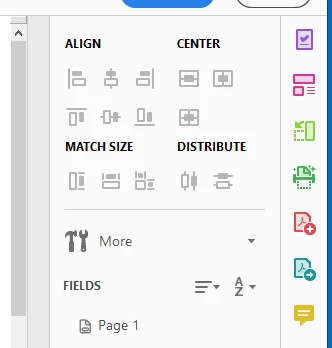
In the field panel, select More > Revert To Acrobat form.


I'm sorry, what field panel?
The information in this e-mail is intended only for the person to whom it is addressed. If you believe this e-mail was sent to you in error and the e-mail contains patient information, please contact the Mass General Brigham Compliance HelpLine at https://www.massgeneralbrigham.org/complianceline <> .
Please note that this e-mail is not secure (encrypted). If you do not wish to continue communication over unencrypted e-mail, please notify the sender of this message immediately. Continuing to send or respond to e-mail after receiving this message means you understand and accept this risk and wish to continue to communicate over unencrypted e-mail.
PDF Automation Station
Community Expert
Community Expert
March 21, 2025

You either need two text fields, or one multiline field with the left side to the right of explain:  It will not use the the second line to the left of the left side and you will have to experiment with text size and field placement so the text goes above the lines.  Not an ideal situaltion.  You could also remove the lines and have multline text field underneath "If yes, please explain:"