Known Participant
October 25, 2023
Question

How can i get rid of the highlighter's rounded edges and make them straight?

  • October 25, 2023
  • 2 replies
  • 2223 views

Why does the highlighter in acrobat look like this:
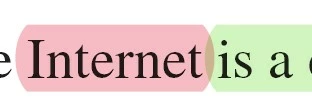
and not like every other pdf editor/viewer:
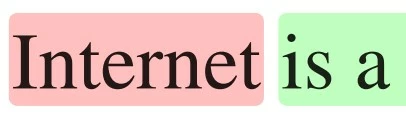
 

is it possible to achieve the second result somehow?

This topic has been closed for replies.

2 replies

Participant
April 23, 2024

 I have the exact opposite problem. This new updated Acrobat has squared edges for the highlighter and I'm used to the rounded ones. I wish they would just make a checkbox somewhere in the preferences for this.

Joel Geraci
Community Expert
Community Expert
October 25, 2023

Unfortunately, that's not something that can be set. Each PDF editor is free to interpret what the on-screen appearance generated for a highlight looks like.

Known Participant
October 25, 2023

They should really change it, it's ridiculous that if i want to highlight a single letter it looks like this:


Known Participant
October 25, 2023

I think they wanted it to look like a real highlighter on paper. But this is a matter of taste so while I'll pass on your feedback, I don't see this changing.


The problem is not really the shape, the problem is that the highlighting is too large and covers part of the previous and following letters. Look at the 2 pictures i sent in the question, how can someone think that the acrobat highlight look better than the other one? Thanks for the help though, appriciated