
Participant
August 12, 2024
Answered

How can I manage or delete the text suggestions in a text box? (English)

  • August 12, 2024
  • 3 replies
  • 1822 views

Hi,

I am using Acrobat 2024.002.20964 on the MAC.

When I insert a text box and enter a text, I get text suggestions through a dropdown, which were probably used in the past. (see picture).

I have the following problems with it:

  • There is an x to delete an entry but, when I click on it, the suggestion is there again the next time.
  • if I make a new entry that does not exist in the list, it is not saved in the drop-down list
  • So I constantly have the same suggestions that are no longer useful to me, I can neither delete them permanently nor add new ones.
  • The problem persists when I uninstall and reinstall Acrobat using the uninstaller.


Where can I manage these entries?

Within Acrobat or by editing or deleting a library file?

I look forward to your help!
Steffen.
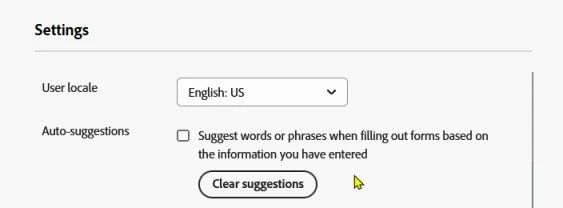
Correct answer Bernd Alheit

Open https://acrobat.adobe.com/link/home/ in a web browser and change the settings of your account:

3 replies

Bernd Alheit
Community Expert
Bernd AlheitCommunity ExpertCorrect answer
Community Expert
August 12, 2024

Open https://acrobat.adobe.com/link/home/ in a web browser and change the settings of your account:

Participant
August 12, 2024

Thank you for your hint, but, unfortunately, it doesn't help. 


Participant
February 18, 2025

It didn't help at first after saving the changes to my online account Settings, but then I signed out of my Adobe account on my local device (not my Internet browser), signed back in, and those annoying popups had stopped. So far, so good.


Been looking for a solution to this problem for months.

try67
Community Expert
Community Expert
August 12, 2024

Go to Edit (or click the Menu button if you're using the new UI) - Preferences - Forms and click the Edit Entry button under Auto-Complete. You can also disable it entirely from there:


try67
Community Expert
Community Expert
August 12, 2024

I'm seeing now the screenshot you posted... This does not look like a text field. Is this a static text box? A comment? Something else?

Participant
August 12, 2024


I use this box (for a comment while signing invoices).


The Auto-Complete is Off and, when I activate it, 'Edit Entry List' remains disabled.. In the Box, no suggestions are listed... 😞

Participant
August 12, 2024