

Answered
how can I reset default print copies to 1
on all pdf documents the print dialog has a default copies as 6. I would like to change that to 1.

on all pdf documents the print dialog has a default copies as 6. I would like to change that to 1.
Here's something to try...
On my Windows 10 machine, with an HP Laser printer, I can click on the Printer Properties button in the Acrobat Print dialog box, and tweak the printer's default settings on the Advanced tab.
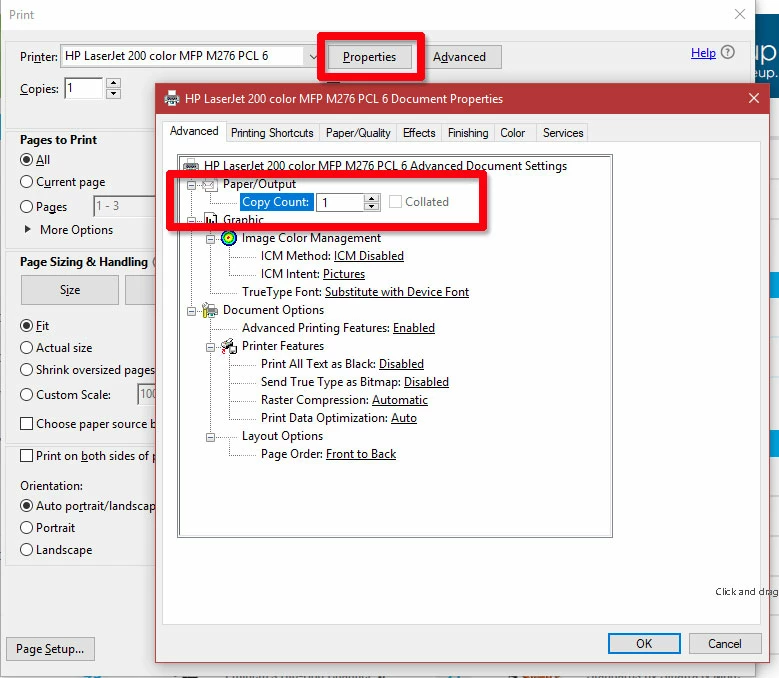
See if that option is available for your printer, and if making changes therre fixes things for you.
I hope this is helpful. My best,
Dave
The properties tab is getting you outside of Acrobat's control into the printer drivers control.Acrobat will, however, honour the settings there. For all settings that Acrobat does not control, Acrobat leaves them at whatever parameter they are set.
If in that tab (that is available only for that kind of printers), the copy count is set at anything else then 1, it is the printer driver who sets it. You will need probably to go to the printers devices to be able to save that parameter permanently.
Already have an account? Login
Enter your E-mail address. We'll send you an e-mail with instructions to reset your password.
 AdChoices