Exit
  • Global community
    • Language:
      • Deutsch
      • English
      • Español
      • Français
      • Português
  • 日本語コミュニティ
  • 한국 커뮤니티
1

How do I create a hyperlink in Acrobat Pro DC?

New Here ,
May 22, 2015 May 22, 2015

I could have sworn this was once a feature. All I am seeing is the ability to add a box around an area of content, however I want it to look cleaner, can someone please advise?

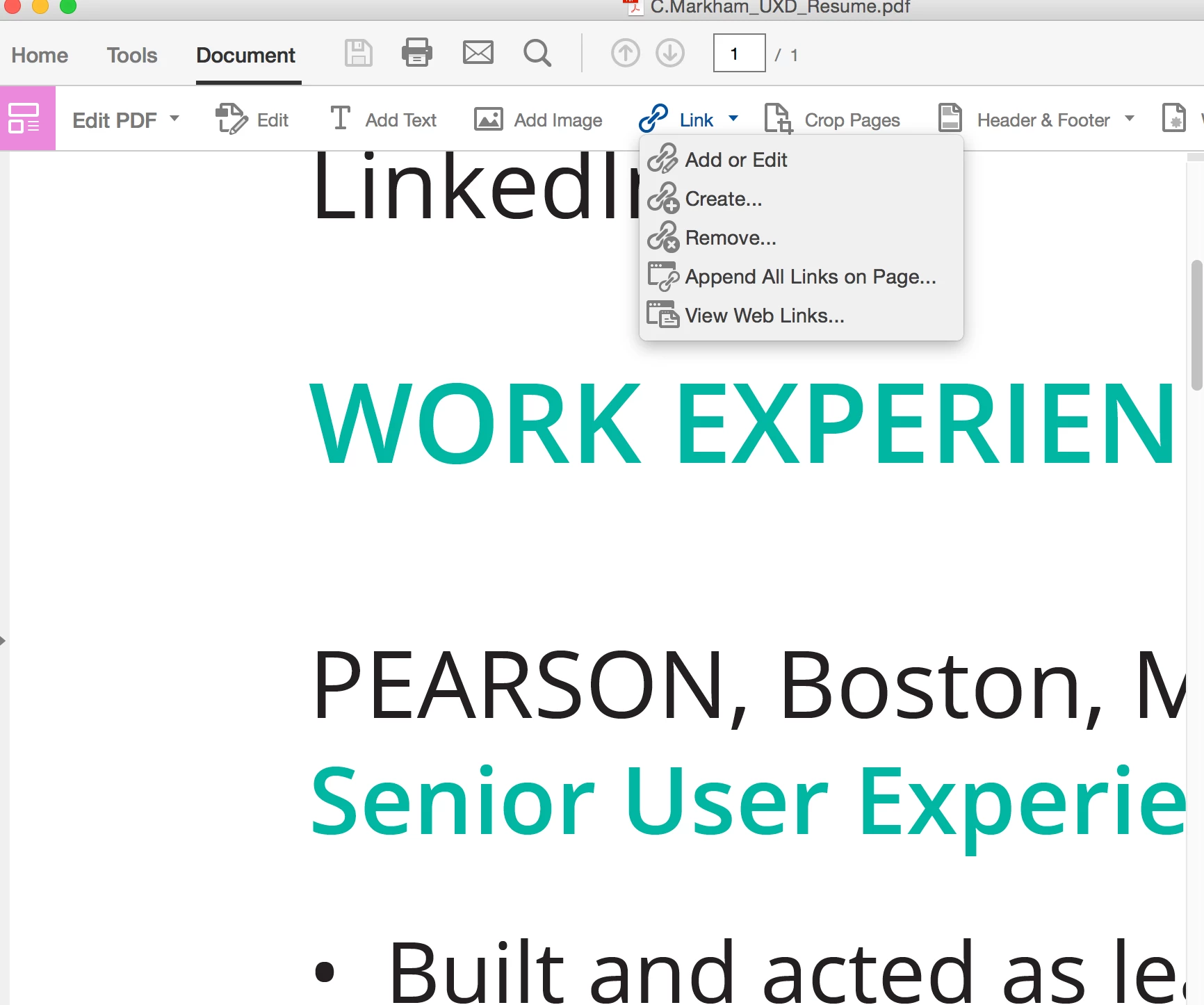
Screen Shot 2015-05-22 at 10.07.57 AM.png

Screen Shot 2015-05-22 at 10.08.22 AM.png

TOPICS
Create PDFs
65.2K
Translate
Report
Community guidelines
Be kind and respectful, give credit to the original source of content, and search for duplicates before posting. Learn more
community guidelines
1 ACCEPTED SOLUTION
Adobe Employee ,
May 22, 2015 May 22, 2015

It IS a feature. The steps are here:  https://helpx.adobe.com/pdf/acrobat_reference.pdf#page=150

I also sent you a private message.

View solution in original post

Translate
Report
Community guidelines
Be kind and respectful, give credit to the original source of content, and search for duplicates before posting. Learn more
community guidelines
Adobe Employee ,
May 22, 2015 May 22, 2015

It IS a feature. The steps are here:  https://helpx.adobe.com/pdf/acrobat_reference.pdf#page=150

I also sent you a private message.

Translate
Report
Community guidelines
Be kind and respectful, give credit to the original source of content, and search for duplicates before posting. Learn more
community guidelines
New Here ,
Aug 10, 2015 Aug 10, 2015

I have the same problem - I have Adobe Acrobat Reader DC and I go into the Tools Menu > Edit PDF and it doesn't give me the option to add links

Translate
Report
Community guidelines
Be kind and respectful, give credit to the original source of content, and search for duplicates before posting. Learn more
community guidelines
Sep 25, 2015 Sep 25, 2015

Hi LeshRitsonCarriageGroup,

Adobe Acrobat Reader doesn't allow you to edit PDF files, as Acrobat Pro/Standard does. You are welcome to download a free 30-day trial of Acrobat from this page: Download Adobe Acrobat free trial | Acrobat Pro DC.

Best,

Sara

Translate
Report
Community guidelines
Be kind and respectful, give credit to the original source of content, and search for duplicates before posting. Learn more
community guidelines
New Here ,
Nov 01, 2016 Nov 01, 2016

did you ever get an answer on this...it won't allow me to paste the link anywhere!

Translate
Report
Community guidelines
Be kind and respectful, give credit to the original source of content, and search for duplicates before posting. Learn more
community guidelines
New Here ,
Nov 01, 2016 Nov 01, 2016

found it you have to choose "open a webpage"

Translate
Report
Community guidelines
Be kind and respectful, give credit to the original source of content, and search for duplicates before posting. Learn more
community guidelines
New Here ,
Oct 20, 2015 Oct 20, 2015

I am able to create hyperlinks following your instructions, but they appear in a black rectabgle even when I've chosen options to make the hyperlink invisible (rectanble type: none). What am I doing wrong?

Translate
Report
Community guidelines
Be kind and respectful, give credit to the original source of content, and search for duplicates before posting. Learn more
community guidelines
New Here ,
Oct 26, 2015 Oct 26, 2015

In the Create Link dialog box you can select Link Type.  This will allow you to create an "invisible" box.

Translate
Report
Community guidelines
Be kind and respectful, give credit to the original source of content, and search for duplicates before posting. Learn more
community guidelines
Community Beginner ,
Jul 13, 2017 Jul 13, 2017

That does not work even if its selected. This is why we are all posting it as an issue

Translate
Report
Community guidelines
Be kind and respectful, give credit to the original source of content, and search for duplicates before posting. Learn more
community guidelines
Community Expert ,
Oct 27, 2015 Oct 27, 2015

nmshea wrote:

I am able to create hyperlinks following your instructions, but they appear in a black rectabgle even when I've chosen options to make the hyperlink invisible (rectanble type: none). What am I doing wrong?

Where can you see "rectanble type" ?

Translate
Report
Community guidelines
Be kind and respectful, give credit to the original source of content, and search for duplicates before posting. Learn more
community guidelines
Contributor ,
Sep 24, 2015 Sep 24, 2015

adobe sucks. there is now web link tool for acrobatProDC  if there is they've hidden it well. you guys need some competition because right now you really suck.

Translate
Report
Community guidelines
Be kind and respectful, give credit to the original source of content, and search for duplicates before posting. Learn more
community guidelines
New Here ,
Sep 20, 2016 Sep 20, 2016

Compared to older versions of Acrobat Pro, the hyperlinking process is now counter-intuitive. Talk about user unfriendly. Every time I need to create a hyperlink or make a document interactive. I have to do research to remember where this feature is located. I guess I'm not the only one.

To the developers: please consider making the interactive tools easier to find.

Translate
Report
Community guidelines
Be kind and respectful, give credit to the original source of content, and search for duplicates before posting. Learn more
community guidelines
Community Expert ,
Sep 20, 2016 Sep 20, 2016

Mouse click on Tools. There search for the tool.

Translate
Report
Community guidelines
Be kind and respectful, give credit to the original source of content, and search for duplicates before posting. Learn more
community guidelines
New Here ,
Dec 02, 2016 Dec 02, 2016

is there a way to create the Link-OBJR tag when creating a link this way?

Translate
Report
Community guidelines
Be kind and respectful, give credit to the original source of content, and search for duplicates before posting. Learn more
community guidelines
Community Beginner ,
Jul 13, 2017 Jul 13, 2017

Adobe Acrobat Pro DC 2017 does not have an "link"/"add or edit" option within the View/Tools/Edit PDF. It just provides "open", "remove shortcut" or "learn more". ???

Translate
Report
Community guidelines
Be kind and respectful, give credit to the original source of content, and search for duplicates before posting. Learn more
community guidelines
Community Expert ,
Jul 13, 2017 Jul 13, 2017

Choose "open".

Translate
Report
Community guidelines
Be kind and respectful, give credit to the original source of content, and search for duplicates before posting. Learn more
community guidelines
Community Beginner ,
Jul 13, 2017 Jul 13, 2017

I did. Its Ok, I deleted that shortcut altogether and figured it out trying it in a different way. Thanks for the reply.

Translate
Report
Community guidelines
Be kind and respectful, give credit to the original source of content, and search for duplicates before posting. Learn more
community guidelines
New Here ,
Apr 24, 2021 Apr 24, 2021

To enable single-key shortcuts, open the Preferences dialog box:

Edit > Preferences), and under General, select the Use Single-Key Accelerators To Access Tools option

The shortcut is "L" (why not "K" like everyone else? ..sigh)

From https://helpx.adobe.com/acrobat/using/keyboard-shortcuts.html

Translate
Report
Community guidelines
Be kind and respectful, give credit to the original source of content, and search for duplicates before posting. Learn more
community guidelines
Explorer ,
Mar 25, 2022 Mar 25, 2022
LATEST

I have exactly the same issue - it's completely counter-intuitive. I have a PDF that is text only (it was originally created from a Word document, I think), and I can edit the text no problem at all in Adobe Acrobat Pro DC. However, what I've just added is a URL - and I'd like to highlight that URL and turn it into a hyperlink.


The official documentation tells me to use "Add link" to get a crosshair, and then draw a box round the bit I want to highlight. That's fine for an image, but for a text, that's just crazy - my URL wraps round a line, so I can't "draw a box" round it. I just want to highlight the text and turn it into a hyperlink. Is there really no way to do this?


I tried, in desperation, using the option to generate links from the entire document - when I did that, it told me it had added 5 links. Great. I've no idea where - none of these mysterious 5 links were highlighted or clickable.

Translate
Report
Community guidelines
Be kind and respectful, give credit to the original source of content, and search for duplicates before posting. Learn more
community guidelines
