Participant
September 27, 2018
Answered

How do I create Batch Print command in Adobe Acrobat Pro DC?

  • September 27, 2018
  • 1 reply
  • 47687 views

How do I create Batch Print command in Adobe Acrobat Pro DC to Print multiple PDFs? In Adobe Acrobat Pro 9 there was a Batch Processing - Print All option that would let you select multiple files and would print them in the sequential order that was shown.

This topic has been closed for replies.
Correct answer Karl Heinz Kremer

Batch sequences are now called "Actions". There is no longer a "Print All" action that gets distributed with Acrobat, but you can create your own. When you edit the batch sequence in Acrobat 9, that's what you will see:
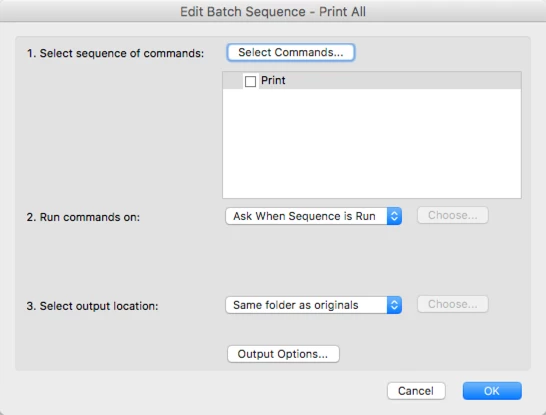
This means that there is one step in the sequence, and that prints the document. You can create the same in Acrobat DC: Just create a new Action - e.g. go to the "Tools" pane and type "Action" into the search field at the top, and then click on the "New Action":
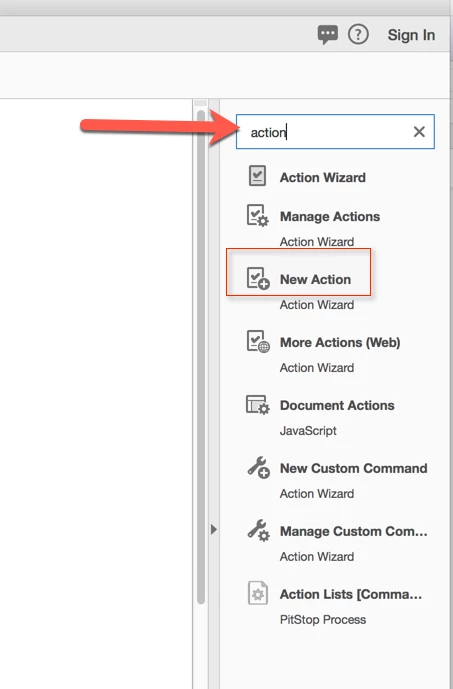
This will bring up the action editor. Now select "Print" from the "More Tools" category and either double-click on the "Print" item, or use the "+" button between the two panels.
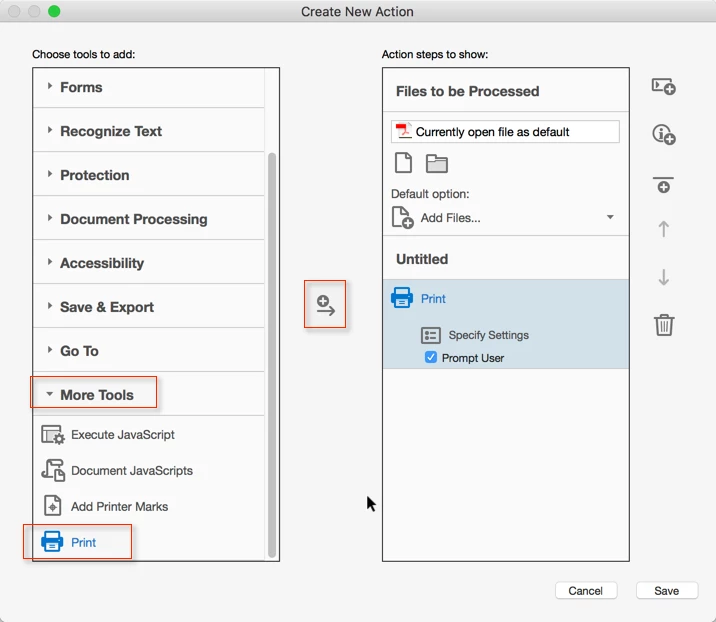
Now save this new action under the name of "Print All" and give it a try.

1 reply

Karl Heinz  Kremer
Community Expert
Karl Heinz KremerCommunity ExpertCorrect answer
Community Expert
September 27, 2018

Batch sequences are now called "Actions". There is no longer a "Print All" action that gets distributed with Acrobat, but you can create your own. When you edit the batch sequence in Acrobat 9, that's what you will see:

This means that there is one step in the sequence, and that prints the document. You can create the same in Acrobat DC: Just create a new Action - e.g. go to the "Tools" pane and type "Action" into the search field at the top, and then click on the "New Action":

This will bring up the action editor. Now select "Print" from the "More Tools" category and either double-click on the "Print" item, or use the "+" button between the two panels.

Now save this new action under the name of "Print All" and give it a try.

Participant
September 28, 2018

That's great thank you, however it seems to open each pdf file and then the print box appears for each file, requiring me to click print for each file opposed to the batch process in Adobe 9 where it selects all the files and just sends them to the printer. Do you know if there is anything further I can do to enable this to happen?

Karl Heinz  Kremer
Community Expert
Community Expert
October 2, 2018

That's great thank you, I've just tested it and it works. However, although adobe appears to print each file sequentially as listed, my printer doesn't receive them in the correct order. I thought this may be due to my printer settings but this worked correctly when using adobe 9 and my printer settings are the exactly the same? Is there another action I can add to enable each document to be sent to the printer first before sending the next?


Once Acrobat hands over the print job to the operating system, it's out of Acrobat's control in which order jobs are printed. You need to figure out if there is a way in your operating system to control how the jobs are spooled and handed off to the printer.