
How do I embed all fonts/glyphs used by a form?
High level summary:
What I am trying to do is have a PDF that is form-filled on a linux server.
The problem I think I have (I am new to this so I may be wrong) is that not all the glyphs for a given font are being embedded in the PDF, so when I try to form-fill the PDF it fails. Specifically when I am dealing with some Unicode characters.
Here is a lot more detail:
I have tried a number of server-side technologies to do the form filling including pdftk, apache's pdfbox, etc. these technologies on stumble on the high-order characters.
I have a super simple test-file.pdf that has 2 form fields in it, both using different fonts (Helv and Times Roman)
When I run pdfbox using the attached test-file.pdf and test-file-warning.xfdf (no high order characters), I get this output which seems to imply that the font is not fully embedded. (Note: this does generate a pdf)
Jun 20, 2024 5:21:02 PM org.apache.pdfbox.pdmodel.font.PDType1Font <init>
WARNING: Using fallback font LiberationSans for base font Helvetica
Jun 20, 2024 5:21:02 PM org.apache.pdfbox.pdmodel.font.PDType1Font <init>
WARNING: Using fallback font LiberationSans for Helvetica
Jun 20, 2024 5:21:02 PM org.apache.pdfbox.pdmodel.PDAbstractContentStream setFont
WARNING: attempting to use font 'Helvetica' that isn't embedded
Jun 20, 2024 5:21:02 PM org.apache.pdfbox.pdmodel.font.PDType1Font <init>
WARNING: Using fallback font LiberationSans for Times-Roman
Jun 20, 2024 5:21:02 PM org.apache.pdfbox.pdmodel.PDAbstractContentStream setFont
WARNING: attempting to use font 'Times-Roman' that isn't embedded
Run like this:
java -jar pdfbox-app-3.0.2.jar import:xfdf --input test-file.pdf --output test-file-warning-filled.pdf --data test-file-warning.xfdf
And when I run the process with an xfdf file that has high order characters like this:
java -jar pdfbox-app-3.0.2.jar import:xfdf --input test-file.pdf --output test-file-crash-filled.pdf --data test-file-crash.xfdf
It totally fails:
java.lang.IllegalArgumentException: U+014D ('omacron') is not available in the font Times-Roman (generic: LiberationSans), encoding: StandardEncoding with differences
	at org.apache.pdfbox.pdmodel.font.PDType1Font.encode(PDType1Font.java:424)
	at org.apache.pdfbox.pdmodel.font.PDFont.encode(PDFont.java:337)
...
Which all implies to me that my PDF does not have the fonts for the forms fields fully embedded. When I look at File / Document Properties / Fonts, I do not see either of the fonts for my form fields.
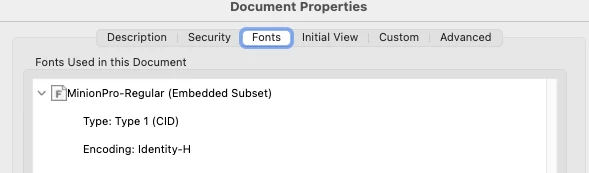
So what I think I want to do here is embed the entire font (all glyphs) for any fonts used in the form so that later when I form-fill, if there is a high-order character, the glyph is available.
Also note: I do not have the "master" copy of the PDF, my clients do. They create the PDF, then I name the form fields, etc. So I can do some light massaging of the PDF but not much.
It looks like I cannot upload my xfdf files, so here they are raw:
test-file-warning.xfdf
<?xml version="1.0" encoding="UTF-8"?>
<xfdf xmlns="http://ns.adobe.com/xfdf/" xml:space="preserve">
  <fields>
    <field name="field1">
      <value>some data
      </value>
    </field>
    <field name="field2">
      <value>Boom Technologies
      </value>
    </field>
  </fields>
</xfdf>
test-file-crash.xfdf
<?xml version="1.0" encoding="UTF-8"?>
<xfdf xmlns="http://ns.adobe.com/xfdf/" xml:space="preserve">
  <fields>
    <field name="field1">
      <value>some data
      </value>
    </field>
    <field name="field2">
      <value>Bōōm Technologies
      </value>
    </field>
  </fields>
</xfdf>
 AdChoices