

jaspert47233501
Participant
April 30, 2022
Answered

How do I move objects between pages?

  • April 30, 2022
  • 4 replies
  • 29344 views

I want to drag a text box from on page to another. But when i try, the object hits an invisible wall and wont let me move it to the next page. How do I drag a text box/object from one page to another?


I am using PC. Acrobat 2022. 
Correct answer JR Boulay


  Any solution?


By @Seth26643713gr7x


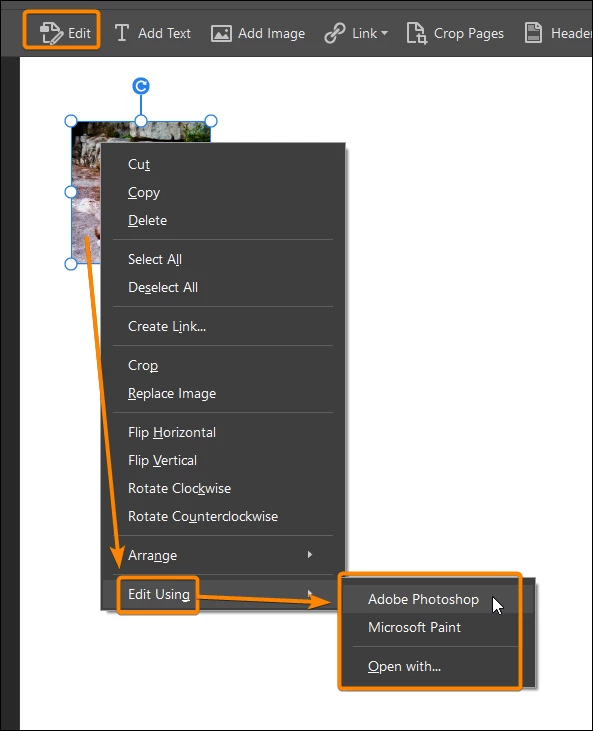
Right-click on the image using the Edit tool : Edit using : Photoshop/Paint/Etc.

Then you can save the image and import it in another page.


4 replies

March 25, 2023

The 'correct answer' to this question is not correct.  The question asks about moving a text box, not an image.  The question as it reads has not been answered.

try67
Community Expert
Community Expert
March 25, 2023

The correct answer is it's impossible to drag any objects from one page to another. You have to cut and paste them.

Participant
April 16, 2025

A text box will not copy and paste. 


also if you try to copy the text from inside the box, you lose the font. 


If the font isn't an adobe font, ti won't let you assign the font even though it's in the PDF.


this is insane. it's completely blocking me for hours now trying to find a workaround.

JR Boulay
Community Expert
JR BoulayCommunity ExpertCorrect answer
Community Expert
December 9, 2022


  Any solution?


By @Seth26643713gr7x


Right-click on the image using the Edit tool : Edit using : Photoshop/Paint/Etc.

Then you can save the image and import it in another page.


Acrobate du PDF, InDesigner et Photoshopographe
Participant
December 9, 2022

Perfect, works like a charm! Thank you for this super helpful work-around. 🙂

JR Boulay
Community Expert
Community Expert
May 3, 2022

Impossible.

You must cut and paste.

Acrobate du PDF, InDesigner et Photoshopographe
Participant
October 17, 2022

The problem with cut / paste (if your moving an object that's in image format) is that when you copy Acrobat reduces the resolution by a substantial amount so that the object is blurry when pasting into the next page.  Note that I cannot simply newly import the image onto a different page if I only have the image in the PDF to begin with.  Any solution?

Participant
December 9, 2022

I'm in the same boat. This is so annoying. Why not just be able to drag???

Legend
April 30, 2022

Hello @jaspert47233501,


you can not drag a text box from one page to another... you'll have to copy it from page then you can paste it to another one.


Regards,

Mike

Participating Frequently
February 24, 2025

I can't seem to do that either. Lame.