
FerventDesigns
Participant
July 12, 2023
Question

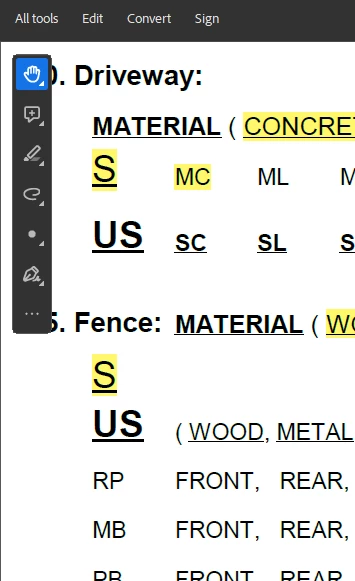
How do I move/remove the Quick Actions Toolbar from Acrobat Pro 2022.003.xxxx

  • July 12, 2023
  • 3 replies
  • 15356 views

I want to put the tools back at the top, so that I can read my full PDF without the toolbar blocking access to significant information, and without having to lower the zoom on the PDF. PLEASE HELP! There are numbers behind that toolbar that I need to see!
 

3 replies

Participant
August 31, 2023

I absolutely detest this toolbar. Why would you release a product with a feature that overlays the actual content of the pdf? I'm very glad I can disable the new Adobe, but seriously please reconsider this UI. The items on the toolbar aren't even helpful for how we use Adobe! 

Adobe Employee
July 19, 2023

Hi @FerventDesigns 


Glad that you love the new UI! 🙂

For the issue raised above, we are working to make the Quick toolbar moveable.

Quick workaround for the problem is : You can adjust the document according to your reading pane of your document. Or you can also use the zoom functionality that should help you this.


Let us know if the problem still persists for you.


jamesd213
Participant
September 22, 2023

Instead of moving it can you just give us the option to turn it off? Pretty simple solution right?

Amal.
Community Manager
Community Manager
July 13, 2023
FerventDesigns
Participant
July 13, 2023

Oh wow.. that's surprising. My only option to to revert back to the old UI? I don't want to go back, I love the new UI, I just need to rehome those shortcuts. Word does it well, letting me put my most used feature/tools at the VERY top of the window... 


Amal.
Community Manager
Community Manager
May 2, 2024

Agree FerventDesigns. But when someone desides for you where they think you should have the tools and don't allow the possibility to move them to a usable location...


Hi there


You may now grab the quick action toolbar from the grey line at the top and move it around the page to your desired position.

~Amal