

FerventDesigns
Participant
July 12, 2023
Frage

How do I move/remove the Quick Actions Toolbar from Acrobat Pro 2022.003.xxxx

  • July 12, 2023
  • 3 Antworten
  • 15381 Ansichten

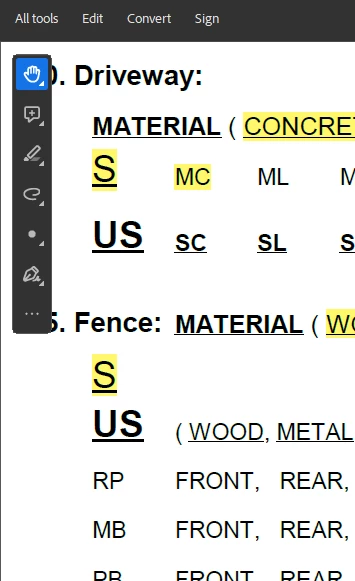
I want to put the tools back at the top, so that I can read my full PDF without the toolbar blocking access to significant information, and without having to lower the zoom on the PDF. PLEASE HELP! There are numbers behind that toolbar that I need to see!
 

3 Antworten

Participant
August 31, 2023

I absolutely detest this toolbar. Why would you release a product with a feature that overlays the actual content of the pdf? I'm very glad I can disable the new Adobe, but seriously please reconsider this UI. The items on the toolbar aren't even helpful for how we use Adobe! 

Adobe Employee
July 19, 2023

Hi @FerventDesigns 


Glad that you love the new UI! 🙂

For the issue raised above, we are working to make the Quick toolbar moveable.

Quick workaround for the problem is : You can adjust the document according to your reading pane of your document. Or you can also use the zoom functionality that should help you this.


Let us know if the problem still persists for you.


SteveDigital
Participant
September 22, 2023

There's no option to install a previous Acrobat version in the Creative Cloud app. This Quick Action Toolbar is horrible. Can you help with that?

Participant
January 16, 2025

Hi there


The option to move the quick toolbar around the document is now available with the new version 23.06.20320. Go to Help > Check for updates and reboot the computer once.


To move the toolbar, grab it from the grey bar by holding the mouse button and then move it to your desired location and release the mouse as shown in the screenshot below:


Let us know how it goes.


~Amal


I really don't want to move the toolbar around.  It was nice having it across the top.  I could access everything there and now I have to move it, add to it, etc.  It is not as user friendly.  I want the quick tools at the tops.  I also would like All tools to open at the right, as they did before.  I have a new license and I can't reset to previous view, as it doesn't have the history to do so.

Amal.
Legend
July 13, 2023
mariahweyne
Inspiring
July 13, 2023


Kathy5FFA
Inspiring
July 13, 2023

Thank you for this! Sorry, but I hate the new Acrobat experience. It's terrible. Much better before.