
How do I paste a vector image into a PDF made from Microsoft word
I am writing a grant that has a combination of text written in Word with figures that I made in Illustrator. I'll skip the intermediate steps for a moment, but what I want to do is 1) save a Word document as a PDF 2) open it in acrobat DC (newest version) 3) edit the PDF 4) delete a rasterized PNG file (exported from latest version Illustrator) 5) insert the original vectorized PDF file (saved in latest version of Illustrator) into the gap where I deleted the PNG file.
I can easily do steps 1-4. Step 5 is what I'm asking about.
I have found ways to have Acrobat "try" to do this...and it either immediately rasterizes the PDF (stupid) or only pastes the text that is in the PDF (also stupid).
I have included a snapshot below. Everything should be vectorized. The picture on the right has been rasterized to paste it into Microsoft word. I can select the picture and delete it in Acrobat just fine...but I cannot figure out how to insert the original PDF of that same image into that spot. I have also notice that every time I try to import the PDF into Word or Acrobat (which they both seem to rasterize), they resize the image. I have made the PDF exactly the size I want...not sure why it gets smaller.
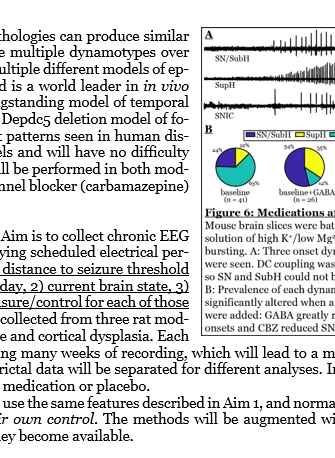
A few more details about how the file was made this way. I am typing into Word and want to have inline figures. Previously, while using a Mac I could simply paste the vectorized PDF files into Word--it allowed me to select PDFs as "images". It was beautiful. On a PC, this is much more difficult--it only allows raster files to be "images". I can insert an "adobe acrobat PDF" as an object but it appears to convert that into a raster image. It also opens the file up as too small, so I have to resize it...which since it's a raster file makes it look terrible. Stupid.
I just want to have my PDF figures look good. Rasterizein
 AdChoices