
jamiel50619123
Participant
November 8, 2018
Answered

How do I print a booklet AND staple in the middle of the pages

  • November 8, 2018
  • 2 replies
  • 19089 views

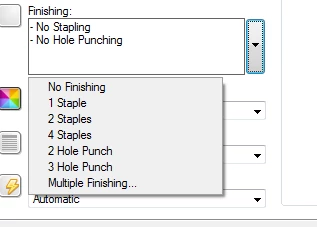
I know how to print a booklet but I am trying to print a booklet AND staple in the middle of the pages.  I am using a commercial printer but can only figure out how to staple on the top of the pages, not the center.  When I go into the printer properties I do not get options about where to staple, only the amount of staples. Thank you in advance.
This topic has been closed for replies.
Correct answer Dov Isaacs

This is not really an Acrobat/Reader issue, but rather one of the driver provided by your printer manufacturer and how it interacts with the printer's finishing hardware.

Please contact your printer manufacturer's technical support for assistance with this. Sorry, we cannot help here.

          - Dov

2 replies

Lukas Engqvist
Community Expert
Community Expert
November 14, 2018

Even though this is not an Adobe problem it would depend on your workflow. Printers that have both booklet and stapling usually want the documents to be printed as single pages, and use a combined imposition and finishing programme. It would normally be called "multiple finishing", "multi fold"+ staple or something like that. As Dov says searching for a user forum for your RIP or printer is more likely to get you answers (also specifying the printer and configuration will get you better help.)

Dov Isaacs
Dov IsaacsCorrect answer
Legend
November 9, 2018

This is not really an Acrobat/Reader issue, but rather one of the driver provided by your printer manufacturer and how it interacts with the printer's finishing hardware.

Please contact your printer manufacturer's technical support for assistance with this. Sorry, we cannot help here.

          - Dov

- Dov Isaacs, former Adobe Principal Scientist (April 30, 1990 - May 30, 2021)