Participant
February 25, 2021
Answered

How do I remove the date/time stamp from the signature?

  • February 25, 2021
  • 2 replies
  • 26917 views

Hi everyone,

Can someone explain how do I remove the date/time stamp from under an adobe signed document - or keep it from showing in the first place? 

Thanks!

Correct answer try67

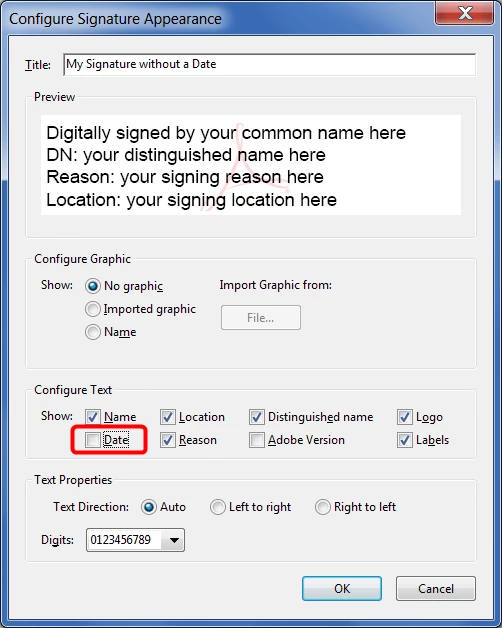
If you're referring to a digital signature field, you need to create a new appearance for your signature profile and make sure to un-tick the "Date" check-box under Configure Text:


2 replies

try67
Community Expert
try67Community ExpertCorrect answer
Community Expert
February 25, 2021

If you're referring to a digital signature field, you need to create a new appearance for your signature profile and make sure to un-tick the "Date" check-box under Configure Text:


Participant
June 3, 2024

How do you find these options?

ls_rbls
Community Expert
Community Expert
April 2, 2025

Hi! I have a similar problem, is there a way to add the date on a signature but without the timestamp? So basically just the date. So for example in the photo below, only "2025.03.29". Is it possible?

Eventually, if it's also possible to change the format to day/month/year would be great, thanks! 


Hi @juancarlos94 ,


Yes you can. To eliminate the timestamp, it is already answered on this thread.


But you may aldo employ a JavaScript script to execute at signing time, using the util.printd() method.


Util.printd() allows to manipulate the desired format of a date output.


See this article:


Additional insights:


ls_rbls
Community Expert
Community Expert
February 25, 2021

Hi,


Are you referring to a textfield that doesn't reset to blank after a digital signature field is cleared?

Sara5E3BAuthor
Participant
February 25, 2021

Hi,

Thanks for asking. When I get the signed document, it has a date and time electronic stamp that I don't know how to remove - or to keep from appearing. I assume there must be a setting where I can disable the stamp, but I don't know where to find it. 

ls_rbls
Community Expert
Community Expert
February 25, 2021

Yes, try67 provided the correct guidance.