Participating Frequently
December 6, 2019
Answered

How do I set the default size for a stamp?

  • December 6, 2019
  • 4 replies
  • 63432 views

I added a custom stamp, but the image file stamps on the page in a size much larger than I desire. I have re-sized the stamp, but how do I save that size as default? It made sense to me that when I got it where I wanted it I would RMB click on the stamp and choose Properties>Make Current Properties Default, but that doesn't work.


Thanks in advance for the help.

Correct answer Bevi Chagnon - PubCom.com

"is to create it in the correct size in the first place."

This is not a helpful answer. If we knew how to do that then we probably wouldn't be here...


I've imported a JPEG as a custom stamp. The resulting stamp is WAY bigger than the JPEG previewed in my image editing app. There's no option to set the size of the stamp. I can 'resize' the JPEG all I like before importing it, but the resulting stamp is always the same ENORMOUS size. 


Easy way:

No matter what size your original graphic was made, and what size it became once placed as a stamp in Acrobat, you can easily resize the stamp in Acrobat.


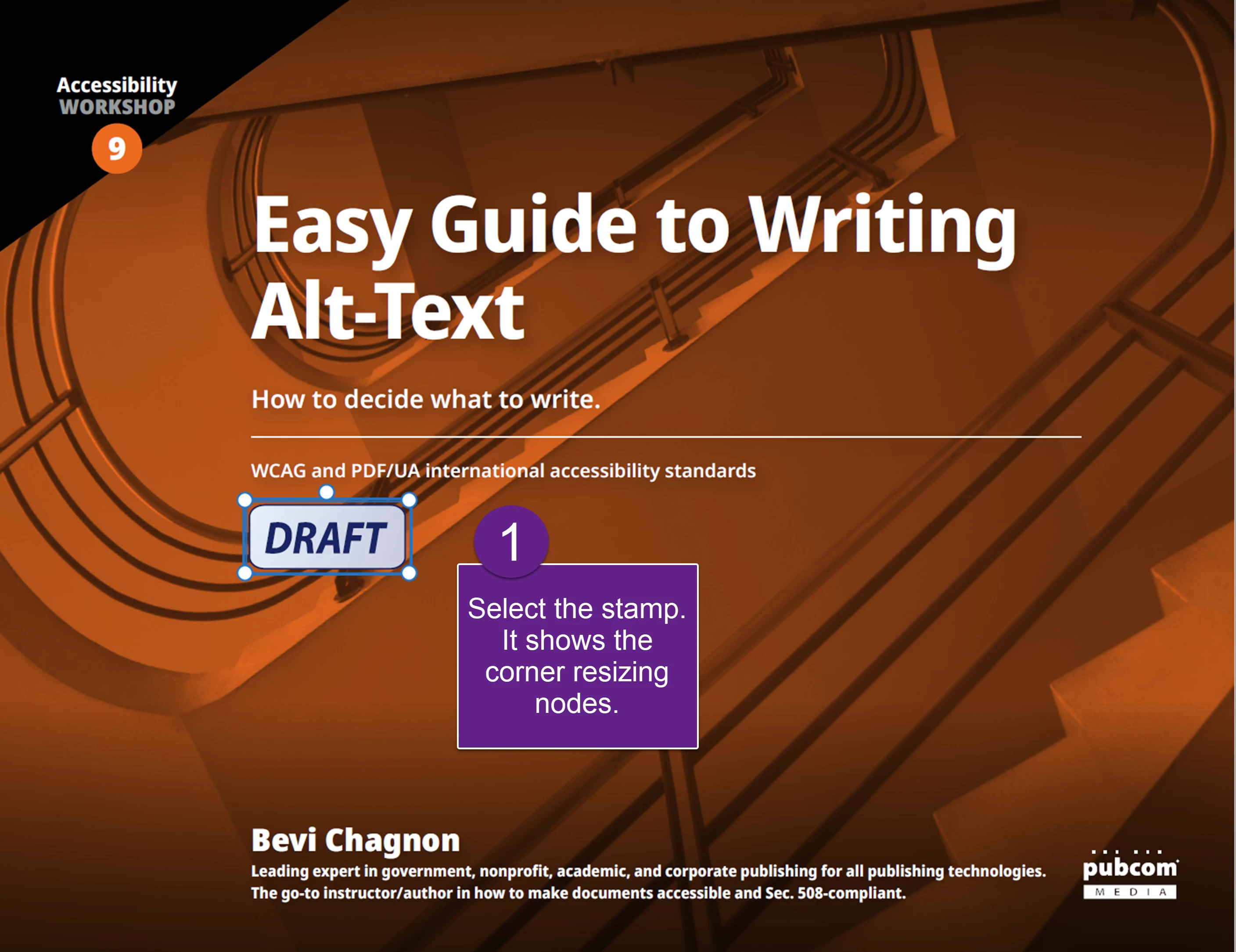
  1. Place the stamp and select it. The risizing nodes appear on the corners.
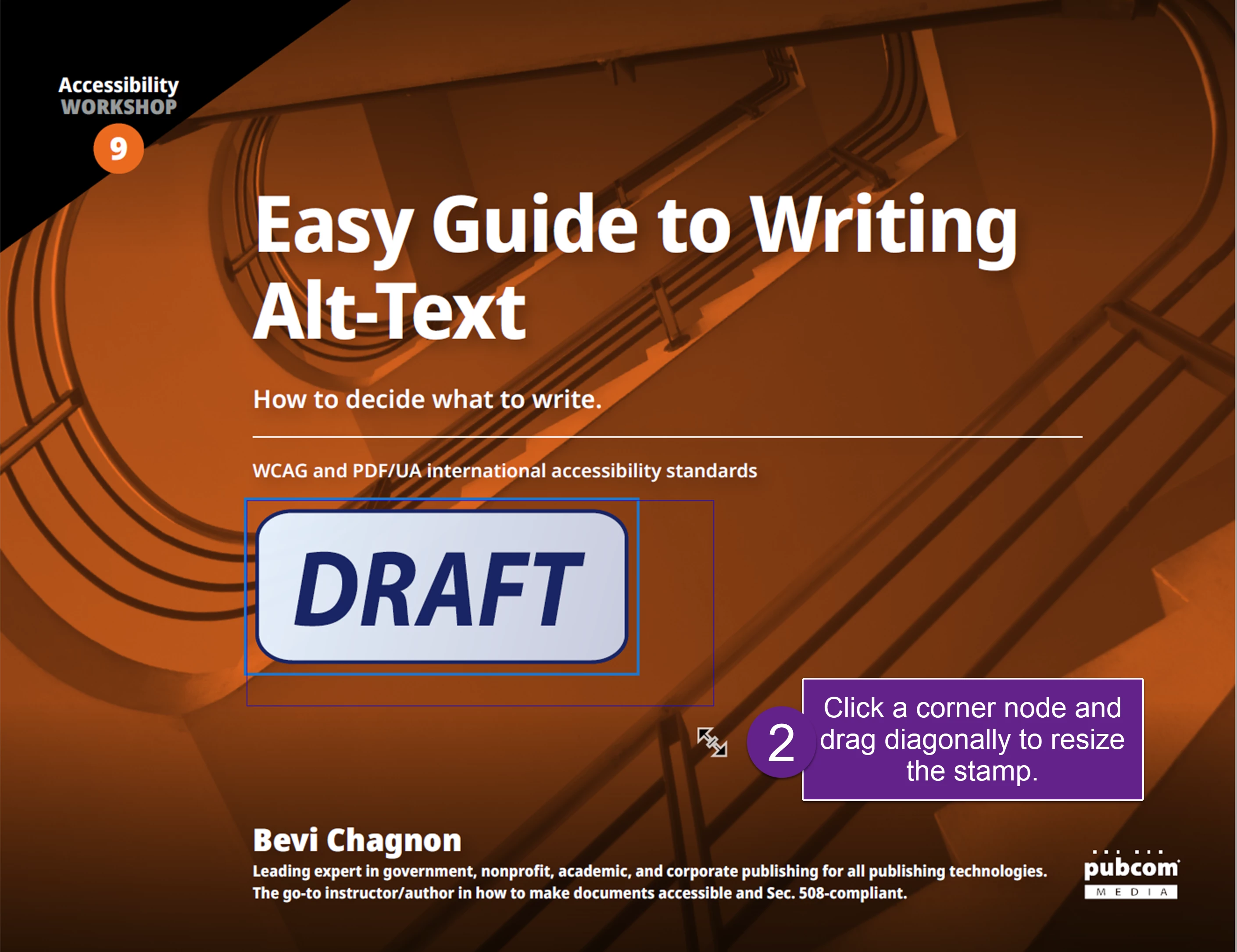
  2. Grab a corner node and drag it to the size you want.
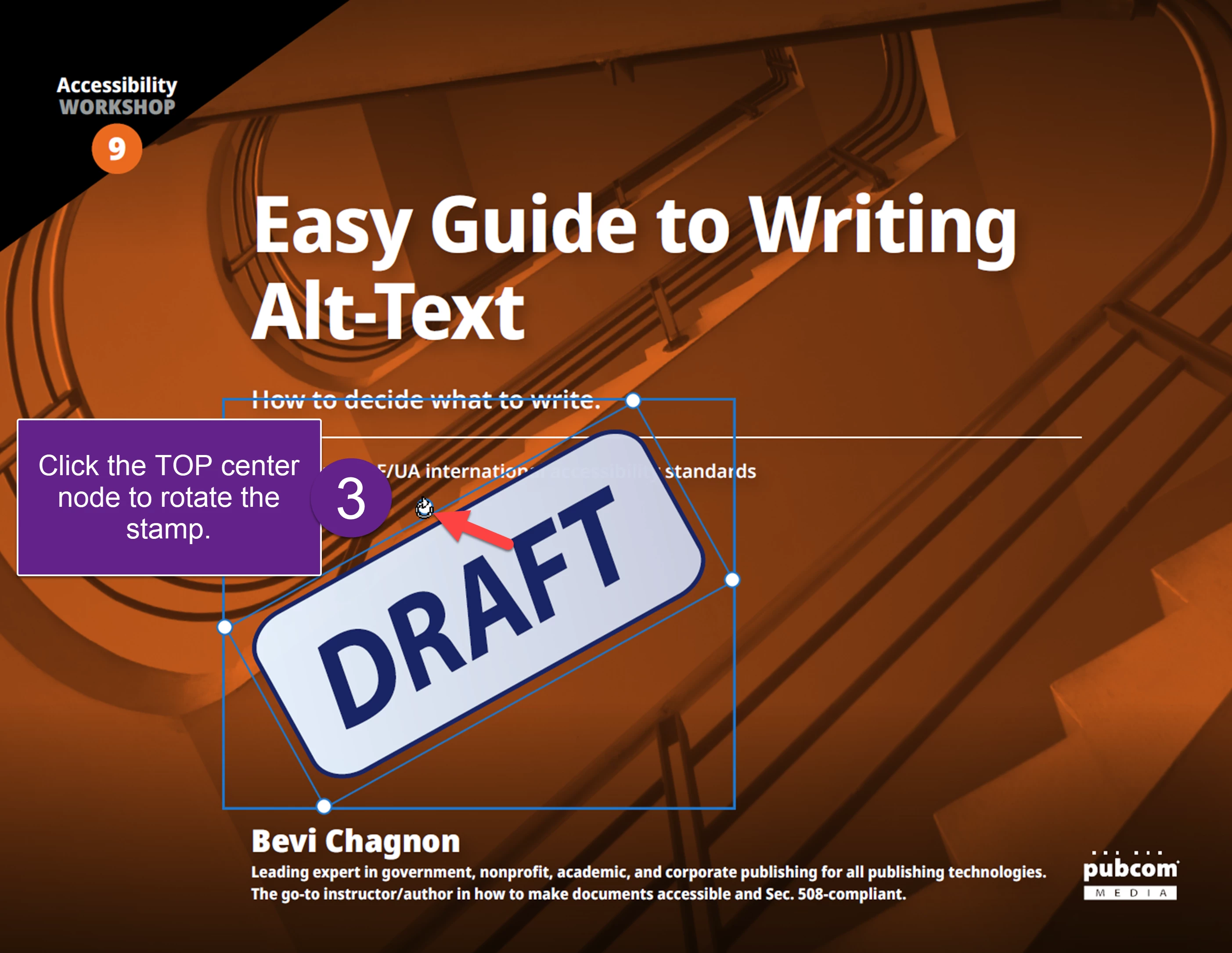
  3. You also rotate the stamp by grabbing the top center node and rotating your cursor clockwise/counterclockwise.

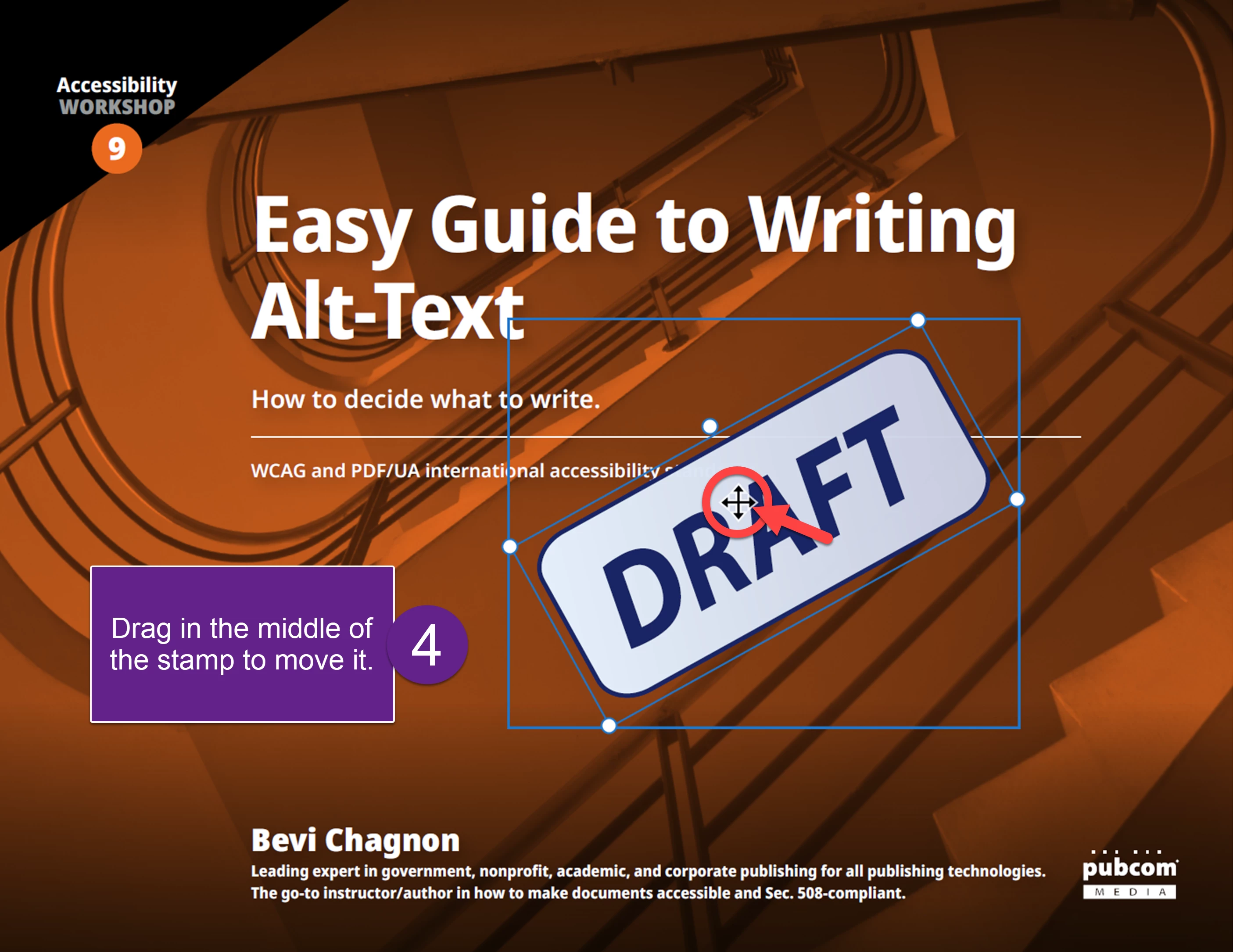
    4. And you can move the stamp anywhere on the page. Click the stamp in the middle and drag it.
4 replies

New Participant
November 14, 2022

No disrespect to Thom Parker but Adobe Acrobat is lacking and I am not one of these other users. Sizing an image prior to making a stamp can be done but getting this correct is not at all straightforward. If you look at built in tools, just about every other object can be resized in acrobat via a dialog box. I don't see why adobe makes this more difficult on the user when Acrobat could have the ability to change the size of the stamp by "percent of size" in the properties dialog and then allow to set the "Default size" OR resize the object in acrobat and then allow it to be set as the Default size. I sholdn't have to mess around with it external to acrobat. Acrobat has such precision in most areas. Why not this?


Sounds like many others have the same problem. That's a clue to Adobe to look at it.

Thom Parker
Community Expert
November 14, 2022
quote

No disrespect to Thom Parker but Adobe Acrobat is lacking and...


By @Evan26444775gpqm


I don't work for Adobe. I have zero influence over what they do. I'm just trying to work around issues like everyone else. I've been at this now for 20 years, so I've seen a lot of water under the Acrobat bridge. If sizing a stamp is your worst issue, then you've got no problems.


So here's another method that you might find more useful.  I assume you're creating static stamps, so we'll go with that method.  Create your stamp with any size image you have.  Then open the stamp file and use the "PDF Edit" tools to resize the image to the size you want for the stamp. Acrobat has handy rulers to help you with this, so it's pretty easy to do.  The size of the content on the stamp page in the stamp file, is the size of the stamp when it is applied to a PDF page.  


Thom Parker - Software Developer at PDFScriptingUse the Acrobat JavaScript Reference early and often
alekseys41954945
New Participant
April 28, 2022

Change resolution in image with stamp to 400 pixels/inch and save tiff with transparent layer. 

Bevi Chagnon - PubCom.com
Brainiac
June 26, 2021

The "workaround" you provided is the standard way of resizing and positioning an Acrobat Stamp.

Glad you figured out how to use Acrobat.


This is covered in Adobe's online HELP sectionhttps://helpx.adobe.com/acrobat/using/adding-stamp-pdf.html (Scroll to the section "Change a stamp’s location or appearance"). And most likely there are probably a bazillion YouTube videos on it, too. And Help also has a section on how to create a basic stamp: https://helpx.adobe.com/acrobat/using/adding-stamp-pdf.html#create_a_custom_stamp.  Wooo Hooo!


Note that this is a user-to-user forum. None of us are Adobe employees, nor are we paid to be here. The ACPs and MVPs that answer questions are volunteering their knowledge to help other users. Occassionally an Adobe employee chimes in and you can see the red Adobe icon next to their name.


But we're not here to teach anyone how to use their software, nor give a private tutorial on doing this and that. So an answer like "The best solution for a correctly sized stamp is to create it in the correct size in the first place" is the single most accurate answer in this thread.


If you don't know how to size your original graphic in whatever software program you originally used, then don't shoot the messenger. It's your responsibility to learn how to do that. This is an Adobe Acrobat user forum; we have no idea what program you used to create the original graphic, and we can't cover the use of other programs.


Bottom line:

Get training in how to use Acrobat and its more advanced features. There are many options, some are free:

  • Use Adobe's online help section at https://helpx.adobe.com/support/acrobat-b.html
  • Use Adobe's free online tutorials at the same URL.
  • Take a class from an online training center, like LinkedIn Learning. They have a deal giving you one month's free access to their entire library, so you can learn a lot in 30 days.
  • Take a formal class from an Adobe Authorized Training Center or individual Certified Instructor (many are ACPs on this forum).  https://learning.adobe.com/partner-finder.html  Because they are Adobe certified, they teach the correct way to use Adobe's software programs.
  • Search YouTube for short tutorials on the topic. Caution: like everything else on the web, you might not get accurate or current instructions. Unless you already know the correct methods, you can't tell if a YouTube video is giving you good advice or not. There's a lot of crap out there!
  • Get a book! (Yes, I know this is a novel idea.)  Best for this topic: Adobe's Classroom-in-a-Book for Acrobat DC https://www.amazon.com/Adobe-Acrobat-DC-Classroom-Book/dp/0134171837 Available in print and digital formats. This is the official book on Acrobat that is used for training before becoming certified.


|    Bevi Chagnon   |  Designer, Trainer, & Technologist for Accessible Documents ||    PubCom |    Classes & Books for Accessible InDesign, PDFs & MS Office |
try67
Community Expert
December 6, 2019

You need to resize the stamp file Acrobat created, or resize the image you used and then create a new stamp from it.

3DNutAuthor
Participating Frequently
December 6, 2019

Really? I had to go into an image editor and scale the image down to 20 pixels x 20 pixles and now (of course) the image looks all pixelated and jaggy. If that is true, that is mind blowing. Thanks for the assistance.

Thom Parker
Community Expert
December 6, 2019

What do you mean "mind blowing"? The size is a pretty natural thing. A stamp is a PDF page, so the size of the stamp when placed is the size of that page.  

You didn't need to resample your image down to create a 20x20 stamp You have other options. For example, create a 20x20 button, then use the full size image as the icon. Or, a better option is to create a PDF page from your full size image, then use the PDF Edit tools to select and resize it to 20x20. These are both options that scale the image for viewing, while preserving the orginal size. 


And yet another option is to write a script to place your stamp, so the script sets the size on placement. 

Thom Parker - Software Developer at PDFScriptingUse the Acrobat JavaScript Reference early and often
