dawnj25259236
Participant
May 25, 2017
Answered

How do I talk to someone in Adobe Support?

  • May 25, 2017
  • 2 replies
  • 288979 views

I work for a small business from home.  The owner purchased Acrobat PRO to use.  She saves documents into dropbox for me to get and edit and return for her.   I am a user on her account.  However, I am now unable to use it because it keeps telling me my trial period is over.   I have searched your website for 35 minutes, trying to find a way to actually talk to someone.   This is RIDICULOUS.    PLEASE, I AM BEGGING YOU, somebody please call me [personal information removed by moderator.  This is a public forum, not Adobe support]
Correct answer Cari Jansen

Hi there,

To talk to someone from Adobe support:

  1. Go to Adobe.Com
  2. In top right of screen click Sign In
  3. User your Adobe ID and password that is registered against your Acrobat Pro membership/license
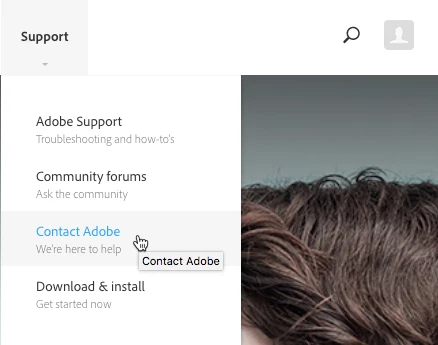
  4. At top of screen click Support link, and select Contact Adobe
  5. Under "1. What can we help you with?", click on Adobe Acrobat Pro.
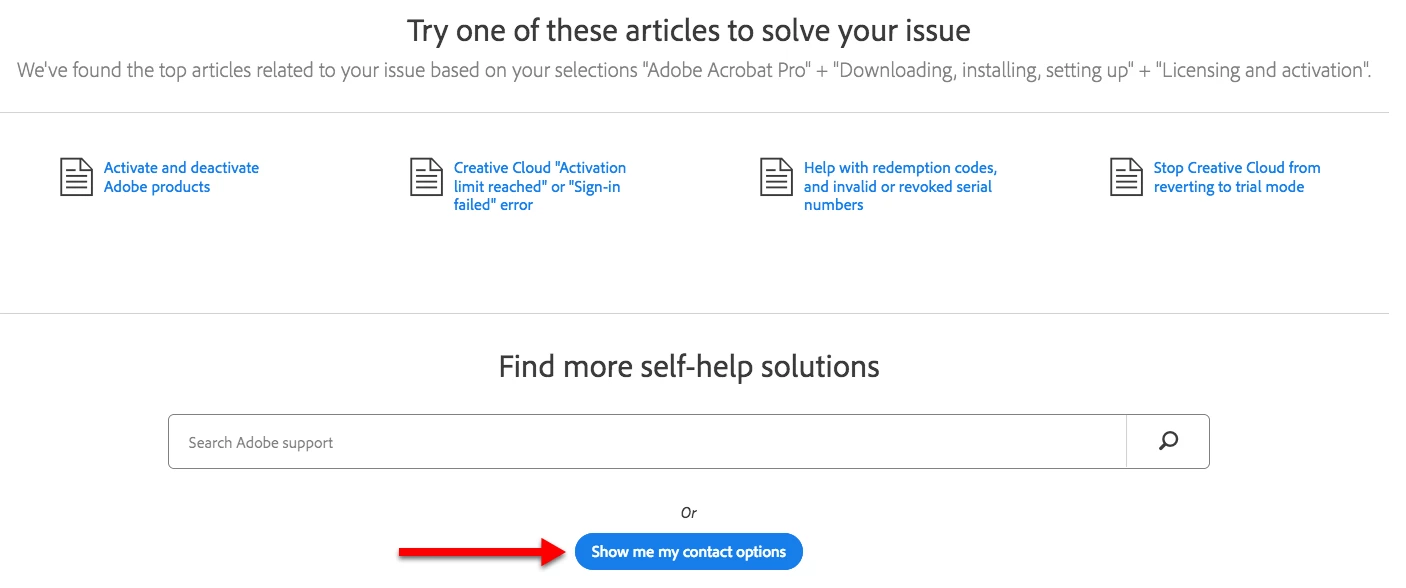
  6. Under "2. What type of issue are you experiencing", click on Licensing and activation.A number of 'self-help solutions' will appear, but you should also see a BLUE button 'Show me my contact options'.  Click the Show me my contact options button.


  7. You should now see "3. Would like to contact us?" and below that a 'Chat' and 'Phone' option.
  8. Click the Phone option and the "3. Support - Phone" option appears with a phone number listed below it that you can dial.

NOTE: the phone number will vary depending on what region / location you live in. Most important is that you Sign In (step 2), as without a sign in I believe the phone option will not be available.

ALSO in the meantime you could opt to install the FREE Adobe Acrobat Reader, so at least you can see the PDFs and review them, that might be a work around to use for now?

2 replies

Participant
June 4, 2018

Hi I have found that none of the solutions work, you just keep going around the carousel over and over, like some kind of reccurrent nightmare. The only time i managed to contact someone i was cut off mid conversation and my case was closed.  The very worst customer service i have ever experienced in my entire life. Please why do none of these work.

Participant
August 16, 2020

Yeah, I can't find a contact. Will have to call on Monday. Great service after the sale so far.


Cari JansenCorrect answer
Legend
June 6, 2017

Hi there,

To talk to someone from Adobe support:

  1. Go to Adobe.Com
  2. In top right of screen click Sign In
  3. User your Adobe ID and password that is registered against your Acrobat Pro membership/license
  4. At top of screen click Support link, and select Contact Adobe
  5. Under "1. What can we help you with?", click on Adobe Acrobat Pro.
  6. Under "2. What type of issue are you experiencing", click on Licensing and activation.A number of 'self-help solutions' will appear, but you should also see a BLUE button 'Show me my contact options'.  Click the Show me my contact options button.


  7. You should now see "3. Would like to contact us?" and below that a 'Chat' and 'Phone' option.
  8. Click the Phone option and the "3. Support - Phone" option appears with a phone number listed below it that you can dial.

NOTE: the phone number will vary depending on what region / location you live in. Most important is that you Sign In (step 2), as without a sign in I believe the phone option will not be available.

ALSO in the meantime you could opt to install the FREE Adobe Acrobat Reader, so at least you can see the PDFs and review them, that might be a work around to use for now?