
February 8, 2017
Answered

How do I turn OFF the setting that automatically displays bookmarks when I open a file?

  • February 8, 2017
  • 24 replies
  • 128157 views

Every time I open a PDF file, the bookmarks panel is automatically displayed, and I have to take the extra step of closing it, because I do not use bookmarks. I see that there is an option to change how a particular PDF file opens, but most of the PDFs I work with are not saved, so I want to change the settings for Adobe so that it does NOT open every PDF with the bookmarks panel displayed. Please help!
Correct answer Tariq Ahmad Dar

Hi @QCHOG


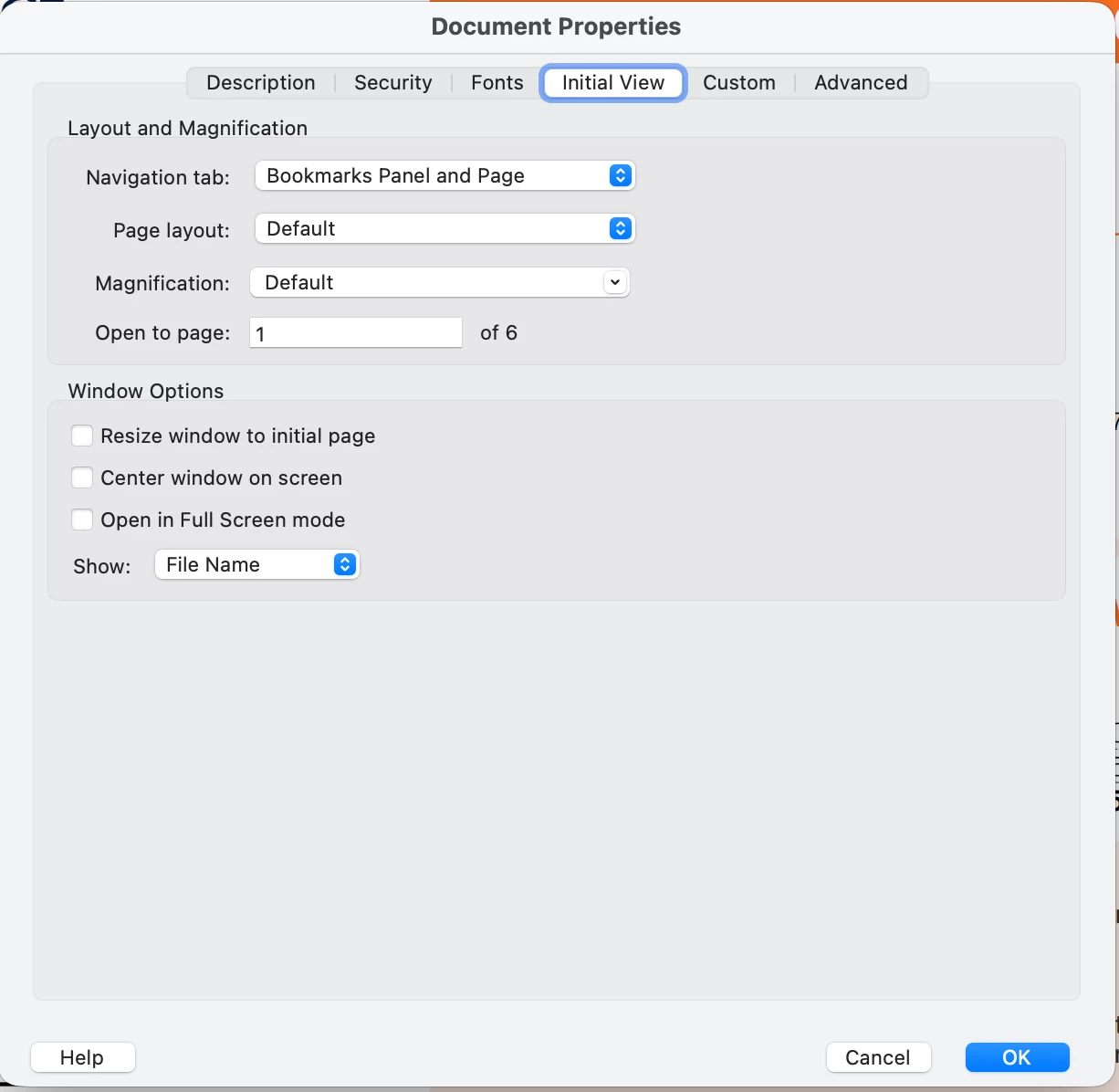
Thanks for reaching out. If the file's author has set the initial view to launch the Bookmarks panel, the initial view preference will override other settings. The bookmark panel will always be visible whenever you open the file. 

Check the screenshot of the file set to launch the Bookmarks panel by its author. 

You can check the initial view settings under File Properties in Adobe Acrobat. It is not possible to see this setting with Adobe Reader. 


~Tariq

24 replies

Participant
November 5, 2024

To set up Adobe Acrobat to not open the bookmarks panel when opening a PDF file, open the document properties, navigate to the "Initial View" tab, and then select "Page" from the "Navigation Tabs" dropdown menu instead of "Bookmarks Panel and Page.


When you open any file, righ click on it and you can see the document properties on the dropdown menu.

Souvik Sadhu
Community Manager
Community Manager
November 6, 2024

Hi @default3167393607xeik,


Hope you are doing well. Thanks for writing in!


While I understand that it would be the best solution, it cannot be always possible to make changes to the initial view, as they can be locked by the creator.


-Souvik

Participant
October 17, 2024

Thank youi, I am trying this. BTW I called Adobe, 25 mins, useless help. Of course, when you're 85% of the industry you don't have to give a damn about customers paying you every month. The bookmarks issue is some geek setting this in code and there is NO WAY to deal with this easilly.The customer, for Adobe, always has to fight for fixes.

Souvik Sadhu
Community Manager
Community Manager
October 18, 2024

Hi @peterriva,


Hope you are doing well. Sorry for the trouble. 


Unless the file has been created as such that it will open the bookmark panel at launch, you can try the below steps and see if the layout you are working with stays intact.


Could you please try deleting “Exchange-ProMesaages” DB file after closing Adobe Acrobat.


The file is located at “C:\Users\<Username>\AppData\LocalLow\Adobe\Acrobat\DC.”


Once this file is deleted, open Acrobat and continue with the workflow.


Let me know if this works for you.


-Souvik

Participant
October 18, 2024

I have a free pre-installed version of Acrobat DC in Windows 11, and it worked for me, except my file in the folder you indicated is named "ReaderMessages".  I've been wanting a solution to this for a couple years, so thanks!

Participant
July 15, 2024

ADOBE: Stop creating extra work for people. If I want the Bookmarks tab on I'll turn it on. Keep it off so I don't have to turn it off for the hundreds of PDFs I have to open every year. Get rid of this annoying default feature. 

Participating Frequently
July 17, 2024

well said; thank you

Known Participant
June 20, 2024

I give up, I just need a pdf reader and not this complicated piece of over engineering

Participant
December 7, 2024

I stopped using Acrobat Pro a couple of years ago because I got sick of paying a monthly fee / tax / charge to use a program. If I want the latest and greatest program, I'll buy it, rather than rent it and never own it. So I downloaded Kofax Power PDF. Is nearly identical to Acrobat Pro in so many ways. There is only one irritation for me with Kofax is when you save a copy, there is no option. It is "Duplicate" and it opens another window (a duplicate), and then you save it. Minor irritation, but I paid ONCE.

And yeah, Adobe COULD simply implement the feature that everyone here is talking about. I mean, it's not that **** hard? I still use Acrobat Reader for some things, and it would be NICE ADOBE IF YOU COULD LISTEN TO YOUR USERS!

Participant
April 22, 2024

Yes, it is so annoying. It is a waste of time when you have to open tens and even hundreds of PDFs every day to do the extra step and close the Bookmarks simply because most people don't need it. Hopefully, it will be fixed soon. 


Participant
February 12, 2024

That decision occurs when the PDF is created. For instance if the File is printed in Solidworks it needs changed in the Options popup. Uncheck the Bookmark box.

Participating Frequently
February 12, 2024

WOAH this did it for me!!

For AutoCAD users looking to solve this problem:

- PRINT command (opens print dialogue)

- in the window, under "Printer/plotter", with a PDF plotter selected (the one I was using is "AutoCAD PDF (General Documentation).pc3", click on the button that says "PDF Options..."

- Under "Data" section, uncheck the box that says "Create bookmarks"

- Click OK, and save the changes to the pc3 file


Thank you @David247836165iho !

Participant
September 6, 2023

I found a simple solution that works for me in Windows, and there is probably an equivalent solution in MacOS.  Simply set the default app for opening pdf documents to Google Chrome. You get a nice full window or tab with the few basic tools you need for quick viewing those 99% of documents.


A corollary to this solution is do not renew your Acrobat subscription, if any.

Participant
August 7, 2023

This works on Acrobat Pro 2023 on my Mac, not sure about Windows... With a PDF open, right-click the little bookmark icon. Look for "Unpin Bookmarks". See if that does the trick.


I personally find it helpful to "Pin" the Page Thumbnails view, as I like to see that more often than not.

Participant
February 25, 2023

If you are using Adobe Acrobat Reader then the solution that works is to make a registry change (click on Start in Windows then type regedit):

Navigate to:

[Computer\HKEY_CLASSES_ROOT\Acrobat.Document.DC\shell\Open\command]

To be safe, right click on the "command" folder and select "Export" to back up it before editing it.  

Now amend the Data value to:

"C:\Program Files\Adobe\Acrobat DC\Acrobat\Acrobat.exe" /A "navpanes=0" "%1"

I found this from another site and it prevents Bookmarks from appearing after opening pdf. 

Participating Frequently
April 4, 2023

This works really well! Thank you so much for offering this Registry fix.
And, if only occasionally you want to see any bookmarks on whichever documents have them, just go to View > Show/Hide > Navigation Panes > Bookmarks.

Participating Frequently
August 7, 2023

One more note on this, which I found out later: to make the process of reinstating the viewing of the bookmarks on a specific document, you can either use the "View > Show/Hide > Navigation Panes > Bookmarks" or, even simpler, RIGHT click anywhere on the open document, and the last line of the drop-down menu will give you "Show Navigation Pane Buttons".
Et, voilá!, as the French would say! 

Participant
January 30, 2023

Open the file and go to File - Properties - Initial View. Under "Navigation Tab" select "Page Only". Press OK and then save the file.


GOOD LUCK!