
Participant
May 27, 2022
Answered

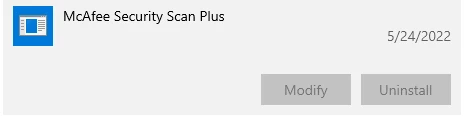
How do I uninstall McAfee Security Scan Plus?

  • May 27, 2022
  • 12 replies
  • 60700 views

How do I uninstall the McAfee Security Scan Plus software Adobe Acrobat DC installed without my permission on Windows 10?


The Uninstall option is grayed out in Windows Settings -> Apps & Features. McAfee keeps popping up telling me I have a "potential" security threat and won't tell me what it is and directs me to the McAfee website to purchase it. Seems like a marketing scam to me. I don't appreciate Adobe doing this. 
Correct answer Schmedly

I too had this problem and after reading several complex solutions that included multiple reoboots and manually editing the Windows registry, I stumbled across this simple solution:


1) In the search bar next to the Windows icon, type in 'mcafee' (yes, lower case).

2) A list of your apps should come up, but under a file tree different than the standard uninstall control panel.

3) Click on Mcafee Security Scan Plus, and the uninstall button should magically appear.

4) Click uninstall, and the program should now be removed.

5) Finally, go back to the search bar and again type 'mcafee' - a shortcut remains which can now be removed as well.


Hope this works for you too!

12 replies

Participant
July 3, 2022

Try run->appwiz.cpl
Find McAfee Security Scan Plus on the list of programs and right-click, select remove/uninstall

Participant
September 13, 2022

McAfee is pure GARBAGE!


try67
Community Expert
Community Expert
May 28, 2022
Participant
June 5, 2022

I run the tool, restart my computer and it's still there and still pops up with marketing alerts to SCAM me to buy the software to remove a "potential threat" in which it never says what it is exactly. After decades of working in IT and trusting Adobe products, I'm disappointed that Adobe would trick its users like this. Not happy!

try67
Community Expert
Community Expert
June 6, 2022

I think this is more of an issue of McAfee and how they do things, but I agree that Adobe should not be pushing this sub-par application on its users.