
Adobe DME Logo
  • Featured Communities
  • Announcements
  • Feature Requests
Adobe DME Logo
  • Create a post
  • Login
  • Home
  • App communities
  • Acrobat
  • Questions
  • How do you DISABLE the auto-selection of the EDIT TEXT & IMAGES tool in PREPARE FORM mode
J
justcallmeeesa
Participant
Forum|Forum|6 years ago
February 13, 2020
Question

How do you DISABLE the auto-selection of the EDIT TEXT & IMAGES tool in PREPARE FORM mode

  • Forum|Forum|6 years ago
    February 13, 2020
  • 2 replies
  • 7407 views

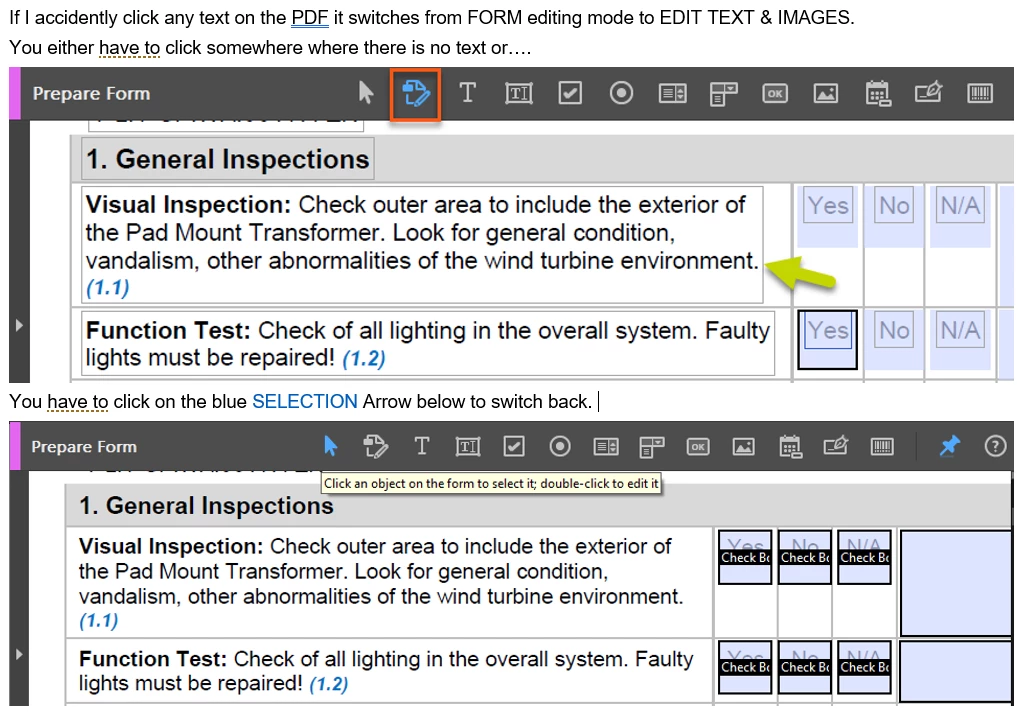
The most recent version of Adobe Pro, when I am working on creating forms, if I accidently click on something other then a form field it puts me into EDIT TEXT & IMAGES mode - which is making it so much harder to work on forms. I'm constantly having to click the SELECTION cursor to go back to PREPARE FORM mode. If I am in PREPARE FORM mode I would love to just work on forms not editing the text on the page. Can I disable this feature somewhere? Very frustating! See example below.


  • Create PDFs
  • PDF forms
  • Edit and convert PDFs
This topic has been closed for replies.

2 replies

  • Oldest first
  • Most Liked
JR Boulay
Community Expert
JR BoulayCommunity Expert
Community Expert
Forum|Forum|6 years ago
February 16, 2020

Welcome in Acrobat's UI wonderland!

😉

Acrobate du PDF, InDesigner et Photoshopographe
gauravs43202023
Adobe Employee
gauravs43202023
Adobe Employee
Forum|Forum|6 years ago
February 15, 2020

Hello,


Sorry for the inconvenience.

You can use the below registry details to disable this dynamic switching between text and form fields based on user click.

In case, you face any issues in setting the registry, refer https://community.adobe.com/t5/acrobat/new-feature-unified-edit-text-and-form-fields/m-p/10684483?page=1#M223153

Please let us know if you still face issues even after setting the registry.


Registry details :

  • Win name: ADC4275035_ClickEdit
  • Mac name: ADC4275035_ClickEdit
  • Data type: Win DWORD, MAC Boolean
  • Win HKCU path: NA
  • Mac User path : N/A
  • HKLM path:
    HKEY_LOCAL_MACHINE\SOFTWARE\WOW6432Node\Adobe\Adobe Acrobat\DC\FeatureState
  • Mac lock file/path: /Library/Application Support/Adobe/Acrobat/DC/Preferences/com.adobe.Acrobat.FeatureState.plist
  • Default: ON
  • Possible values: 0 to disable and 1 to enable
  • Product version introduced? Oct 2019
  • Applies to both Acrobat and Reader? Only Acrobat
  • Tracks: Cont
  • GUI: (any UI in product?): No


Thanks,

Gaurav


try67
Community Expert
try67Community Expert
Community Expert
Forum|Forum|6 years ago
February 16, 2020

I hope Adobe are going to add this as a settable preference, and not send people to the Registry to disable this "feature".

    Bernd Alheit
    Community Expert
    Bernd AlheitCommunity Expert
    Community Expert
    Forum|Forum|4 years ago
    March 31, 2022

    What exact version of Adobe is this fix from? On the version I am running (Version 2020.005.30314) it is not there and when I go to Check for Updates it says that there are no updates.


    I use version 22.001.20085


    Powered by Gainsight
    Terms & ConditionsAccessibility statement

    Sign up

    Already have an account? Login

    To post, reply, or follow discussions, please sign in with your Adobe ID.

    Sign in

    Sign in to Adobe Community

    To post, reply, or follow discussions, please sign in with your Adobe ID.

    Sign in

    Enter your E-mail address. We'll send you an e-mail with instructions to reset your password.

    Back to overview

    Scanning file for viruses.

    Sorry, we're still checking this file's contents to make sure it's safe to download. Please try again in a few minutes.

    OK

    This file cannot be downloaded

    Sorry, our virus scanner detected that this file isn't safe to download.

    OK
    Using the community Terms of use Privacy Cookie preferences Do not sell or share my personal information ad choicesAdChoices