
Participant
July 25, 2022
Question

How I can get Font TimesNewRomanPSMT to install in PC

  • July 25, 2022
  • 2 replies
  • 14274 views

Hi all,


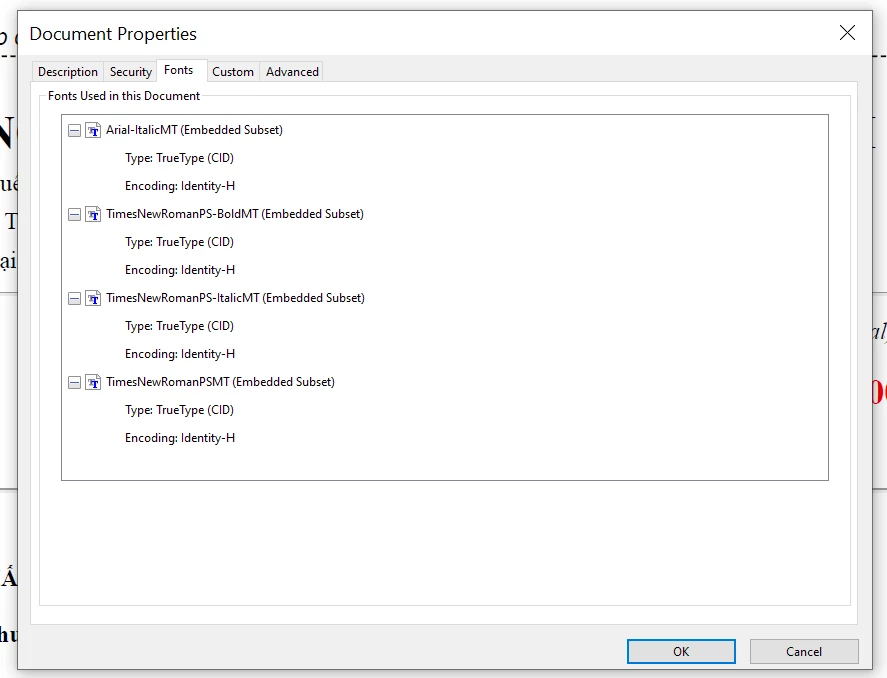
Whenever I save as PDf in browser, font in html is TimesNewRoman changed to TimesNewRomanPSMT in pdf. 

Have anyway to get TimesNewRomanPSMT(like in pdf) to install in PC(incluse TimesNewRomanPS-BoldMT, TimesNewRomanPS-ItalicMT, Arial-ItalicMT).

I want to create pdf by other way in my PC (like use wkhtmltopdf...), but It always TimesNewRoman font.
Thankyou!!!


This topic has been closed for replies.

2 replies

Legend
July 25, 2022

Looks mainly like different spacing, but the same font. Apps will adjust spacing. Perhaps it would be useful to go back to the original problem that you see. What is wrong? Also, how do you save from the browser to PDF (in detail)?

Participant
July 25, 2022

Just ctrl + P for print, and select mode Save as PDF.

gary_sc
Community Expert
Community Expert
July 25, 2022

If you did "Save as PDF…", than Windows did the PDF generation for you, not Acrobat and we cannot help you for that. Asuming that you have Acrobat on your computer, try again, but use "Save as Adobe PDF…"

Legend
July 25, 2022

Confusingly, fonts have two names. Different apps will use a different name. Times New Roman and TimesNewRoman-PSMT are probably exactly the same font, designed by Monotype (MT). You cannot control which of the two names an app chooses to show you.

Participant
July 25, 2022

Hi, look like you missing something, for display in pdf, font TimesNewRoman and TimesNewRomanPSMT is difference.

Times..PSMT:


Only TimesNewRoman: