April 23, 2015
Answered

how to add blank page to existing Document In Adobe Dc

  • April 23, 2015
  • 4 replies
  • 124823 views

how to add blank page to existing Document In Adobe Dc Pro

Correct answer AadeshSingh

Hi thashrifs16749461,

You can add a blank page using Adobe Acrobat DC by following the below instructions :-

1) Open your existing pdf document in Acrobat DC.

2) Choose the 'Organize Page' option form the Tools pane on the right as shown below in the screen shoot.
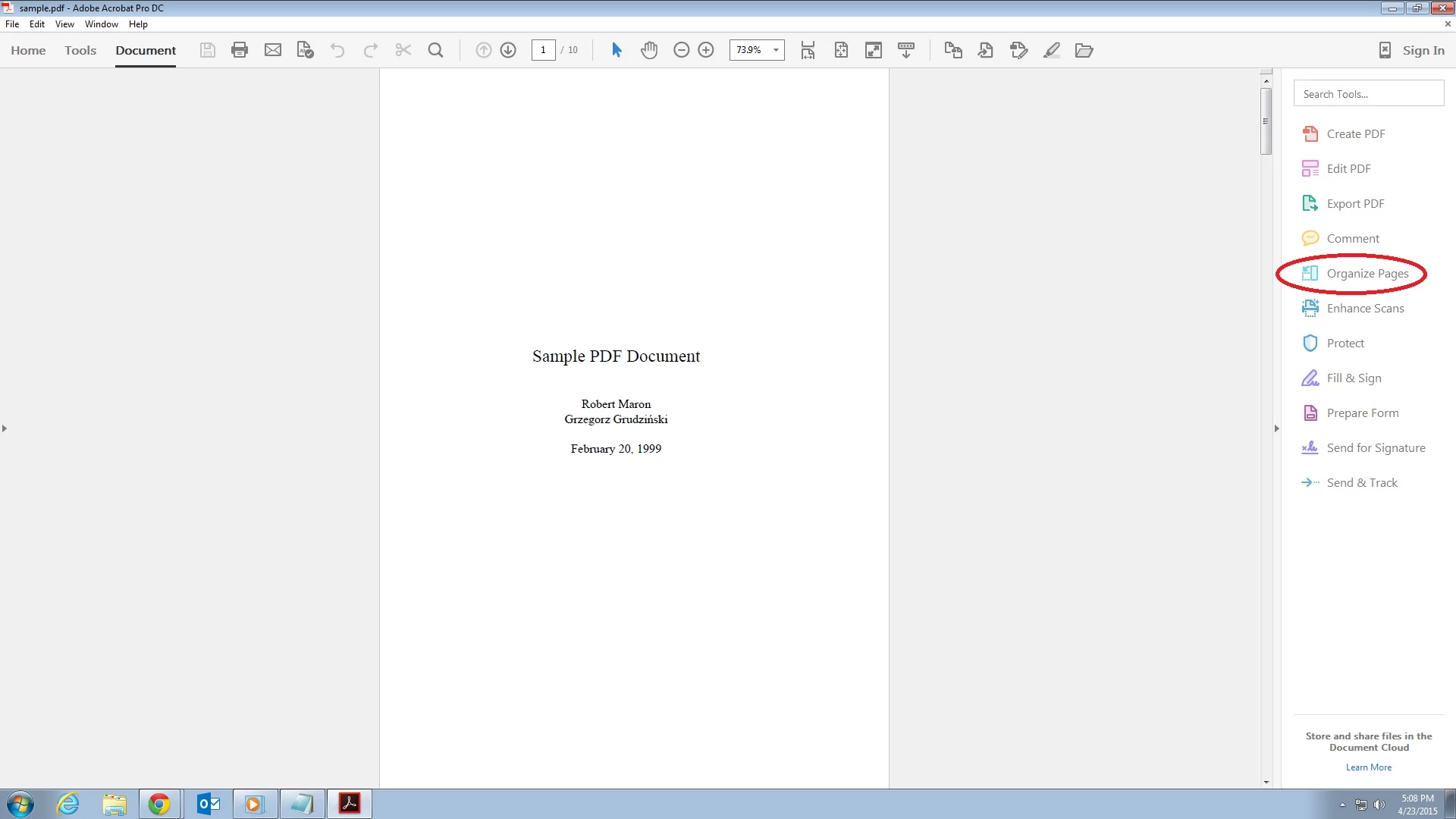
3) Now at the top you will see all the tools to Organize the page, Click on 'Insert' & select 'Blank Page' from the drop-down to insert blank pages.

*Shortcut : If you are using windows computer you can use ' Shift+Ctrl+T ' key to insert blank pages.

In case if you experience any issue or have any query please let us know. We will be happy to help you.

Regards,

Aadesh

4 replies

Participant
September 20, 2025

If you are adding to an existing PDF, there are two tools you can use: Adobe Acrobat, which requires a subscription, or Preview on Mac. You can also rearrange pages, delete pages, or add blank pages.


There is a step-by-step guide that demonstrates this process.

Participant
August 28, 2022

how to drag text from one page to the new blank page?

corys82331386
Participant
July 6, 2016

Thank you!!!

AadeshSingh
AadeshSinghCorrect answer
Participating Frequently
April 23, 2015

Hi thashrifs16749461,

You can add a blank page using Adobe Acrobat DC by following the below instructions :-

1) Open your existing pdf document in Acrobat DC.

2) Choose the 'Organize Page' option form the Tools pane on the right as shown below in the screen shoot.

3) Now at the top you will see all the tools to Organize the page, Click on 'Insert' & select 'Blank Page' from the drop-down to insert blank pages.

*Shortcut : If you are using windows computer you can use ' Shift+Ctrl+T ' key to insert blank pages.

In case if you experience any issue or have any query please let us know. We will be happy to help you.

Regards,

Aadesh