
Participant
July 26, 2018
Answered

How to close the automatically opened annotation windows in Adobe Acrobat DC?

  • July 26, 2018
  • 1 reply
  • 1309 views

When I was reading a scanned PDF file in Adobe Acrobat DC, so many blank annotation windows opened automatically (my other PDF files are still clean).

It seems that every comment mark (include underline, comment, highlight ...) has a opened annotation in the right of Acrobat window like below:
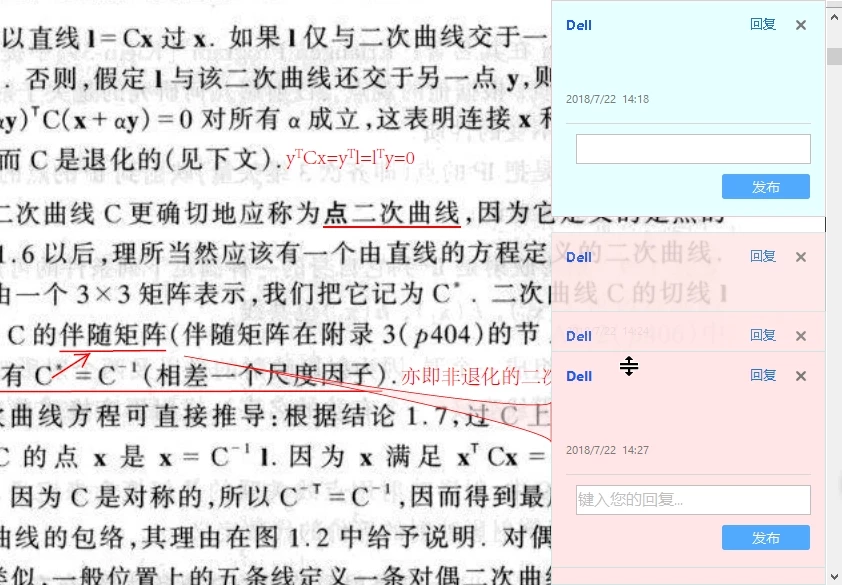
Would someone please tell me why it happened and how to close these small windows? Thank you very much!

This topic has been closed for replies.
Correct answer try67

Go to Edit - Preferences - Commenting and try changing some of the settings there, like "Automatically open comment pop-ups for comments other than notes" or "Create new pop-ups aligned to the edge of the document"...

1 reply

try67
Community Expert
try67Community ExpertCorrect answer
Community Expert
July 26, 2018

Go to Edit - Preferences - Commenting and try changing some of the settings there, like "Automatically open comment pop-ups for comments other than notes" or "Create new pop-ups aligned to the edge of the document"...