Participant
October 31, 2022
Answered

How to count radio buttons - Yes column

  • October 31, 2022
  • 1 reply
  • 2124 views

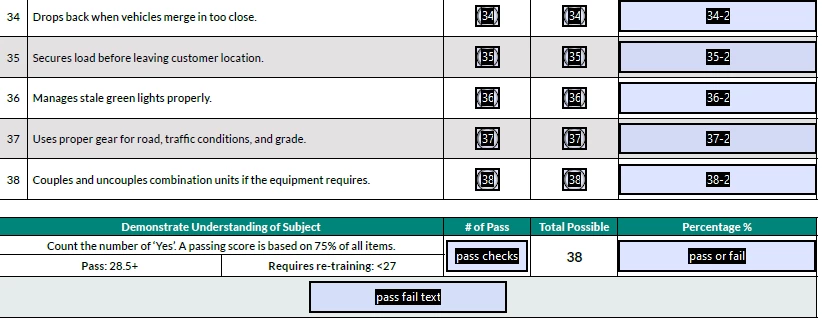
I'm struggling to find how to properly count the number of radio buttons selected only in the 'Yes' column. Because the radio buttons are in groups per row it also counts the 'No' column. What would I need to do to caculate the 'Yes' selected radio buttons and have them appear in "pass checks" field?


This topic has been closed for replies.
Correct answer Thom Parker

Put this calculation script into the "pass checks" field. 


var nSum = 0;

for(var i=1;i<=38;i++)

{

    if(this.getField("Group " + i).value == "Choice1")

        nSum++;

}

event.value = nSum;


This will work with the fields as you've descibed them, which is perfectly fine. You've used a consitent naming pattern, which makes the scripting simpler and direct.  However, the best practice would be the set the export value of the Yes radios to "Yes" and the no radios to "No".  Direct simple names and values make things easy to remember and work with. To this point. Fields that are treated as a group should use group naming as I described previously. This allows all the related fields to be acquired without needing to know specific names or how many there are. For example, all radio buttons would be acquired with this single line of code. 


var aRadButts = this.getField("Radios").getArray();


You can read more about form scripting here:

https://www.pdfscripting.com/public/PDF-Form-Scripting.cfm



1 reply

Thom Parker
Community Expert
Community Expert
November 1, 2022

To write such a script we need to know the names of the radio button fields and the export value for the Yes column. 


The best method would be use a group naming pattern for the radio button groups, such as "Radios.Group1",  "Radios.Group2", etc.  This would make scripting very simple.


Thom Parker - Software Developer at PDFScriptingUse the Acrobat JavaScript Reference early and often
Participant
November 1, 2022

For simplicity, I've renamed the radio button groups: "Group 1", Group 2", "Group 3", etc.

Thom Parker
Community Expert
Thom ParkerCommunity ExpertCorrect answer
Community Expert
November 1, 2022

Put this calculation script into the "pass checks" field. 


var nSum = 0;

for(var i=1;i<=38;i++)

{

    if(this.getField("Group " + i).value == "Choice1")

        nSum++;

}

event.value = nSum;


This will work with the fields as you've descibed them, which is perfectly fine. You've used a consitent naming pattern, which makes the scripting simpler and direct.  However, the best practice would be the set the export value of the Yes radios to "Yes" and the no radios to "No".  Direct simple names and values make things easy to remember and work with. To this point. Fields that are treated as a group should use group naming as I described previously. This allows all the related fields to be acquired without needing to know specific names or how many there are. For example, all radio buttons would be acquired with this single line of code. 


var aRadButts = this.getField("Radios").getArray();


You can read more about form scripting here:

https://www.pdfscripting.com/public/PDF-Form-Scripting.cfm


Thom Parker - Software Developer at PDFScriptingUse the Acrobat JavaScript Reference early and often