
eugenez79468640
Participating Frequently
October 6, 2018
Answered

how to delete measure arrows in acrobat dc pro

  • October 6, 2018
  • 2 replies
  • 4849 views

Hi All.

I used Measuring Tool to draw arrow lines in PDF document and now would like to delete them. In selected arrow but cannot delete it.
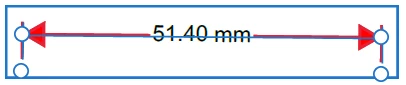
When I Right-Click and select Properties all options under Appearance tab are grayed out.  How to make enable properties and delete arrows?

Thanks.

This topic has been closed for replies.
Correct answer AkanchhaS8194121

Hi Eugenez,

Sorry for the delay in response.

You should be able to delete the Arrow lines in between PDF without any trouble. You just need to select the arrow by double clicking on it (as shown in screenshot shared above) and right click. The option for right click should show as below-

As asked above, help us with the screenshot of the right click options you get.

https://forums.adobe.com/docs/DOC-7043#jive_content_id_How_do_I_attach_a_screenshot

Regards,

Akanchha

2 replies

AkanchhaS8194121
AkanchhaS8194121Correct answer
Legend
November 21, 2018

Hi Eugenez,

Sorry for the delay in response.

You should be able to delete the Arrow lines in between PDF without any trouble. You just need to select the arrow by double clicking on it (as shown in screenshot shared above) and right click. The option for right click should show as below-

As asked above, help us with the screenshot of the right click options you get.

https://forums.adobe.com/docs/DOC-7043#jive_content_id_How_do_I_attach_a_screenshot

Regards,

Akanchha

Bernd Alheit
Community Expert
Community Expert
October 7, 2018

Post a screenshot of the properties.