kennyb777
Participant
October 3, 2020
Answered

How to disable comment pane from opening

  • October 3, 2020
  • 3 replies
  • 4803 views

For some reason, every time I open a pdf, the comment pane now opens on the right side.  Can't find a way to make it stop.  It's very annoying.  I think it was from the most recent update.  

Correct answer JR Boulay

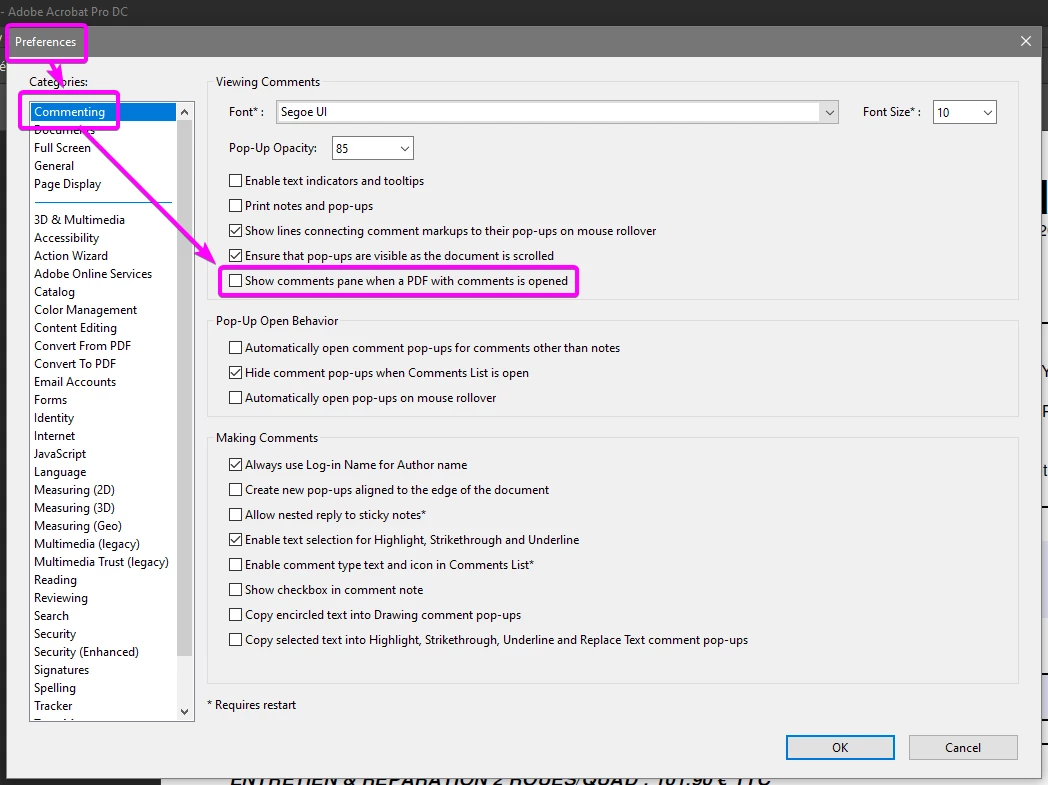
There is a new option in Commenting Preferences:
 

3 replies

kennyb777
kennyb777Author
Participant
October 5, 2020

Thank you.  That worked

JR Boulay
Community Expert
JR BoulayCommunity ExpertCorrect answer
Community Expert
October 5, 2020

There is a new option in Commenting Preferences:


Acrobate du PDF, InDesigner et Photoshopographe
Participant
May 21, 2024

Why I can't uncheck this box ?
It still comes back to "check" again when opening a new file.

cindyc69536512
Participant
July 28, 2024

Same issue occuring even in the old UI for me. Tested on Reader 24.002.20895 Windows 11. and Acorbat Pro on Windows 10.


Me, too. I'm on a Mac OSMonterey 12.7.5. Switching to old UI did not allow me to disable comment pane from opening.

Amal.
Legend
October 5, 2020

Hi Kennyb


We are sorry for the trouble. As described, you want to disable to comment pane from opening every time you open PDF.


Please click on the small arrow on the right hand comment pane once and then go to Edit (Windows), Acrobat DC (Mac) > preferences > Documents > Select 'Restore last view settings when reopening documents' > Click OK and reboot the application and check.


Regards

Amal