Participating Frequently
February 23, 2024
Answered

How to export data from multiple forms in Adobe Pro

  • February 23, 2024
  • 2 replies
  • 1217 views

Hi,

I have data of 100s of filled forms which i want to export in excel and then refelect that data into a dashboard.

  1. How can I find "Export data from multiple forms" in Adobe Pro Ver 2023.008.20533 64 Bit?
  2. How can I update the excell data when new PDF forms comes in?
Correct answer Thom Parker

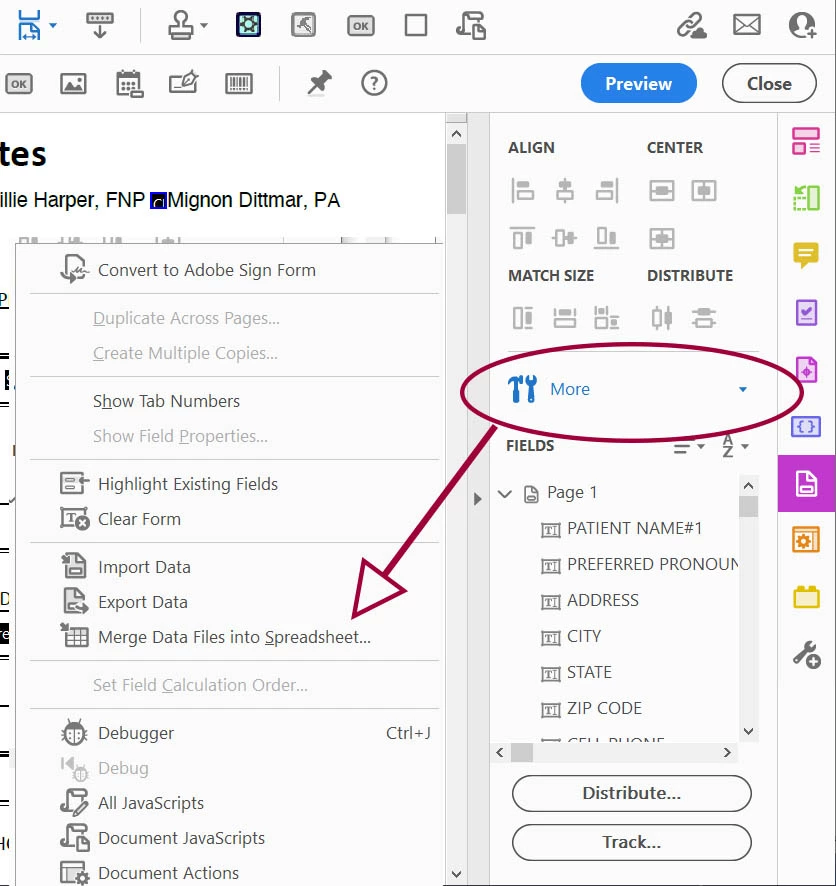
Acrobat has a built-in method for exporting data on the More Menu in the "Prepare Forms" tools.

It has some limitations, for example, its a one shot action. You select the forms for export and it creates a CSV file.  There is no built-in method for updating the CSV.  Another limitation is that it won't export data from some protected or signed files. 


The only other option is a 3rd party tool or create your own.

I've created several JavaScript automation tools for importing and exporting data. You can see some of them here:

https://www.pdfscripting.com/public/Automation-Tool-Descriptions.cfm

and here:

https://www.pdfscripting.com/public/Form-Data-Handling.cfm


I've also created an Action (batch process) for exporting to a CSV file. This tool also keeps a log of all imported files and can update the CSV with new files at anytime. Contact me if you are interested.    
 

2 replies

try67
Braniac
February 23, 2024

2. You can't do that automatically. You will have to re-run the entire process using the new files. You also can't append data to an existing spreadsheet, only create new ones. In Excel you can then import that data into your existing file.

Thom Parker
Thom ParkerCorrect answer
Inspiring
February 23, 2024

Acrobat has a built-in method for exporting data on the More Menu in the "Prepare Forms" tools.

It has some limitations, for example, its a one shot action. You select the forms for export and it creates a CSV file.  There is no built-in method for updating the CSV.  Another limitation is that it won't export data from some protected or signed files. 


The only other option is a 3rd party tool or create your own.

I've created several JavaScript automation tools for importing and exporting data. You can see some of them here:

https://www.pdfscripting.com/public/Automation-Tool-Descriptions.cfm

and here:

https://www.pdfscripting.com/public/Form-Data-Handling.cfm


I've also created an Action (batch process) for exporting to a CSV file. This tool also keeps a log of all imported files and can update the CSV with new files at anytime. Contact me if you are interested.    

 

Thom Parker - Software Developer at PDFScriptingUse the Acrobat JavaScript Reference early and often