
Participant
August 24, 2022
Question

How to move navigation pane back to the lefthand side? (Mac)

  • August 24, 2022
  • 5 replies
  • 21575 views

My boss updated Adobe and noticed that his navigation pane was moved to the righthand side. He needs this moved back to the lefthand side so that he can more easily access bookmarks, pages, etc. in the way that he is used to doing. How can I help him switch this back to the left? 
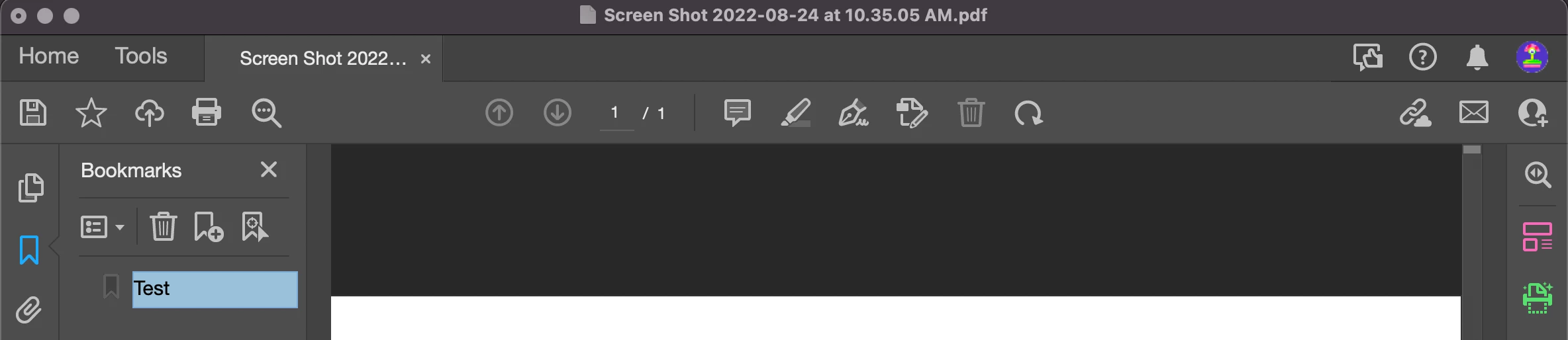
 

^This is a screenshot of my Adobe - As you can see, my navigation pane is on the lefthand side. 

    5 replies

    Participant
    October 18, 2024

    Thnak you for at least offering the ability to disable the new Acrobat. Navigation on the left is more natural. This also made the comment toolbar easier to access. I hope that all future version of Acrobat will allow using the better old version of the UI.

    Participant
    April 23, 2024

    I would also like to move the pages and bookmarks panel to the left side of the screen. The fix below switches back to the old version - can't we do that in this new version?

    Also what is actually better in this new version? It seems like all they did was move everything around and hide tools.

    Participant
    January 18, 2024

    Instead of fixing stuff that needs to be fixed (like the progress bar in Distiller on the Mac not working) they have to mess up something that has worked for everyone for years. Crazy how people that don't use the programs for work get to decide what to change.

    Bernd Alheit
    Community Expert
    Community Expert
    August 24, 2022

    You can disable this new feature:

    Participant
    August 24, 2022

    How do I find this on a Mac? I don't have that button on my Adobe 

    AnandSri
    Community Manager
    Community Manager
    September 10, 2023

    I'm not seeing it


    Hi @Katie_-_-_ 


    Please click on the View Tab, and then you can select the Disable the new Acrobat option.


    We acknowledge that the new Acrobat represents a notable change. However, we hope that as you get familiar with the new interface, you will be able to be more productive & get more out of Acrobat.  


    A point to note is that as we made these changes in the interface, we have tried to ensure all tools & features currently supported retain their familiar functionalities and workflows as they did in the previous version

    Rest assured, we are actively working on any missing feature, functionality or ability to customize or move the Quick Toolbar or the All Tools section. We will address them with the highest priority.


    Please don't hesitate to reach out if you continue to experience any issues or if you have any further questions related to the new Acrobat. We are here to assist you.


    Thanks,

    Anand Sri.

    Jeff_Coatsworth
    Community Expert
    Community Expert
    August 24, 2022

    Moved you over to the Acrobat forum - you had posted in the Robohelp area.