
Participant
June 27, 2025
Answered

How to open an attached PDF in a new tab using a link

  • June 27, 2025
  • 2 replies
  • 716 views

Hi!

I user Acrobat 2017 Pro (2017.012.30262) under MS Windows 10. Sometimes I have to generate PDFs to which other PDFs are attached under the paper clip symbol. To open these documents conveniently, I place links in the main document.

Previously, clicking on one of the links opened an attached document in a new tab of the same Acrobat window, which was exactly what I wanted. Now, however, now when I create new documents with attachments, clicking on a link opens the attachment in the tab of the main document, i.e., the main document is replaced by the attachment. I am not aware of having deliberately changed any options associated with the links.
How can I revert to the previous behavior and include links that open attachments in a new tab?
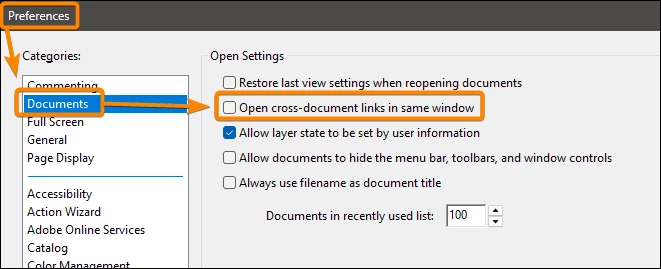
Correct answer JR Boulay

Uncheck this option in the Preferences:


2 replies

JR Boulay
Community Expert
JR BoulayCommunity ExpertCorrect answer
Community Expert
June 27, 2025

Uncheck this option in the Preferences:


Acrobate du PDF, InDesigner et Photoshopographe
AVoelpAuthor
Participant
June 27, 2025

... gotcha! Thank you so much!

AVoelpAuthor
Participant
June 27, 2025

... edit: I know how to edit the behavior of the link after it has been created, which has been described here in this thread . However, how can I include links that open attachments in new tabs by default, which used to be the behavior of my Acrobat installation previously?

Meenakshi_Negi
Legend
June 27, 2025

Hi AVoelp,


Thank you for reaching out.


When you add a link in Acrobat, you can select the "New window" option in the properties. If you open PDFs in Tab format, the attached PDF will only open in a new tab. Please check the screenshot below.


You can also take a look at the information in the following help document: Links and attachments in PDFs.


Feel free to let us know if you have any questions.


Thanks,

Meenakshi

AVoelpAuthor
Participant
June 27, 2025

Hi @Meenakshi Negi , thank you for your response.

Unfortunately, the Properties dialog is only available after the link has been created (as indicated above, I'm using Acrobat 2017 Pro; I don't know whether this makes a difference). In the Properties dialog, under Action -> Go to page view, I can then choose between 'Window according to user defaults', 'New window' and 'Existing window' (I work with a German localized version of Acrobat; I hope my translations are correct or at least understandable). Obviously, the default on my system is 'Existing window'.

I want to avoid having to edit each and every link after creating it, and therefore I would like to set my user dafault to 'New window'. How can I do this?

BTW: There was no screenshot attached to your post ...