Participant
August 31, 2017
Answered

How to print exact 50% scaling in Adobe Acrobat X

  • August 31, 2017
  • 2 replies
  • 2983 views

Simple Question:

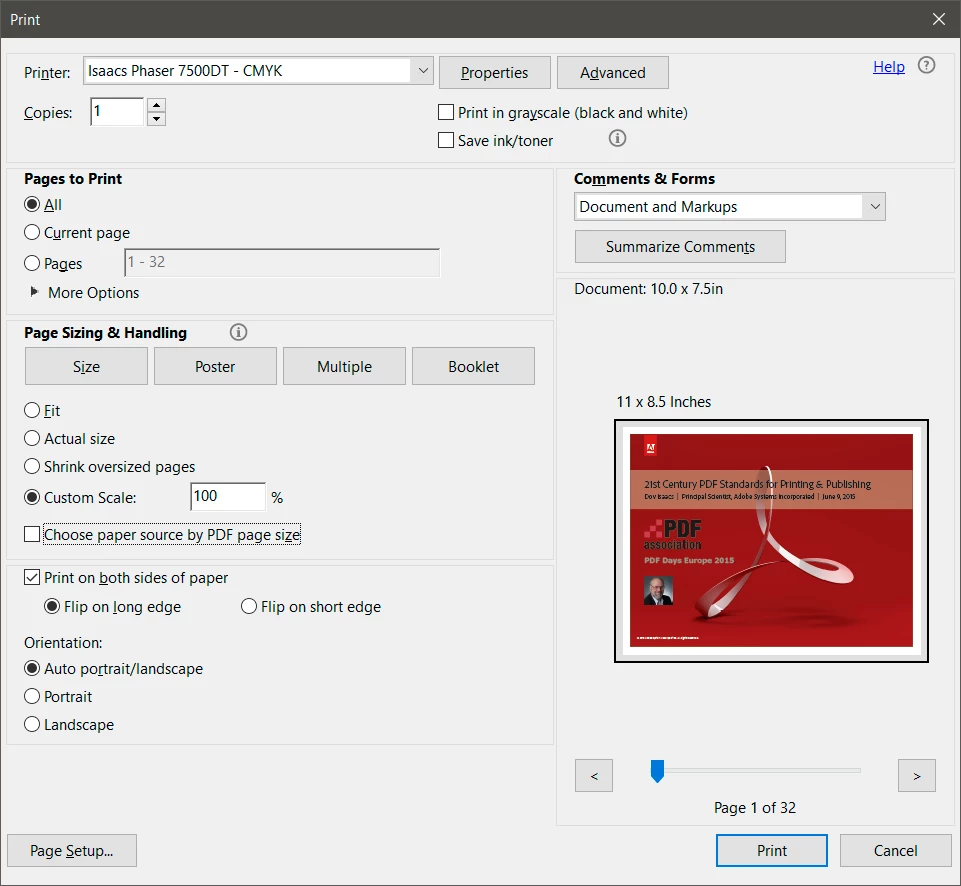
How to print exact 50% scaling (e.g A1 PDF > A3 paper) in Adobe Acrobat X (version 10.1.16)

OR

Is this simply a crucial function removed from the software? If so why?

extra info:

(Have updated version of Acrobat)

Windows machine at work

Windows 7 Professional (Service Pack 1)

Printing to Ricoh MP C3004ex (multi-function printer) (with updated driver)

There is no "Scaling" option as can be seen below:

Thank you for any answers in advance.

This topic has been closed for replies.
Correct answer Dov Isaacs

Ask and you shall receive …  

          - Dov

2 replies

Participating Frequently
October 30, 2017

I am interested in the original question about that particular version. You repeating an answer about other versions is not the same as answering the original question.

Dov Isaacs
Legend
August 31, 2017

Exact scaling for printing is available in Acrobat DC (and I believe also was in Acrobat 11). I don't believe that it was ever “removed” from a version.

          - Dov

- Dov Isaacs, former Adobe Principal Scientist (April 30, 1990 - May 30, 2021)
Participating Frequently
October 25, 2017

Hi Dov-

A screen shot would be nice. I have the exact same issue.

Dov Isaacs
Dov IsaacsCorrect answer
Legend
October 25, 2017

Ask and you shall receive …  

          - Dov

- Dov Isaacs, former Adobe Principal Scientist (April 30, 1990 - May 30, 2021)