
katbelle2000
Participant
July 6, 2018
Answered

How to remove blank spaces from form document

  • July 6, 2018
  • 1 reply
  • 10813 views

Hi,

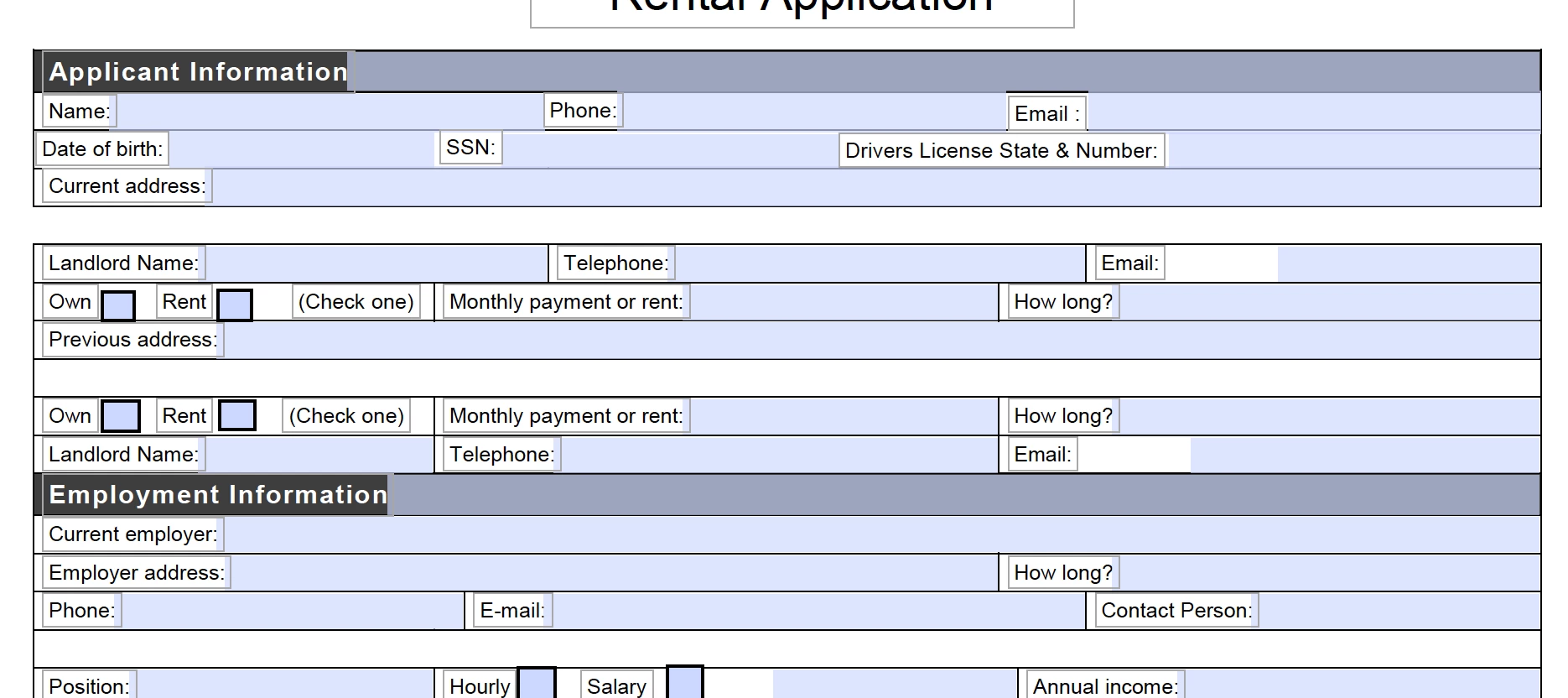
I have a fillable form I created in Acrobat.  I have taken out several of the fillable fields and text and now have blank spaces in my document between sections.  How do I get rid of these blank areas?  The area between "Current Address" and "Landlord Name" is what I am looking to remove. 
This topic has been closed for replies.
Correct answer Debbie Morris

You could either move the area below the blank space up, or move the area above the blank space down. You'll need to do it in two steps, since it's a combination of text and form fields. Use "Edit PDF" to move the text, and "Prepare Form" to move the form fields. Just click and drag to draw a box around the area to move, then use your arrow keys to move it up or down.

1 reply

Debbie MorrisCorrect answer
Inspiring
July 10, 2018

You could either move the area below the blank space up, or move the area above the blank space down. You'll need to do it in two steps, since it's a combination of text and form fields. Use "Edit PDF" to move the text, and "Prepare Form" to move the form fields. Just click and drag to draw a box around the area to move, then use your arrow keys to move it up or down.

katbelle2000
Participant
July 10, 2018

Thank you so much Debbie! That was exactly what I needed and I was stumped!